
Transport Layer
The Transport Layer is the fourth layer in the OSI model and ensures reliable and efficient data transmission between network nodes. Unlike lower layers that focus on moving raw data between devices, the Transport Layer manages communication between applications. It breaks large data streams into smaller segments for transmission and reassembles them at the receiving end to ensure completeness and correct order.
This layer handles flow control to prevent a fast sender from overwhelming a slower receiver and provides error detection and correction to maintain data integrity.
Two main protocols operate at this layer: Transmission Control Protocol (TCP) and User Datagram Protocol (UDP). TCP is connection-oriented, establishing a reliable session that guarantees delivery and ensures segments arrive in sequence. UDP, on the other hand, is connectionless and prioritizes speed over reliability by sending data without confirming receipt. This makes UDP suitable for applications such as video streaming or online gaming, where low latency is crucial.
Both protocols use port numbers to direct data to the correct application or process on source and destination devices. Port numbers allow multiple applications on the same device to communicate simultaneously without interference, a process called multiplexing.
By providing segmentation, error detection, flow control, and multiplexing, the Transport Layer enables seamless end-to-end communication between applications across diverse, complex networks.
Transmission Control Protocol (TCP)
Transmission Control Protocol (TCP) is a connection-oriented protocol that ensures reliable data transmission between processes on different devices over a network. Before any data transfer occurs, TCP establishes a connection using a three-way handshake to synchronize both the sender and receiver and ensure they are ready to communicate.
Once the connection is established, TCP divides the data into segments for transmission. It verifies delivery by receiving acknowledgments from the receiving device. If any segment is lost or corrupted during transmission, TCP automatically retransmits it to ensure complete and accurate data delivery.
This reliability makes TCP ideal for applications where data integrity and order are critical, such as web browsing, email, and file transfers.
- Pros
- Reliable
- Error checking and recovery
- Cons
- Slow
- Resource intensive
- Uses
- File sharing
- Downloading
- Flags
- SYN: Starts a connection (It’s set at the beginning of TCP connection)
- ACK: Confirms that data or initiation request has been received
- RST: Aborts the connection immediately
- FIN: Aborts the connection gracefully
- PSH: Pushes the data to the application as soon as possible (No intermediate buffering)
- URG: Prioritizes the data (This flag is obsolete)
User Datagram Protocol (UDP)
User Datagram Protocol (UDP) is a connectionless, message-oriented protocol that allows processes to send data over a network without establishing a prior connection or verifying delivery. Unlike TCP, UDP does not provide mechanisms for sequencing, acknowledgment, or retransmission. This means data packets may arrive out of order, be duplicated, or even be lost without notice.
This lightweight approach reduces overhead and latency, making UDP ideal for applications that require fast, real-time communication. Such applications include video streaming, online gaming, voice over IP (VoIP), and broadcasting, where speed and efficiency are prioritized over guaranteed delivery.
- Pros
- Fast
- Simple
- Cons
- Does not have any error recovery
- Uses
- Video streaming
- Real-time services
- Flags
- None
*Note, UDP does have error checking but doesn’t have any error-recovery
Logical Ports
Logical ports are virtual connection points within an operating system that facilitate the sending and receiving of data over a network. Each port is identified by a 16-bit number ranging from 0 to 65,535, allowing multiple services to operate simultaneously on the same device without conflict.
Ports numbered below 1024 are known as privileged or well-known ports. Running services on these ports typically requires elevated system privileges, such as administrative rights, to ensure the security and proper management of critical services like web, email, or FTP servers.
The assignment and use of these ports can vary slightly depending on the operating system. Still, in all cases, logical ports provide a structured way to direct network traffic to the correct application or process.
Common Used Ports
- File Transfer Protocol (ftp/21)
- Secure Shell Protocol (ssh/22)
- Teletype Network (telnet/23)
- Simple Mail Transfer Protocol (SMTP/25)
- Domain Name System Protocol (DNS/53)
- Hypertext Transfer Protocol (http/80)
- Hypertext Transfer Protocol Secure (https/443)
- Microsoft Directory Services (microsoft-ds/445)
- Remote Desktop Protocol (ms-wbt-server/3389
- Viewer Remote Desktop (vnc/5900)
Enumerate Ports (Locally)
Enumerating ports locally involves identifying which ports are currently in use by services and applications on a computer. This can be done using commands such as netstat or lsof, which display all active and listening ports along with the associated processes.
By running these commands, administrators can monitor network activity, troubleshoot connectivity issues, and verify that services are operating on the intended ports. For example, if you run a custom web server, you might observe it actively listening on port 80, the standard port for HTTP traffic, confirming that the service is properly bound and ready to receive incoming connections.
This local enumeration is essential for network management, security auditing, and ensuring proper service configuration.
lsof -i -P -n | grep -E "(LISTEN)"
Python    1544   www    3u  IPv4 0x0      0t0  TCP *:80 (LISTEN)
Enumerate Ports (Remote host)
Enumerating ports on a remote host involves discovering which network services are reachable from outside the target and identifying the ports they listen on. Common techniques include TCP and UDP scanning (e.g., SYN/half-open or full-connect scans), service and version detection (banner grabbing), and targeted probes to identify specific application behavior. These tasks are often performed using tools like Nmap or Masscan for legitimate inventorying and threat hunting.
This activity, described in the MITRE ATT&CK® Reconnaissance matrix as Network Service Discovery, helps defenders build asset inventories and prioritize patching, while attackers use the same information to plan exploitation. The results typically inform follow-up actions such as vulnerability assessment or access control changes.
PCAP Example
The web server is listening on port 80. The client can connect to this web server using the network adapter IP, but they do not need to specify port 80 in the web browser because it uses the HTTP protocol. If the web server port is 6789, the client can do http://<Network_Adapter_IP>:6789
from http.server import SimpleHTTPRequestHandler # Import the built-in HTTP request handler
from socketserver import TCPServer # Import a basic TCP server implementation
from io import BytesIO # Import BytesIO to handle bytes in memory (for gzip compression)
from gzip import GzipFile # Import GzipFile to compress HTTP response
from datetime import datetime # Import datetime to generate timestamps for logging
from contextlib import suppress # Import suppress to prevent crasheswith suppress(Exception): # Try importing network interface details
from netifaces import gateways, ifaddresses, AF_INET, AF_LINK # Network interface utilities
print(“The default network interface is: “, gateways()[‘default’][AF_INET][1]) # Display default network interface name
print(“The default network interface mac address is: “, ifaddresses(gateways()[‘default’][AF_INET][1])[AF_LINK]) # Display MAC address of the default network interfaceclass Server(SimpleHTTPRequestHandler): # Define a custom HTTP server
def do_GET(self): # Handle HTTP GET requests
compressed = False # Track whether gzip compression is used
content = b'<HTML><h1>Hello World!</h1></HTML>’ # HTTP response body (bytes)if len(content) > 0: # Only attempt compression if content exists
if ‘accept-encoding’ in self.headers: # Check if client sent Accept-Encoding header
if ‘gzip’ in self.headers[‘accept-encoding’]: # Client supports gzip
bytes_ = BytesIO() # Create an in-memory byte buffer
with GzipFile(fileobj=bytes_, mode=’w’, compresslevel=5) as f: # Gzip wrapper
f.write(content) # Compress the response body
content = bytes_.getvalue() # Replace content with compressed bytes
compressed = True # Mark response as compressedself.send_response(200) # Send HTTP 200 OK status
if compressed:
self.send_header(‘content-encoding’, ‘gzip’) # Notify client of gzip encoding
self.send_header(‘content-length’, len(content)) # Send content length header
self.end_headers() # End HTTP headers
self.wfile.write(content) # Write response body to clientdef log_message(self, format, *args): # Override default request logging
print(“[{}] – {}:{} – {} {}”.format( # Custom log format
datetime.now().strftime(“%m/%d/%Y %H:%M:%S”), # Timestamp
self.client_address[0], # Client IP address
self.client_address[1], # Client source port
args[0], # HTTP method
args[1] # Requested path
))TCPServer((‘0.0.0.0’, 80), Server).serve_forever() # Start server on all interfaces, port 80
from http.server import SimpleHTTPRequestHandler
from socketserver import TCPServer
from io import BytesIO
from gzip import GzipFile
from datetime import datetime
from contextlib import suppress

with suppress(Exception):
    from netifaces import gateways, ifaddresses, AF_INET, AF_LINK
    print("The default network interface is: ",gateways()['default'][AF_INET][1])
    print("The default network interface mac address is: ",ifaddresses(gateways()['default'][AF_INET][1])[AF_LINK])

class Server(SimpleHTTPRequestHandler):
    def do_GET(self):
        compressed = False
        content = b'<HTML><h1>Hello World!</h1></HTML>'
        if len(content) > 0:
            if 'accept-encoding' in self.headers:
                if 'gzip' in self.headers['accept-encoding']:
                    bytes_ = BytesIO()
                    with GzipFile(fileobj=bytes_, mode='w', compresslevel=5) as f:
                        f.write(content)
                        f.close()
                        content = bytes_.getvalue()
                        compressed = True
        self.send_response(200)
        if compressed:
            self.send_header('content-encoding', 'gzip')
        self.send_header('content-length', len(content))
        self.end_headers()
        self.wfile.write(content)

    def log_message(self, format, *args):
        print("[{}] - {}:{} - {} {}".format(datetime.now().strftime("%m/%d/%Y %H:%M:%S"), self.client_address[0],self.client_address[1],args[0],args[1]))

TCPServer(('0.0.0.0', 80), Server).serve_forever()
Client initiates 3-way handshake
The client sends Synchronize Sequence Number (SYN) request
| Layer | Protocol | PDU | Info | Ports | IPs | MACs |
| Transport Layer | TCP | Segments | 3 Way handshake Process (SYN) | Src Port: 35310 Dst Port: 80 | ||
| Network Layer | IP | Packets | 3 Way handshake Process (SYN) | Src Port: 35310 Dst Port: 80 | Src IP: 10.0.0.3 Dst IP: 10.0.0.2 | |
| Data Link Layer | Ethernet | Frames | 3 Way handshake Process (SYN) | Src Port: 35310 Dst Port: 80 | Src IP: 10.0.0.3 Dst IP: 10.0.0.2 | Src MAC: bc:35:db:cf:1b:03 Dst MAC: bc:f2:b8:57:86:02 |
| Physical Layer | Coax | Bits | 01001000 01010100 01010100 | 01001000 01010100 | 01001000 01010100 | 01001000 01010100 |
The server receives the SYN request
| Layer | Protocol | PDU | Info | Ports | IPs | MACs |
| Physical Layer | Coax | Bits | 01001000 01010100 01010100 | 01001000 01010100 | 01001000 01010100 | 01001000 01010100 |
| Data Link Layer | Ethernet | Frames | 3-Way handshake Process (SYN) | Src Port: 35310 Dst Port: 80 | Src IP: 10.0.0.3 Dst IP: 10.0.0.2 | Src MAC: bc:35:db:cf:1b:03 Dst MAC: bc:f2:b8:57:86:02 |
| Network Layer | IP | Packets | 3-Way handshake Process (SYN) | Src Port: 35310 Dst Port: 80 | Src IP: 10.0.0.3 Dst IP: 10.0.0.2 | |
| Transport Layer | TCP | Segments | 3-Way handshake Process (SYN) | Src Port: 35310 Dst Port: 80 |
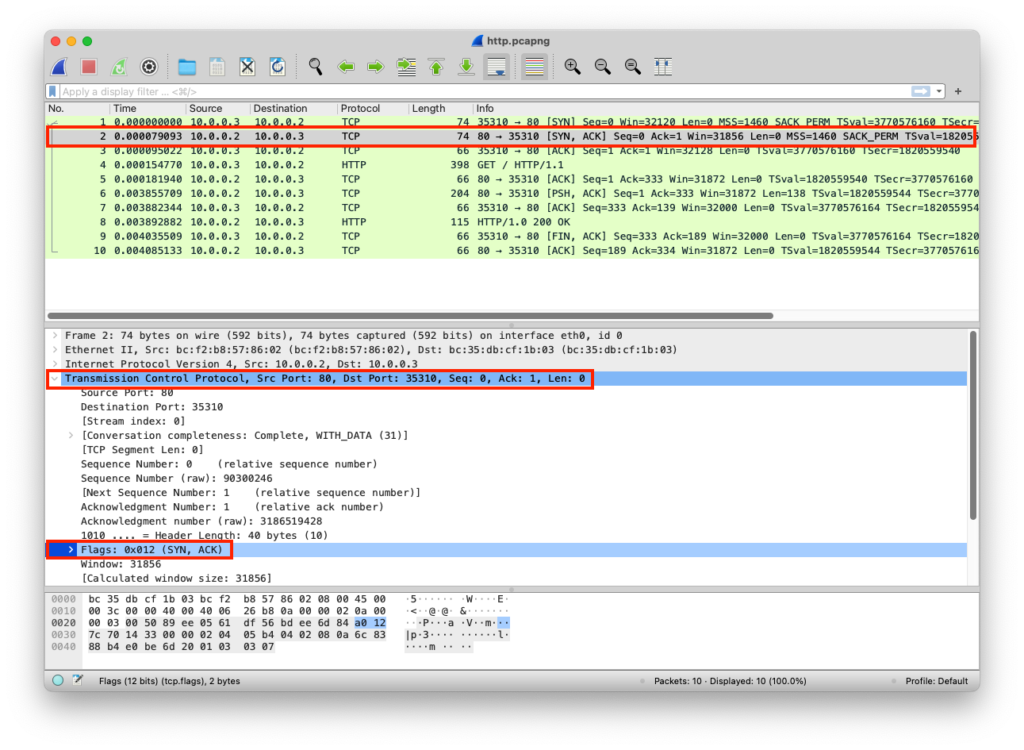
The server responds with Acknowledgement Sequence Number (SYN/ACK)
| Layer | Protocol | PDU | Info | Ports | IPs | MACs |
| Transport Layer | TCP | Segments | 3-Way handshake Process (SYN/ACK) | Src Port: 80 Dst Port: 35310 | ||
| Network Layer | IP | Packets | 3-Way handshake Process (SYN/ACK) | Src Port: 80 Dst Port: 35310 | Src IP: 10.0.0.2 Dst IP: 10.0.0.3 | |
| Data Link Layer | Ethernet | Frames | 3-Way handshake Process (SYN/ACK) | Src Port: 80 Dst Port: 35310 | Src IP: 10.0.0.2 Dst IP: 10.0.0.3 | Src MAC: bc:f2:b8:57:86:02 Dst MAC: bc:35:db:cf:1b:03 |
| Physical Layer | Coax | Bits | 01001000 01010100 01010101 | 01001000 01010100 | 01001000 01010100 | 01001000 01010100 |
The client receives the SYN/ACK request
| Layer | Protocol | PDU | Info | Ports | IPs | MACs |
| Physical Layer | Coax | Bits | 01001000 01010100 01010101 | 01001000 01010100 | 01001000 01010100 | 01001000 01010100 |
| Data Link Layer | Ethernet | Frames | 3-Way handshake Process (SYN/ACK) | Src Port: 80 Dst Port: 35310 | Src IP: 10.0.0.2 Dst IP: 10.0.0.3 | Src MAC: bc:f2:b8:57:86:02 Dst MAC: bc:35:db:cf:1b:03 |
| Network Layer | IP | Packets | 3-Way handshake Process (SYN/ACK) | Src Port: 80 Dst Port: 35310 | Src IP: 10.0.0.2 Dst IP: 10.0.0.3 | |
| Transport Layer | TCP | Segments | 3-Way handshake Process (SYN/ACK) | Src Port: 80 Dst Port: 35310 |
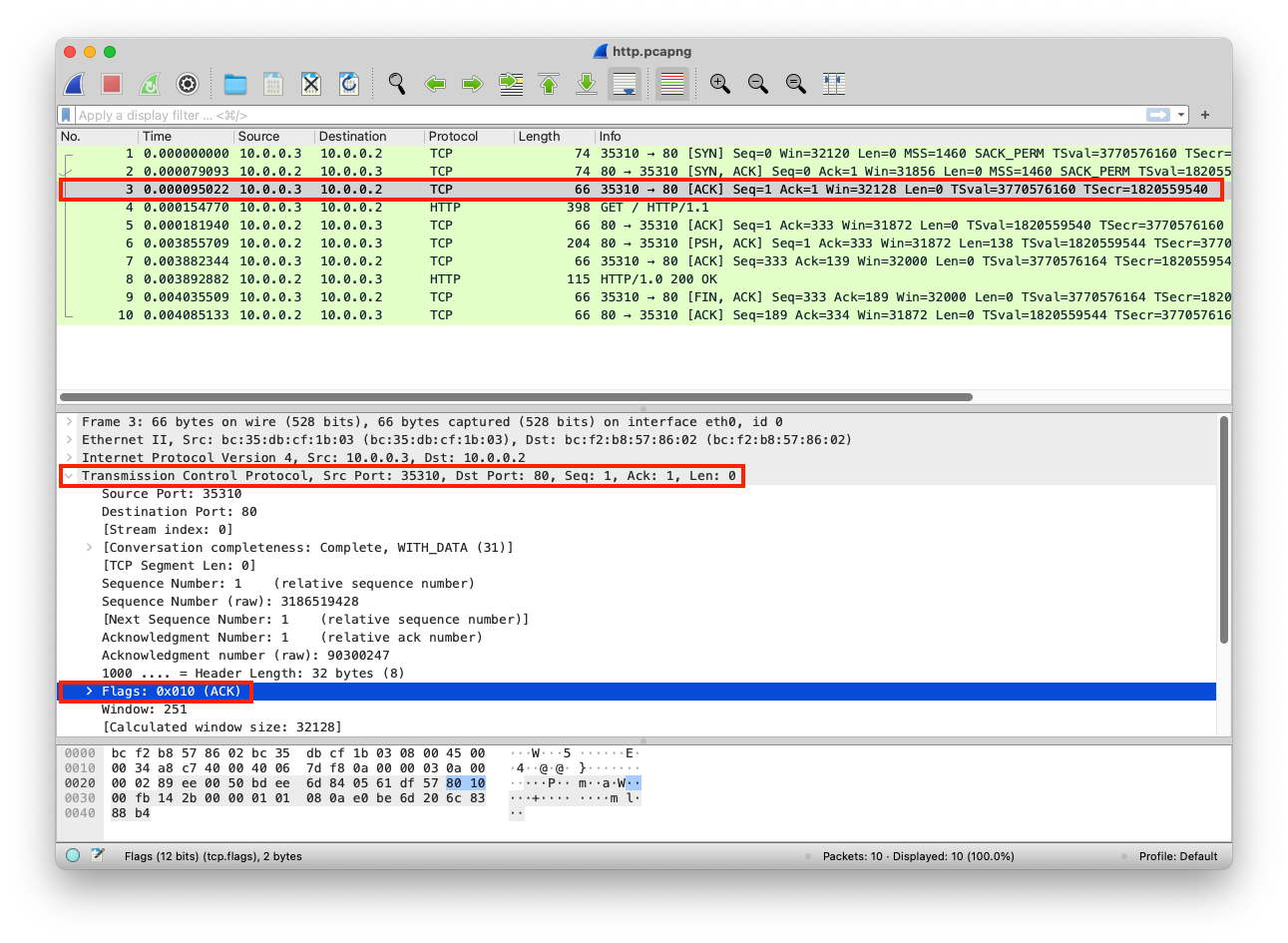
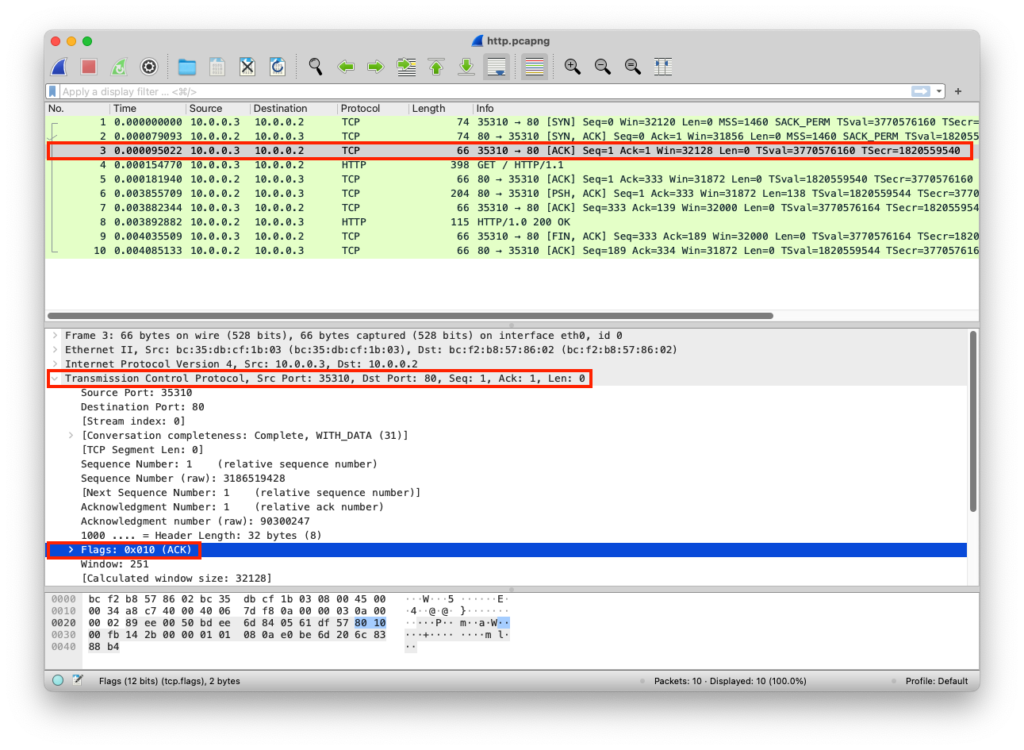
The client sends the ACK
| Layer | Protocol | PDU | Info | Ports | IPs | MACs |
| Transport Layer | TCP | Segments | 3-Way handshake Process (ACK) | Src Port: 35310 Dst Port: 80 | ||
| Network Layer | IP | Packets | 3-Way handshake Process (ACK) | Src Port: 35310 Dst Port: 80 | Src IP: 10.0.0.3 Dst IP: 10.0.0.2 | |
| Data Link Layer | Ethernet | Frames | 3-Way handshake Process (ACK) | Src Port: 35310 Dst Port: 80 | Src IP: 10.0.0.3 Dst IP: 10.0.0.2 | Src MAC: bc:35:db:cf:1b:03 Dst MAC: bc:f2:b8:57:86:02 |
| Physical Layer | Coax | Bits | 01001000 01010100 01010111 | 01001000 01010100 | 01001000 01010100 | 01001000 01010100 |
The server receives ACK request
| Layer | Protocol | PDU | Info | Ports | IPs | MACs |
| Physical Layer | Coax | Bits | 01001000 01010100 01010111 | 01001000 01010100 | 01001000 01010100 | 01001000 01010100 |
| Data Link Layer | Ethernet | Frames | 3-Way handshake Process (SYN/ACK) | Src Port: 35310 Dst Port: 80 | Src IP: 10.0.0.3 Dst IP: 10.0.0.2 | Src MAC: bc:35:db:cf:1b:03 Dst MAC: bc:f2:b8:57:86:02 |
| Network Layer | IP | Packets | 3-Way handshake Process (SYN/ACK) | Src Port: 35310 Dst Port: 80 | Src IP: 10.0.0.3 Dst IP: 10.0.0.2 | |
| Transport Layer | TCP | Segments | 3-Way handshake Process (SYN/ACK) | Src Port: 35310 Dst Port: 80 |