Application Layer
The Application Layer is the seventh and topmost layer of the OSI model, providing the interface for end users to interact with network services. It acts as a bridge between user applications and the underlying network, allowing software to access communication functions without managing data transport or routing. This layer handles high-level protocols and services that enable tasks such as sending emails, browsing the web, transferring files, and accessing remote databases.
By providing these services, the Application Layer ensures seamless and efficient user interaction with the network.
In addition to user interaction, the Application Layer formats, presents, and interprets data in a way applications can understand. It could include functions such as data encoding, encryption, and session management to ensure information is meaningful, secure, and correctly synchronized. For example, a web browser at this layer requests HTML pages from a web server via HTTP and presents the content to the user in a readable format. Similarly, email clients use protocols such as SMTP, POP3, and IMAP to send, receive, and organize messages.
The Application Layer interacts closely with the Presentation and Session Layers to provide complete end-to-end services. While the Presentation Layer handles data translation and formatting, and the Session Layer manages communication sessions, the Application Layer focuses on making network services accessible and usable to end users. This layer encompasses a wide variety of protocols and services, from web and email to file transfer, remote login, and messaging, ensuring that network functionality translates into practical, user-facing applications.
Hypertext Transfer Protocol (HTTP)
Hypertext Transfer Protocol (HTTP) is a TCP/IP-based protocol that enables communication between a client, such as a web browser, and a web server. It defines the rules for requesting and delivering resources like HTML pages, images, videos, and other web content over the internet
HTTP operates as a stateless protocol, meaning each request from a client to a server is independent. However, extensions like cookies and sessions can maintain state across multiple interactions. By standardizing communication between clients and servers, HTTP enables users to access and navigate websites seamlessly, making it the foundation of data exchange on the World Wide Web.
Some HTTP Headers
- Host: Target virtual host to use (HOST:PORT)
- Server: Target server that handled the request
- User-Agent: Software/Browser that is making the request
Some HTTP request methods
- GET: Read data
- POST: Insert data
- HEAD: Return metadata about the target
Some HTTP Response Status Codes
- 200: Request has succeeded
- 404: Server cannot find the requested resource
- 500: Internal server error
If you want to get a file named test.html from qeeqbox.com, your HTTP request will be something like this
GET /test.html HTTP/1.1
Host: www.qeeqboox.com
If the server does have the requested file, the HTTP response will be
HTTP/1.1 200 OK
Content-Length: 12
Content-Type: text/plain; charset=utf-8

Hello World!
If the file does not exist, the HTTP response will be
HTTP/1.1 404
Content-Length: 0
Uniform Resource Locator (URL)
A Uniform Resource Locator (URL) is a standardized and unique identifier used to locate and access resources on the internet, such as web pages, files, or services. It provides the necessary information for a client, like a web browser, to retrieve a resource from a specific server.
- Protocol: A set of rules that define how content is transferred between the web server and browser
- Sub Domain: An extension to a domain name to separate a website section
- Root Domain: A website’s main or primary domain
- Top Level Domain: An identifier that’s used to categorize the domain
- Sub Directory: A directory that exists inside another directory
- Path: A location on the website
                Top Level Domain
                      |
      Sub-Domain      |           Path
         |            |            |
        ---          ---      --------------
https://www.qeeqboox.com:433/files/test.html
-----       --------     |   ----- ---------
   |           |         |    |       |
Protocol       |        Port  |      File
           Root Domain        |
                         Sub Directory
Process
A process is an instance of a running application on a computer or device. It represents the program in action, including its code, current activities, memory allocation, and system resources it uses while executing. A single application can create multiple processes simultaneously, allowing different parts of the program to run independently or enabling multiple users to use the same application at once.
The operating system manages processes by allocating resources, scheduling execution, and isolating each process to prevent interference. This ensures that applications run efficiently and securely.
- Foreground: Requires user to interact with it
- Background: Does not require users to interact with it
Services
A service is a type of process that runs continuously in the background without terminating, providing ongoing functionality to the operating system or other applications. Unlike regular processes that start and stop with user interaction, services are designed to operate independently. They typically start automatically when the system boots and run until it shuts down.
Examples include web server services, database services, and print spoolers. These services handle requests, manage resources, or deliver functionality continuously. By operating persistently, services ensure that essential system functions and networked applications remain available and responsive at all times.
Application
An application is a software program designed to perform specific tasks or functions for users or other systems. It provides a user-friendly interface or automated processes that allow individuals or devices to accomplish objectives such as word processing, web browsing, data analysis, gaming, or communication.
Applications can range from simple utilities to complex software suites and rely on underlying system resources, such as the operating system and network services, to function effectively. By translating user inputs into actions and delivering outputs in a usable form, applications bridge the gap between technical systems and practical, everyday tasks.
Web Application
A web application is a software program that runs on a web server and is accessed by users through a web browser or network client over the internet or an internal network. Unlike traditional desktop applications, web applications do not require local installation and can provide interactive functionality such as online shopping, email services, social media platforms, or cloud-based productivity tools.
Web applications rely on web technologies like HTML, CSS, JavaScript, and server-side programming languages to process user input, communicate with databases, and deliver dynamic content. By operating over a network, web applications allow users to access services from anywhere, on various devices, while centralizing maintenance and updates on the server side.
Cyberattacks
- Cross-Site Scripting
- A threat actor aims to execute malicious actions on the victim’s website (It’s a client-side code injection attack)
- Reflected Cross-Site Scripting
- A threat actor injects malicious content into web pages or web applications. The content will be reflected in the response and executed in the victim’s browser
- Dom-Based Cross-Site Scripting
- A threat actor injects malicious content into web pages or web applications. The content is not reflected in the response and is executed in the victim’s browser
- Stored Cross-Site Scripting
- A threat actor injects malicious content into a vulnerable server. The content is retrieved by users and then execute
- Reflected Cross-Site Scripting
- A threat actor aims to execute malicious actions on the victim’s website (It’s a client-side code injection attack)
- Cross-site request forgery
- A threat actor may trick an authenticated or trusted victim into transmitting unauthorized actions on their behalf
- A threat actor crafts an exploit URL for a fund transfer and sends it to an authenticated user
- Denial-of-service (DoS)
- A threat actor makes a target device\resource unavailable by overloading it using a device
- A threat actor uses one device to overload XYZ LLC’s website (This was common in the old days, but nowadays it often does not work )
- Distributed Denial of Service (DDoS)
- A threat actor makes a target device\resource unavailable by flooding using multiple devices
- A threat actor uses hundreds of infected devices to flood XYZ LLC’s website
PCAP Example
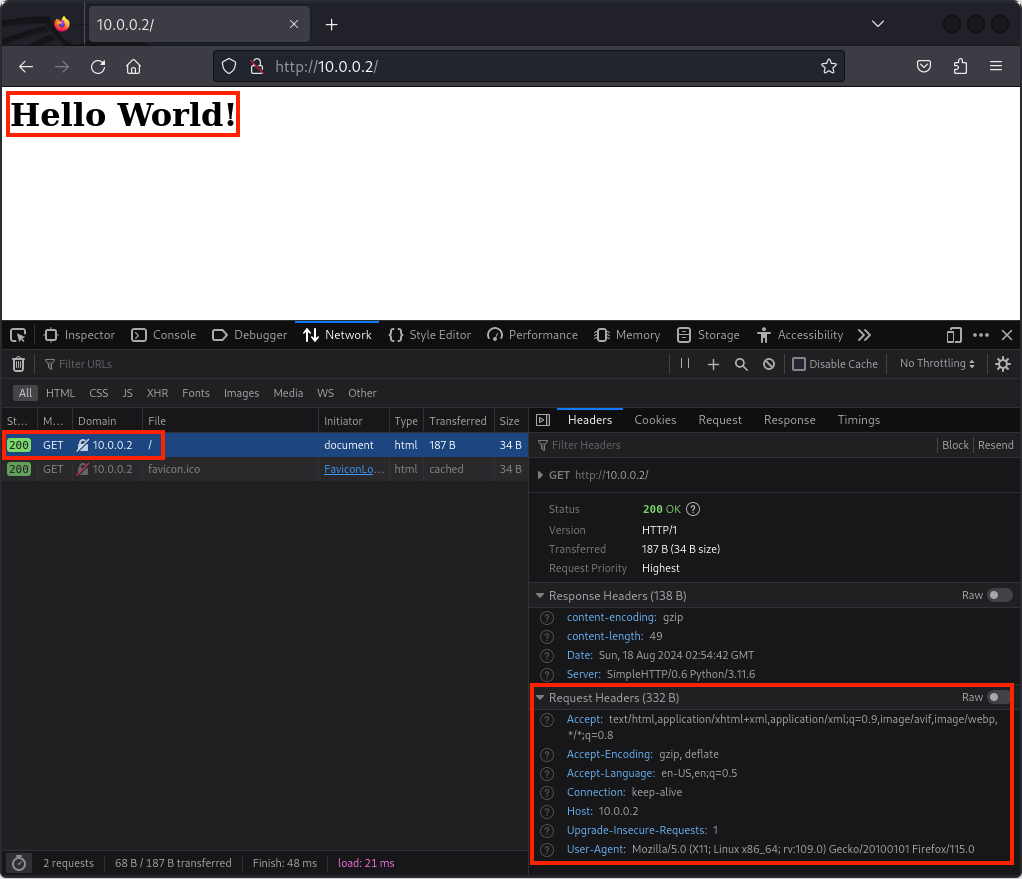
The client requested web content from the server over an insecure protocol called HTTP, the server responded with the web content, the client received the web content and got rendered by the client’s web browser. Insecure protocols can be intercepted, and the data carried in them can be modified
Client Sends Data
The client requests specific web content over HTTP using the GET method
| Layer | Protocol | PDU | Info | Ports | IPs | MACs |
| Application Layer | HTTP | Data | GET / HTTP/1.1 Host: 10.0.0.2 User-Agent: Mozilla/5.0 (X11; Linux x86_64; rv:109.0) Gecko/20100101 Firefox/115.0 Accept: text/html,application/xhtml+xml,application/xml;q=0.9,image/avif,image/webp,*/*;q=0.8 Accept-Language: en-US,en;q=0.5 Accept-Encoding: gzip, deflate Connection: keep-alive Upgrade-Insecure-Requests: 1 | |||
| Presentation Layer | Raw | Data | GET / HTTP/1.1\r\nHost: 10.0.0.2\r\nUser-Agent: Mozilla/5.0 (X11; Linux x86_64; rv:109.0) Gecko/20100101 Firefox/115.0\r\nAccept: text/html,application/xhtml+xml,application/xml;q=0.9,image/avif,image/webp,*/*;q=0.8\r\nAccept-Language: en-US,en;q=0.5\r\nAccept-Encoding: gzip, deflate\r\nConnection: keep-alive\r\nUpgrade-Insecure-Requests: 1 | |||
| Session Layer | Socket | Data | GET / HTTP/1.1\r\nHost: 10.0.0.2\r\nUser-Agent: Mozilla/5.0 (X11; Linux x86_64; rv:109.0) Gecko/20100101 Firefox/115.0\r\nAccept: text/html,application/xhtml+xml,application/xml;q=0.9,image/avif,image/webp,*/*;q=0.8\r\nAccept-Language: en-US,en;q=0.5\r\nAccept-Encoding: gzip, deflate\r\nConnection: keep-alive\r\nUpgrade-Insecure-Requests: 1 | |||
| Transport Layer | TCP | Segments | GET / HTTP/1.1\r\nHost: 10.0.0.2\r\nUser-Agent: Mozilla/5.0 (X11; Linux x86_64; rv:109.0) Gecko/20100101 Firefox/115.0\r\nAccept: text/html,application/xhtml+xml,application/xml;q=0.9,image/avif,image/webp,*/*;q=0.8\r\nAccept-Language: en-US,en;q=0.5\r\nAccept-Encoding: gzip, deflate\r\nConnection: keep-alive\r\nUpgrade-Insecure-Requests: 1 | Src Port: 35310 Dst Port: 80 | ||
| Network Layer | IP | Packets | GET / HTTP/1.1\r\nHost: 10.0.0.2\r\nUser-Agent: Mozilla/5.0 (X11; Linux x86_64; rv:109.0) Gecko/20100101 Firefox/115.0\r\nAccept: text/html,application/xhtml+xml,application/xml;q=0.9,image/avif,image/webp,*/*;q=0.8\r\nAccept-Language: en-US,en;q=0.5\r\nAccept-Encoding: gzip, deflate\r\nConnection: keep-alive\r\nUpgrade-Insecure-Requests: 1 | Src Port: 35310 Dst Port: 80 | Src IP: 10.0.0.3 Dst IP: 10.0.0.2 | |
| Data Link Layer | Ethernet | Frames | GET / HTTP/1.1\r\nHost: 10.0.0.2\r\nUser-Agent: Mozilla/5.0 (X11; Linux x86_64; rv:109.0) Gecko/20100101 Firefox/115.0\r\nAccept: text/html,application/xhtml+xml,application/xml;q=0.9,image/avif,image/webp,*/*;q=0.8\r\nAccept-Language: en-US,en;q=0.5\r\nAccept-Encoding: gzip, deflate\r\nConnection: keep-alive\r\nUpgrade-Insecure-Requests: 1 | Src Port: 35310 Dst Port: 80 | Src IP: 10.0.0.3 Dst IP: 10.0.0.2 | Src MAC: bc:35:db:cf:1b:03 Dst MAC: bc:f2:b8:57:86:02 |
| Physical Layer | Coax | Bits | 01001000 01010100 01010100 01010000 00101111 00110001 00101110 00110000 00100000 | 01001000 01010100 | 01001000 01010100 | 01001000 01010100 |
Server Receives Data
The server receives the client’s HTTP GET request
| Layer | Protocol | PDU | Info | Ports | IPs | MACs |
| Physical Layer | Coax | Bits | 01001000 01010100 01010100 01010000 00101111 00110001 00101110 00110000 00100000 | 01001000 01010100 | 01001000 01010100 | 01001000 01010100 |
| Data Link Layer | Ethernet | Frames | GET / HTTP/1.1\r\nHost: 10.0.0.2\r\nUser-Agent: Mozilla/5.0 (X11; Linux x86_64; rv:109.0) Gecko/20100101 Firefox/115.0\r\nAccept: text/html,application/xhtml+xml,application/xml;q=0.9,image/avif,image/webp,*/*;q=0.8\r\nAccept-Language: en-US,en;q=0.5\r\nAccept-Encoding: gzip, deflate\r\nConnection: keep-alive\r\nUpgrade-Insecure-Requests: 1 | Src Port: 35310 Dst Port: 80 | Src IP: 10.0.0.3 Dst IP: 10.0.0.2 | Src MAC: bc:35:db:cf:1b:03 Dst MAC: bc:f2:b8:57:86:02 |
| Network Layer | IP | Packets | GET / HTTP/1.1\r\nHost: 10.0.0.2\r\nUser-Agent: Mozilla/5.0 (X11; Linux x86_64; rv:109.0) Gecko/20100101 Firefox/115.0\r\nAccept: text/html,application/xhtml+xml,application/xml;q=0.9,image/avif,image/webp,*/*;q=0.8\r\nAccept-Language: en-US,en;q=0.5\r\nAccept-Encoding: gzip, deflate\r\nConnection: keep-alive\r\nUpgrade-Insecure-Requests: 1 | Src Port: 35310 Dst Port: 80 | Src IP: 10.0.0.3 Dst IP: 10.0.0.2 | |
| Transport Layer | TCP | Segments | GET / HTTP/1.1\r\nHost: 10.0.0.2\r\nUser-Agent: Mozilla/5.0 (X11; Linux x86_64; rv:109.0) Gecko/20100101 Firefox/115.0\r\nAccept: text/html,application/xhtml+xml,application/xml;q=0.9,image/avif,image/webp,*/*;q=0.8\r\nAccept-Language: en-US,en;q=0.5\r\nAccept-Encoding: gzip, deflate\r\nConnection: keep-alive\r\nUpgrade-Insecure-Requests: 1 | Src Port: 35310 Dst Port: 80 | ||
| Session Layer | Socket | Data | GET / HTTP/1.1\r\nHost: 10.0.0.2\r\nUser-Agent: Mozilla/5.0 (X11; Linux x86_64; rv:109.0) Gecko/20100101 Firefox/115.0\r\nAccept: text/html,application/xhtml+xml,application/xml;q=0.9,image/avif,image/webp,*/*;q=0.8\r\nAccept-Language: en-US,en;q=0.5\r\nAccept-Encoding: gzip, deflate\r\nConnection: keep-alive\r\nUpgrade-Insecure-Requests: 1 | |||
| Presentation Layer | Raw | Data | GET / HTTP/1.1\r\nHost: 10.0.0.2\r\nUser-Agent: Mozilla/5.0 (X11; Linux x86_64; rv:109.0) Gecko/20100101 Firefox/115.0\r\nAccept: text/html,application/xhtml+xml,application/xml;q=0.9,image/avif,image/webp,*/*;q=0.8\r\nAccept-Language: en-US,en;q=0.5\r\nAccept-Encoding: gzip, deflate\r\nConnection: keep-alive\r\nUpgrade-Insecure-Requests: 1 | |||
| Application Layer | HTTP | Data | GET / HTTP/1.1 Host: 10.0.0.2 User-Agent: Mozilla/5.0 (X11; Linux x86_64; rv:109.0) Gecko/20100101 Firefox/115.0 Accept: text/html,application/xhtml+xml,application/xml;q=0.9,image/avif,image/webp,*/*;q=0.8 Accept-Language: en-US,en;q=0.5 Accept-Encoding: gzip, deflate Connection: keep-alive Upgrade-Insecure-Requests: 1 |
from http.server import SimpleHTTPRequestHandler # Import the built-in HTTP request handler
from socketserver import TCPServer # Import a basic TCP server implementation
from io import BytesIO # Import BytesIO to handle bytes in memory (for gzip compression)
from gzip import GzipFile # Import GzipFile to compress HTTP response
from datetime import datetime # Import datetime to generate timestamps for logging
from contextlib import suppress # Import suppress to prevent crasheswith suppress(Exception): # Try importing network interface details
from netifaces import gateways, ifaddresses, AF_INET, AF_LINK # Network interface utilities
print(“The default network interface is: “, gateways()[‘default’][AF_INET][1]) # Display default network interface name
print(“The default network interface mac address is: “, ifaddresses(gateways()[‘default’][AF_INET][1])[AF_LINK]) # Display MAC address of the default network interfaceclass Server(SimpleHTTPRequestHandler): # Define a custom HTTP server
def do_GET(self): # Handle HTTP GET requests
compressed = False # Track whether gzip compression is used
content = b'<HTML><h1>Hello World!</h1></HTML>’ # HTTP response body (bytes)if len(content) > 0: # Only attempt compression if content exists
if ‘accept-encoding’ in self.headers: # Check if client sent Accept-Encoding header
if ‘gzip’ in self.headers[‘accept-encoding’]: # Client supports gzip
bytes_ = BytesIO() # Create an in-memory byte buffer
with GzipFile(fileobj=bytes_, mode=’w’, compresslevel=5) as f: # Gzip wrapper
f.write(content) # Compress the response body
content = bytes_.getvalue() # Replace content with compressed bytes
compressed = True # Mark response as compressedself.send_response(200) # Send HTTP 200 OK status
if compressed:
self.send_header(‘content-encoding’, ‘gzip’) # Notify client of gzip encoding
self.send_header(‘content-length’, len(content)) # Send content length header
self.end_headers() # End HTTP headers
self.wfile.write(content) # Write response body to clientdef log_message(self, format, *args): # Override default request logging
print(“[{}] – {}:{} – {} {}”.format( # Custom log format
datetime.now().strftime(“%m/%d/%Y %H:%M:%S”), # Timestamp
self.client_address[0], # Client IP address
self.client_address[1], # Client source port
args[0], # HTTP method
args[1] # Requested path
))TCPServer((‘0.0.0.0’, 80), Server).serve_forever() # Start server on all interfaces, port 80
from http.server import SimpleHTTPRequestHandler
from socketserver import TCPServer
from io import BytesIO
from gzip import GzipFile
from datetime import datetime
from contextlib import suppress

with suppress(Exception):
    from netifaces import gateways, ifaddresses, AF_INET, AF_LINK
    print("The default network interface is: ",gateways()['default'][AF_INET][1])
    print("The default network interface mac address is: ",ifaddresses(gateways()['default'][AF_INET][1])[AF_LINK])

class Server(SimpleHTTPRequestHandler):
    def do_GET(self):
        compressed = False
        content = b'<HTML><h1>Hello World!</h1></HTML>'
        if len(content) > 0:
            if 'accept-encoding' in self.headers:
                if 'gzip' in self.headers['accept-encoding']:
                    bytes_ = BytesIO()
                    with GzipFile(fileobj=bytes_, mode='w', compresslevel=5) as f:
                        f.write(content)
                        f.close()
                        content = bytes_.getvalue()
                        compressed = True
        self.send_response(200)
        if compressed:
            self.send_header('content-encoding', 'gzip')
        self.send_header('content-length', len(content))
        self.end_headers()
        self.wfile.write(content)

    def log_message(self, format, *args):
        print("[{}] - {}:{} - {} {}".format(datetime.now().strftime("%m/%d/%Y %H:%M:%S"), self.client_address[0],self.client_address[1],args[0],args[1]))

TCPServer(('0.0.0.0', 80), Server).serve_forever()
Server Sends Data
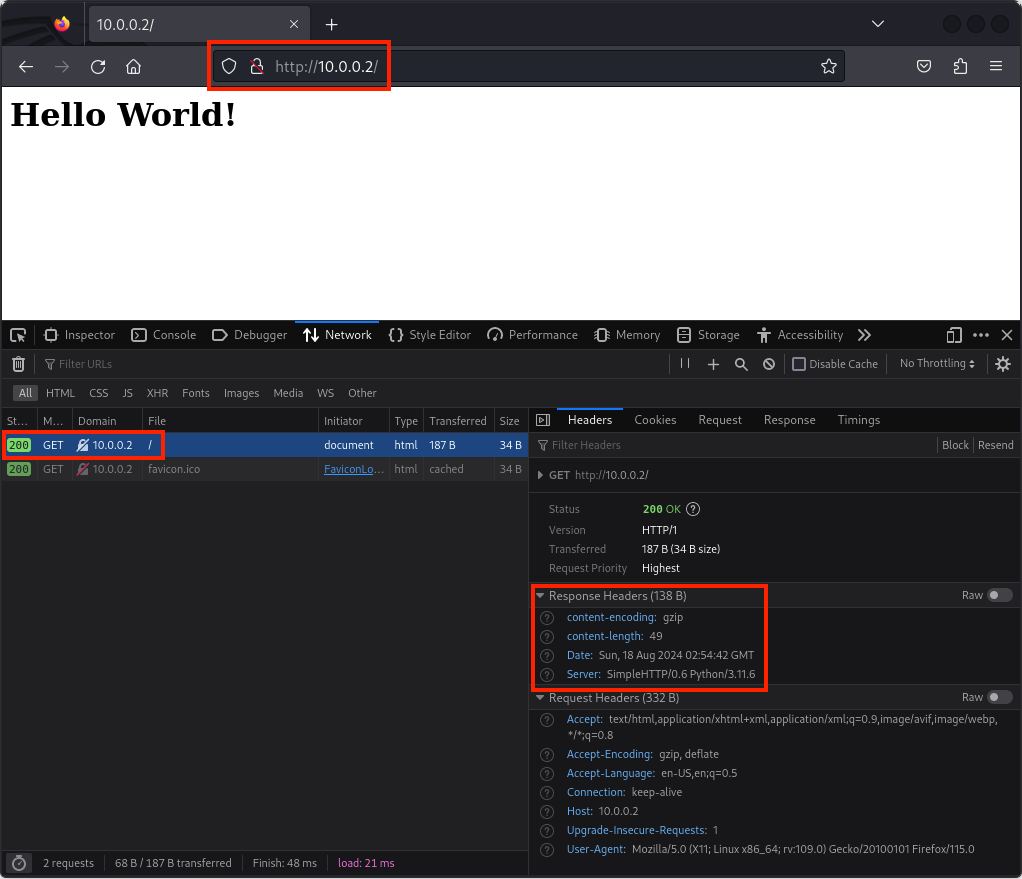
The server sends the client the requested web content over HTTP
| Layer | Protocol | PDU | Info | Ports | IPs | MACs |
| Application Layer | HTTP | Data | HTTP/1.0 200 OK Server: SimpleHTTP/0.6 Python/3.11.6 Date: Sun, 18 Aug 2024 02:54:42 GMT content-encoding: gzip content-length: 49 <HTML><h1>Hello World!</h1></HTML> | |||
| Presentation Layer | GZIP | Data | HTTP/1.0 200 OK\r\nServer: SimpleHTTP/0.6 Python/3.11.6\r\nDate: Sun, 18 Aug 2024 02:54:42 GMT\r\ncontent-encoding: gzip\r\ncontent-length: 49\r\n\r\n….rb.f……….0..H…W../.IQ……..g..7″… | |||
| Session Layer | Socket | Data | HTTP/1.0 200 OK\r\nServer: SimpleHTTP/0.6 Python/3.11.6\r\nDate: Sun, 18 Aug 2024 02:54:42 GMT\r\ncontent-encoding: gzip\r\ncontent-length: 49\r\n\r\n….rb.f……….0..H…W../.IQ……..g..7″… | |||
| Transport Layer | TCP | Segments | HTTP/1.0 200 OK\r\nServer: SimpleHTTP/0.6 Python/3.11.6\r\nDate: Sun, 18 Aug 2024 02:54:42 GMT\r\ncontent-encoding: gzip\r\ncontent-length: 49\r\n\r\n….rb.f……….0..H…W../.IQ……..g..7″… | Src Port: 80 Dst Port: 35310 | ||
| Network Layer | IP | Packets | HTTP/1.0 200 OK\r\nServer: SimpleHTTP/0.6 Python/3.11.6\r\nDate: Sun, 18 Aug 2024 02:54:42 GMT\r\ncontent-encoding: gzip\r\ncontent-length: 49\r\n\r\n….rb.f……….0..H…W../.IQ……..g..7″… | Src Port: 80 Dst Port: 35310 | Src IP: 10.0.0.2 Dst IP: 10.0.0.3 | |
| Data Link Layer | Ethernet | Frames | HTTP/1.0 200 OK\r\nServer: SimpleHTTP/0.6 Python/3.11.6\r\nDate: Sun, 18 Aug 2024 02:54:42 GMT\r\ncontent-encoding: gzip\r\ncontent-length: 49\r\n\r\n….rb.f……….0..H…W../.IQ……..g..7″… | Src Port: 80 Dst Port: 35310 | Src IP: 10.0.0.2 Dst IP: 10.0.0.3 | Src MAC: bc:f2:b8:57:86:02 Dst MAC: bc:35:db:cf:1b:03 |
| Physical Layer | Coax | Bits | 01001000 01010100 01010100 01010000 00101111 00110001 00101110 00110000 00100000 | 01001000 01010100 | 01001000 01010100 | 01001000 01010100 |
from http.server import SimpleHTTPRequestHandler # Import the built-in HTTP request handler
from socketserver import TCPServer # Import a basic TCP server implementation
from io import BytesIO # Import BytesIO to handle bytes in memory (for gzip compression)
from gzip import GzipFile # Import GzipFile to compress HTTP response
from datetime import datetime # Import datetime to generate timestamps for logging
from contextlib import suppress # Import suppress to prevent crasheswith suppress(Exception): # Try importing network interface details
from netifaces import gateways, ifaddresses, AF_INET, AF_LINK # Network interface utilities
print(“The default network interface is: “, gateways()[‘default’][AF_INET][1]) # Display default network interface name
print(“The default network interface mac address is: “, ifaddresses(gateways()[‘default’][AF_INET][1])[AF_LINK]) # Display MAC address of the default network interfaceclass Server(SimpleHTTPRequestHandler): # Define a custom HTTP server
def do_GET(self): # Handle HTTP GET requests
compressed = False # Track whether gzip compression is used
content = b'<HTML><h1>Hello World!</h1></HTML>’ # HTTP response body (bytes)if len(content) > 0: # Only attempt compression if content exists
if ‘accept-encoding’ in self.headers: # Check if client sent Accept-Encoding header
if ‘gzip’ in self.headers[‘accept-encoding’]: # Client supports gzip
bytes_ = BytesIO() # Create an in-memory byte buffer
with GzipFile(fileobj=bytes_, mode=’w’, compresslevel=5) as f: # Gzip wrapper
f.write(content) # Compress the response body
content = bytes_.getvalue() # Replace content with compressed bytes
compressed = True # Mark response as compressedself.send_response(200) # Send HTTP 200 OK status
if compressed:
self.send_header(‘content-encoding’, ‘gzip’) # Notify client of gzip encoding
self.send_header(‘content-length’, len(content)) # Send content length header
self.end_headers() # End HTTP headers
self.wfile.write(content) # Write response body to clientdef log_message(self, format, *args): # Override default request logging
print(“[{}] – {}:{} – {} {}”.format( # Custom log format
datetime.now().strftime(“%m/%d/%Y %H:%M:%S”), # Timestamp
self.client_address[0], # Client IP address
self.client_address[1], # Client source port
args[0], # HTTP method
args[1] # Requested path
))TCPServer((‘0.0.0.0’, 80), Server).serve_forever() # Start server on all interfaces, port 80
from http.server import SimpleHTTPRequestHandler
from socketserver import TCPServer
from io import BytesIO
from gzip import GzipFile
from datetime import datetime
from contextlib import suppress

with suppress(Exception):
    from netifaces import gateways, ifaddresses, AF_INET, AF_LINK
    print("The default network interface is: ",gateways()['default'][AF_INET][1])
    print("The default network interface mac address is: ",ifaddresses(gateways()['default'][AF_INET][1])[AF_LINK])

class Server(SimpleHTTPRequestHandler):
    def do_GET(self):
        compressed = False
        content = b'<HTML><h1>Hello World!</h1></HTML>'
        if len(content) > 0:
            if 'accept-encoding' in self.headers:
                if 'gzip' in self.headers['accept-encoding']:
                    bytes_ = BytesIO()
                    with GzipFile(fileobj=bytes_, mode='w', compresslevel=5) as f:
                        f.write(content)
                        f.close()
                        content = bytes_.getvalue()
                        compressed = True
        self.send_response(200)
        if compressed:
            self.send_header('content-encoding', 'gzip')
        self.send_header('content-length', len(content))
        self.end_headers()
        self.wfile.write(content)

    def log_message(self, format, *args):
        print("[{}] - {}:{} - {} {}".format(datetime.now().strftime("%m/%d/%Y %H:%M:%S"), self.client_address[0],self.client_address[1],args[0],args[1]))

TCPServer(('0.0.0.0', 80), Server).serve_forever()
Client Receives Data
The client receives the specific web content over HTTP and the web browser renders the HTML content
| Layer | Protocol | PDU | Info | Ports | IPs | MACs |
| Physical Layer | Coax | Bits | 01001000 01010100 01010100 01010000 00101111 00110001 00101110 00110000 00100000 | 01001000 01010100 | 01001000 01010100 | 01001000 01010100 |
| Data Link Layer | Ethernet | Frames | HTTP/1.0 200 OK\r\nServer: SimpleHTTP/0.6 Python/3.11.6\r\nDate: Sun, 18 Aug 2024 02:54:42 GMT\r\ncontent-encoding: gzip\r\ncontent-length: 49\r\n\r\n….rb.f……….0..H…W../.IQ……..g..7″… | Src Port: 80 Dst Port: 35310 | Src IP: 10.0.0.2 Dst IP: 10.0.0.3 | Src MAC: bc:f2:b8:57:86:02 Dst MAC: bc:35:db:cf:1b:03 |
| Network Layer | IP | Packets | HTTP/1.0 200 OK\r\nServer: SimpleHTTP/0.6 Python/3.11.6\r\nDate: Sun, 18 Aug 2024 02:54:42 GMT\r\ncontent-encoding: gzip\r\ncontent-length: 49\r\n\r\n….rb.f……….0..H…W../.IQ……..g..7″… | Src Port: 80 Dst Port: 35310 | Src IP: 10.0.0.2 Dst IP: 10.0.0.3 | |
| Transport Layer | TCP | Segments | HTTP/1.0 200 OK\r\nServer: SimpleHTTP/0.6 Python/3.11.6\r\nDate: Sun, 18 Aug 2024 02:54:42 GMT\r\ncontent-encoding: gzip\r\ncontent-length: 49\r\n\r\n….rb.f……….0..H…W../.IQ……..g..7″… | Src Port: 80 Dst Port: 35310 | ||
| Session Layer | Socket | Data | HTTP/1.0 200 OK\r\nServer: SimpleHTTP/0.6 Python/3.11.6\r\nDate: Sun, 18 Aug 2024 02:54:42 GMT\r\ncontent-encoding: gzip\r\ncontent-length: 49\r\n\r\n….rb.f……….0..H…W../.IQ……..g..7″… | |||
| Presentation Layer | GZIP | Data | HTTP/1.0 200 OK\r\nServer: SimpleHTTP/0.6 Python/3.11.6\r\nDate: Sun, 18 Aug 2024 02:54:42 GMT\r\ncontent-encoding: gzip\r\ncontent-length: 49\r\n\r\n….rb.f……….0..H…W../.IQ……..g..7″… | |||
| Application Layer | HTTP | Data | HTTP/1.0 200 OK Server: SimpleHTTP/0.6 Python/3.11.6 Date: Sun, 18 Aug 2024 02:54:42 GMT content-encoding: gzip content-length: 49 <HTML><h1>Hello World!</h1></HTML> |