C Language Compiled Code refers to the machine-readable version of a program written in the C programming language. When you write C source code in human-readable files (.c and .h), it cannot be executed directly by a computer. A compiler translates this source code through several stages including preprocessing, compilation to assembly, assembling into object code, and linking with libraries to produce a standalone executable file. The resulting compiled code consists of binary instructions that the CPU can interpret and run directly. This makes compiled code fundamentally different from the original C source code, which is intended for humans to read, write, and modify.
Source Code
The code is in C language (.c and .h files)
cat # Command used to display the contents of a file test.c # The C source file whose contents will be printed to the terminal
(host) cat test.c
#include <stdio.h> // Includes the Standard Input/Output library so we can use functions like printf()
int main(){ // The main function: program execution starts here printf(“Hello World!”); // Prints the text “Hello World!” to the standard output (usually the terminal) return 0; // Ends the program and returns 0 to the operating system indicating successful execution }
#include <stdio.h>

int main(){
    printf("Hello World!");
    return 0;
}
Pre-Processor
This step includes the headers and expand the macros, the generated file have the .i, .ii extensions
gcc # GNU C Compiler -E # Tells gcc to run only the preprocessor (expands #include, #define, etc.) test.c # The C source file being processed | # Pipe operator; sends the output of the command on the left to the command on the right head # Displays only the first 10 lines of the output
The assembly code gets converted into object code/machine code, the generated file have the .o, .obj extensions
gcc # GNU C Compiler -c # Compile the source code into an object file (machine code) without linking test.c # The C source file being compiled
(host) gcc -c test.c
cat # Outputs the contents of the file test.o # Object file containing compiled machine code | # Pipe operator; sends output of the left command to the right command xxd # Converts binary data into a hexadecimal (hex) and ASCII representation | # Pipe operator again head # Displays only the first 10 lines of the hex output
The last step is combining the object code/machine code and .lib/.a static library files, the generated file have the .exe, elf, bin extensions
gcc # GNU C Compiler used to compile and link the program test.c # The C source file being compiled -o # Option to specify the name of the output file test.bin # Name of the final executable binary file that will be created
(host) gcc test.c -o test.bin
cat # Outputs the contents of the file test.bin # The compiled executable binary file | # Pipe operator; sends output of one command to another xxd # Converts binary data into hexadecimal and ASCII representation | # Pipe operator again head # Displays the first 10 lines of the output
Computer Programming is the process of designing, creating, testing, and maintaining programs to perform specific tasks or solve particular problems. It involves translating logical solutions into a language computers can understand and execute. Programmers use languages like Python, Java, C++, or JavaScript to write code that instructs computers on how to carry out required operations.
Python
Python is a high-level, interpreted programming language known for its simplicity, readability, and versatility. It was first released in 1991 as Python 0.9.0 by Guido van Rossum. Python is cross-platform, so it can run on various operating systems like Windows, macOS, and Linux without significant code changes.
Python supports object-oriented programming, allowing developers to design software using objects that encapsulate data and behavior. It also supports procedural and functional programming paradigms, making it highly flexible. As an interpreted language, Python executes code line by line, which facilitates rapid development, easier debugging, and interactive testing.
Interpreted (?)
Interpreted refers to a method of program execution where the source code is not directly compiled into machine code beforehand. Instead, the code is executed line by line or in small sections at runtime, often through an interpreter.
Interpretation Process
Source Code: The programmer writes Python code in a human-readable form.
Compilation to Bytecode: Before execution, Python automatically translates the source code into bytecode, which is a low-level, platform-independent representation of the code.
Execution by the Python Virtual Machine (PVM): The PVM reads and executes the bytecode, translating it into machine-level instructions that the computer can understand.
Advantages
Cross-Platform Compatibility: Since the bytecode is platform-independent, the same Python program can run on any system with a compatible Python interpreter.
Ease of Debugging: Errors are caught during runtime, making testing and debugging easier, especially for beginners.
Interactive Development: Python supports interactive execution, allowing developers to test code snippets immediately without compiling the entire program.
Compiled
Compiled refers to a method of program execution where the source code written by the programmer is directly translated into machine code by a compiler before the program is run. Machine code consists of low-level instructions that a computer’s processor can execute directly.
Compilation Process:
Source Code: The programmer writes human-readable code in a programming language such as C, C++, or Rust.
Compilation: The compiler analyzes the source code, checks it for errors, and translates it into machine code specific to the target processor and operating system. This results in an executable file.
Linking: If the program uses external libraries or modules, the compiler links them together with the machine code to create a complete, runnable program.
Execution: The final executable file can be run directly by the computer without needing an interpreter.
Advantages
Faster Execution: Compiled programs generally run faster because the code is already translated into machine language.
Platform-Specific: The resulting executable is usually specific to the operating system and processor architecture it was compiled for.
Error Detection: Compilation detects many errors before the program is run, which can make debugging easier.
No Runtime Translation: Unlike interpreted languages, compiled code does not require an interpreter to execute.
Cross-Platform
Cross-Platform refers to software, applications, or programming languages that can run on multiple operating systems or hardware platforms with minimal modification. This means the same program can function on Windows, macOS, Linux, and sometimes even mobile operating systems like Android or iOS.
High-Level
A High-Level Programming Language is designed to be human-readable and easy to use. Unlike low-level languages, which are close to machine code and hardware operations, high-level languages use natural language elements, symbols, and abstractions that are intuitive for programmers.
Object-Oriented
OOP is a programming paradigm that organizes software design around objects—instances of classes. Objects are self-contained units containing data (attributes) and code (methods) that operate on that data. This approach models real-world entities, making programs easier to design, understand, and maintain.
Concepts
Class: A blueprint or template for creating objects, defining attributes and methods.
Object: A specific instance of a class with unique attribute values but shared structure.
Encapsulation: Keeping an object’s data and methods together while restricting outside access, providing controlled interaction.
Inheritance: Allowing a subclass to inherit properties and methods from a superclass, promoting code reuse.
Polymorphism: Enabling different objects to respond differently to the same method call, allowing flexible and interchangeable code.
Abstraction: Hiding complex implementation details and exposing only necessary parts.
Advantages
Modularity: Programs can be broken into reusable, independent objects.
Maintainability: Changes to one object typically do not affect others.
Reusability: Code is reused through inheritance and composition.
Real-World Modeling: Objects naturally map to real-world entities, making problem-solving intuitive.
Kernel Mode v.s. User Mode
The kernel is the core component of an operating system (OS) that manages system resources and facilitates communication between hardware and software. It acts as a bridge between user-level applications and computer hardware, ensuring safe and efficient use of resources like memory, CPU, and input/output devices.
Kernel-Level Applications (Privileged Mode)
Run in kernel mode, also known as privileged mode, with full access to all hardware and system resources.
Considered trusted because improper behavior can crash the system or compromise security.
Examples: device drivers, memory management routines, core OS functions.
User-Level Applications (Restricted Mode)
Run in user mode, a restricted environment that limits access to hardware and critical resources.
Considered less trusted, so the OS restricts their actions to prevent accidental or malicious damage.
Examples: web browsers, word processors, games.
Interaction via System Calls
User-level applications cannot directly access hardware or kernel resources. They communicate with the kernel through system calls.
A system call is a controlled interface that allows programs to request services like file operations, network communication, or memory allocation.
Kernel’s Role in Handling Requests
The kernel executes requested operations in privileged mode when it receives a system call.
After completing the task, the kernel returns control to the user-level application, maintaining system stability and security.
The kernel is crucial for system stability, security, and efficiency. By separating user mode from kernel mode, operating systems ensure that user applications are restricted while trusted kernel processes manage hardware and resources safely. This separation prevents accidental or malicious misuse of critical system functions and enables multitasking by controlling access to shared resources.
Example
Using the standard C library to output Hello World! to the standard output device
cat # Command used to display the contents of a file test.c # The C source file whose contents will be printed to the terminal
(host) cat test.c
#include <stdio.h> // Includes the Standard Input/Output library so we can use functions like printf()
int main(){ // The main function: program execution starts here printf(“Hello World!”); // Prints the text “Hello World!” to the standard output (usually the terminal) return 0; // Ends the program and returns 0 to the operating system indicating successful execution }
#include <stdio.h>

int main(){
  printf("Hello World!");
  return 0;
}
gcc # GNU C Compiler program used to compile C source code test.c # The C source file being compiled -o # Option that tells the compiler to name the output file test.exe # Name of the compiled executable file that will be created
(host) gcc test.c -o test.exe
Output
Hello World!
Step by step of the process
User-mode: Program Execution
test.exe is loaded into user mode memory.
main() function begins execution in user mode.
User-mode: Calling the C Library
printf("Hello World!") function is called within main() function.
printf() function is part of the C standard library and runs in user mode.
System Call: Switching to Kernel-mode
printf internally calls write() system call to send data to stdout.
The write() system call is invoked, which causes a context switch from user mode to kernel mode.
Kernel-mode: Writing Output
The kernel’s write function is executed with the provided data.
The kernel accesses the terminal or console device buffer.
The string "Hello World!" is written to the hardware output (e.g., screen).
The kernel ensures that the operation is performed safely and that access control is maintained.
Kernel-mode: Return to User-mode
After the write operation completes, the kernel returns the result (number of bytes written or error code) back to user mode.
User-mode: Continuing Execution
printf() function receives the result from the kernel and completes its execution.
The main() function continues executing and returns 0, indicating successful termination.
Program Exit
The program exits cleanly, and control is returned to the operating system.
Some General-Purposes
Automation and Testing
Python is widely used for automating repetitive tasks such as file handling, data entry, and system monitoring. It is popular in software testing with frameworks like PyTest and unittest, allowing developers to write automated tests for applications.
Example: Automating data extraction from spreadsheets or websites.
Web Development, Game Development, and Business Applications
Python powers web development through frameworks like Django and Flask, enabling the creation of scalable and secure web applications. In game development, Python is used with libraries like Pygame to create 2D games and prototypes.
Examples: Inventory management, accounting, CRM systems, and desktop software, all benefiting from Python’s rapid development capabilities.
Data Science, Machine Learning, and Deep Learning
Python is the primary language for data science, offering libraries such as NumPy, Pandas, Matplotlib, and Seaborn for data analysis and visualization. In machine learning, libraries like scikit-learn, TensorFlow, and PyTorch enable developers to build predictive models and AI applications.
Deep learning frameworks in Python are used to create neural networks for tasks like image recognition, natural language processing, and other advanced AI applications.
Why Python?
Easy to learn: Python mimics English; it employs a streamlined syntax focusing on natural language, making learning more straightforward for newcomers.
Flexible and reliable: A language for general-purpose programming, it can be used to develop any application with minimum effort.
Extremely active community: The community has all sorts of Python professionals that provide access to documentation or answer your questions.
Python IDLE
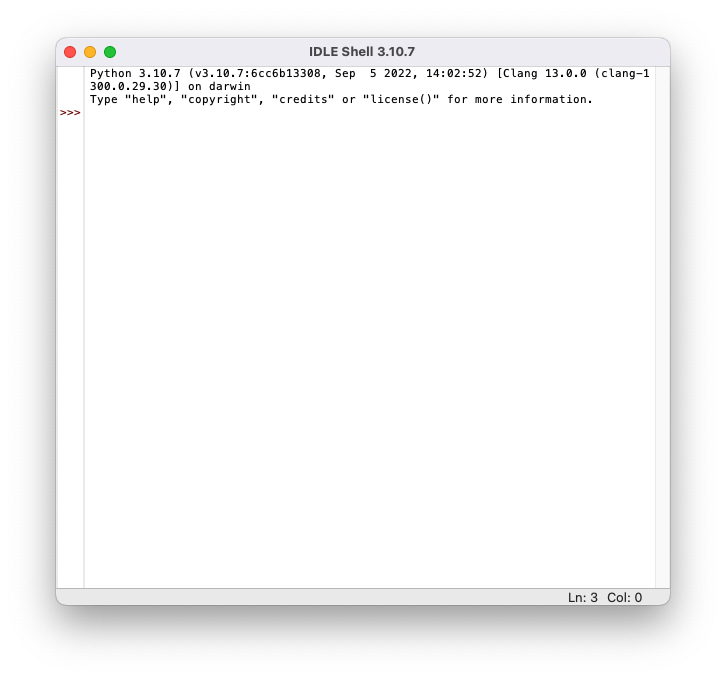
Python’s IDLE is the integrated development environment (IDE) that can be downloaded on different operating systems
Install Python on macOS
Download the latest Python version from here & Install it
Go to Launchpad and look for IDLE (Integrated Development and Learning Environment)
Or, go to Launchpad, then Others, then Terminal, and finally type python3 there