Category: Network Security

  • Web Servers

    Webserver

    A software application that delivers web content, such as HTML pages, images, videos, and other resources, to end users over the internet or a network. When a user requests a web page in a browser, the web server processes the request, retrieves the requested content, and sends it back to the client using HTTP or HTTPS. Two of the most common web servers are Apache and Nginx. Apache uses a thread-based approach, creating a separate thread for each incoming request, which allows it to handle requests individually and can make it faster in some scenarios, especially when processing dynamic content. Nginx, on the other hand, uses an event-driven, asynchronous architecture that efficiently handles a large number of simultaneous connections, making it highly suitable for serving static content and acting as a reverse proxy or load balancer.


    Apache Web Server

    You can download an Apache web server using the apt-get command

    sudo # Run the command with superuser (administrator) privileges
    apt-get # Linux package management command used to handle software packages
    update # Option to refresh the local package index with the latest versions available from repositories

    (RPi) sudo apt-get update

    sudo # Run the command with superuser (administrator) privileges
    apt-get # Linux package management command used to handle software packages
    install # Option to install a specified package
    apache2 # Specify that you want to install the apache2 package

    (RPi) sudo apt-get install apache2

    After installing it, you need to start it, Apache runs in the background, so you will need to start the Apache service using the systemctl command

    sudo # Run the command with superuser privileges
    systemctl # Command to control systemd services
    start # Option to start the specified service immediately
    apache2 # The apache2 service to be started

    (RPi) sudo systemctl start apache2

    Web servers serve web content on port 80. To check if apache2 is listening on port 80, you can use the netstat command

    sudo # Run the following command with superuser (root) privileges
    netstat # Network statistics tool that shows network connections, routing tables, interface stats, etc.
    -t # Show TCP connections only
    -u # Show UDP connections only
    -p # Show the PID and name of the program using each socket
    -l # Show only listening sockets (services waiting for connections)
    -a # Show all sockets (both listening and non-listening)
    -n # Show numerical addresses instead of resolving hostnames

    (RPi) sudo netstat -tuplan 
    Active Internet connections (servers and established)
    Proto Recv-Q Send-Q Local Address           Foreign Address         State       PID/Program name    
    tcp        0      0 0.0.0.0:22              0.0.0.0:*               LISTEN      548/sshd: /usr/sbin
    tcp6       0      0 :::80                   :::*                    LISTEN      4524/apache2        
    tcp6       0      0 :::22                   :::*                    LISTEN      548/sshd: /usr/sbin 
    udp        0      0 0.0.0.0:68              0.0.0.0:*                           536/dhcpcd         
    udp        0      0 0.0.0.0:5353            0.0.0.0:*                           386/avahi-daemon: r 
    udp        0      0 0.0.0.0:42997           0.0.0.0:*                           386/avahi-daemon: r 
    udp6       0      0 :::546                  :::*                                536/dhcpcd          
    udp6       0      0 :::5353                 :::*                                386/avahi-daemon: r 
    udp6       0      0 :::36316                :::*                                386/avahi-daemon: r

    You can browse the default web content (index.html) that is served by Apache using the curl or wget commands

    curl # Command-line tool to transfer data from or to a server using various protocols (HTTP, HTTPS, FTP, etc.)
    127.0.0.1 # The IP address of the local machine (localhost), so curl requests the server running on the same device

    (RPi) curl 127.0.0.1

    <!DOCTYPE html PUBLIC "-//W3C//DTD XHTML 1.0 Transitional//EN" "http://www.w3.org/TR/xhtml1/DTD/xhtml1-transitional.dtd">
    <html xmlns="http://www.w3.org/1999/xhtml">
      <head>
    ...
    ...

    The index.html location is /var/www/html/index.html, you can change its content using echo or nano commands

    sudo # Run the command with superuser (administrator) privileges  
    /bin/bash # Use the Bash shell to execute the command  
    -c # Tells Bash to execute the following string as a command  
    “echo ‘Hello World’” # Prints the text ‘Hello World’  
    > /var/www/html/index.html # Redirects the output to the file index.html in the web server directory, overwriting it if it exists

    (RPi) sudo /bin/bash -c "echo 'Hello World' > /var/www/html/index.html"

    When an end-user asks for the web content, they will be getting Hello World

    curl # Command-line tool to transfer data from or to a server using various protocols (HTTP, HTTPS, FTP, etc.)
    127.0.0.1 # The IP address of the local machine (localhost), so curl requests the server running on the same device

    (RPi) curl 127.0.0.1
    Hello World

    To stop the Apache web server, use the systemctl command

    sudo # Run the command with superuser privileges
    systemctl # Command to control systemd services
    stop # Option to stop the specified service immediately
    apache2 # The apache2 service to be started

    (RPi) sudo systemctl stop apache2

    You can double-check that by using systemctl status or check if port 80 is still used using the netstat command

    sudo # Run the command with superuser privileges
    systemctl # Command to control systemd services
    status # Option to show the current status of the specified service
    apache2 # The apache2 service to be started

    (RPi) sudo systemctl status apache2
    ● apache2.service - The Apache HTTP Server
         Loaded: loaded (/lib/systemd/system/apache2.service; enabled; vendor preset: enabled)
         Active: inactive (dead) since Sun 2023-08-20 20:38:08 PDT; 1s ago
           Docs: https://httpd.apache.org/docs/2.4/
        Process: 7251 ExecStop=/usr/sbin/apachectl graceful-stop (code=exited, status=0/SUCCESS)
       Main PID: 6883 (code=exited, status=0/SUCCESS)
            CPU: 191ms

    Or, netstat (Notice that nothing is listening on port 80)

    sudo # Run the following command with superuser (root) privileges
    netstat # Network statistics tool that shows network connections, routing tables, interface stats, etc.
    -t # Show TCP connections only
    -u # Show UDP connections only
    -p # Show the PID and name of the program using each socket
    -l # Show only listening sockets (services waiting for connections)
    -a # Show all sockets (both listening and non-listening)
    -n # Show numerical addresses instead of resolving hostnames

    (RPi) sudo netstat -tuplan 
    Active Internet connections (servers and established)
    Proto Recv-Q Send-Q Local Address           Foreign Address         State       PID/Program name    
    tcp        0      0 0.0.0.0:22              0.0.0.0:*               LISTEN      548/sshd: /usr/sbin
    tcp6       0      0 :::22                   :::*                    LISTEN      548/sshd: /usr/sbin
    udp        0      0 0.0.0.0:68              0.0.0.0:*                           536/dhcpcd         
    udp        0      0 0.0.0.0:5353            0.0.0.0:*                           386/avahi-daemon: r 
    udp        0      0 0.0.0.0:42997           0.0.0.0:*                           386/avahi-daemon: r 
    udp6       0      0 :::546                  :::*                                536/dhcpcd          
    udp6       0      0 :::5353                 :::*                                386/avahi-daemon: r 
    udp6       0      0 :::36316                :::*                                386/avahi-daemon: r

    Netcat Webserver

    You can create a simple web server using netcat that listens for incoming connections and servers them HTTP header and content, the header HTTP/1.1 200 OK indicates a successful response, and <h1>Hello World</h1> is the content.

    sudo # Run the command with superuser (administrator) privileges
    apt-get # Linux package management command used to handle software packages
    update # Option to refresh the local package index with the latest versions available from repositories

    (RPi) sudo apt-get update

    sudo # Run the command with superuser (administrator) privileges
    apt-get # Linux package management command used to handle software packages
    install # Option to install a specified package
    netcat # Specify that you want to install the netcat package

    (RPi) sudo apt-get install netcat

    cat # Display file content; here used to create a new file
    > script.sh # Redirect the input into a file named script.sh, creating it if it doesn’t exist or overwriting if it does
    <<EOF # Start a “here document” (heredoc) that allows you to type multiple lines into the file until the EOF marker is reached
    while true; # Infinite loop: keeps running the following commands repeatedly
    do
      echo -e # Print the string with interpretation of backslash escapes
      “http/1.1 200 OK\n\n<h1>Hello World</h1>” # This is an HTTP response with status line 200 OK and a simple HTML body
      | # sends that text directly to nc (netcat), which then sends it over the network to any client
      nc (netcat) # Command-line utility for network connections
      -l # Listen mode (server)
      -k # Keep listening after client disconnects
      -p 8080 # Listen on port 8080
      -q 1 # Quit 1 second after EOF on stdin (optional cleanup)
    done
    EOF # End of the heredoc; closes file input

    (RPi) cat > script.sh <<EOF 
    while true;
      do echo -e "http/1.1 200 OK\n\n<h1>Hello World</h1>" | nc -l -k -p 8080 -q 1;
    done
    EOF

    chmod # Change file permissions on a Linux/Unix file
    +x # Add execute permission, allowing the file to be run as a program or script
    script.sh # The filename to which the permission change is applied

    (RPi) chmod +x script.sh

    ./ # Run a program or script located in the current directory
    script.sh # The executable script file to run

    (RPi) ./script.sh
  • Honeypots

    Honeypot

    A decoy application or system, commonly known as a honeypot, is a carefully designed and intentionally vulnerable tool used as bait to attract and trap cyber attackers. By simulating real systems, services, or applications, honeypots create realistic targets that appear valuable to threat actors. This approach enables organizations to observe attacker behavior, study tactics, techniques, and procedures (TTPs), and collect valuable intelligence about potential threats. All of this occurs within a controlled and isolated environment, ensuring that the organization’s actual systems, sensitive data, and network infrastructure remain safe from compromise.

    • Purpose
      • Detection: To identify the presence of potential cyber threats by mimicking real systems or applications.
      • Monitoring: To observe the behavior of threat actors, including how they attempt to exploit vulnerabilities.
      • Analysis: To gather intelligence on attack methods, tools used, and tactics employed by cybercriminals.
    • Types
      • Low-Interaction: Designed to simulate minimal services.
        • Primarily captures connection attempts, allowing administrators to log who is probing the system and when.
        • Useful for detecting automated attacks or scanning activities.
      • Medium-Interaction: Simulates more realistic services than low-interaction honeypots.
        • Captures connection attempts and login credentials, providing insight into attempted attacks and brute-force attempts.
        • Allows limited interaction with attackers while still containing potential risks.
      • High-Interaction: Provides a fully interactive environment that mimics real systems.
        • Captures connection attempts, login credentials, and attacker actions, allowing detailed behavioral analysis.
        • Can perform multiple functions and respond to client requests, offering deeper insight into attack methods, tools, and tactics.
    • Components
      • Decoy Systems: These can include virtual machines, servers, or network devices that simulate real infrastructure.
      • Decoy Applications: Software applications that mimic critical business systems, such as databases or web services.
    • Benefits
      • Early Warning: Provides early detection of intrusion attempts before they reach actual production systems.
      • Threat Intelligence: Provides valuable insights into the latest attack techniques and helps refine security strategies.
      • Cost-Effective: Enables organizations to obtain threat intelligence without dedicating resources to full-scale incident response.
    • Challenges
      • False Positives: Ensuring that legitimate activities are not mistaken for malicious behavior.
      • Maintenance: Keeping decoys up to date and relevant to current threat landscapes.
      • Ethical Considerations: Balancing the need for security with ethical concerns related to the surveillance of attackers.
    • Example Use Cases
      • Phishing Simulations: Using decoy email systems to analyze phishing attempts.
      • Vulnerability Exploits: Setting up virtual machines to detect and study exploit kits targeting specific vulnerabilities.
      • Network Intrusions: Creating simulated network segments to monitor lateral movement by threat actors within an organization.

    Honeypots Projects

    There are different honeypots projects that can be installed on the Raspberry Pi operating system, the following are steps to install one of the open source projects called honeypots

    Install the honeypots package using pip

    PIP_BREAK_SYSTEM_PACKAGES=1 # Environment variable telling pip to ignore warnings about installing packages that could overwrite system-managed Python packages
    pip3 # Python 3 package installer (pip for Python 3)
    install # Command to install Python packages
    “bcrypt<4.0.0” # Install the ‘bcrypt’ package but restrict version to less than 4.0.0 (dependency compatibility)
    honeypots # Install the ‘honeypots’ Python package

    (RPi) PIP_BREAK_SYSTEM_PACKAGES=1

    Run the honeypots project, this command will run the ftp honeypot

    sudo # Run the command with superuser (administrator) privileges
    -E # Preserve the user’s environment variables (like PIP_BREAK_SYSTEM_PACKAGES)
    python3 # Use Python 3 interpreter to run the module
    -m honeypots # Run the Python module named ‘honeypots’
    –setup ftp:21 # Command-line argument for the module; sets up a honeypot service to simulate an FTP server on port 21

    (RPi) sudo -E python3 -m honeypots --setup ftp:21
    [!] For updates, check https://github.com/qeeqbox/honeypots
    [x] Use [Enter] to exit or python3 -m honeypots --kill
    [x] Parsing honeypot [normal]
    {"action": "process", "dest_ip": "0.0.0.0", "dest_port": "21", "password": "test", "server": "ftp_server", "src_ip": "0.0.0.0", "src_port": "21", "status": "success", "timestamp": "2023-08-22T18:00:26.430681", "username": "test"}
    [x] QFTPServer running..
    [x] Everything looks good!

    Connect to the ftp honeypot from the host using an ftp client, you need to change janedoe.local to the hostname you picked and enter a username and password

    ftp> # Indicates you are in an interactive FTP client session
    open # FTP command to connect to a remote FTP server
    jdoe.local # The hostname or local network address of the FTP server you want to connect to

    ftp> open jdoe.local
    421 Service not available, remote server has closed connection
    Connected to jdoe.local.
    220 ProFTPD 1.2.10
    Name (jdoe.local:pc): user123
    331 Password required for user123.
    Password: 
    530 Sorry, Authentication failed.
    ftp: Login faile

    The ftp honeypot recorded the user name and password

    {"action": "connection", "dest_ip": "0.0.0.0", "dest_port": "21", "server": "ftp_server", "src_ip": "192.168.2.1", "src_port": "50173", "timestamp": "2023-08-22T18:00:29.081757"}
    {"action": "login", "dest_ip": "0.0.0.0", "dest_port": "21", "password": "pass123", "server": "ftp_server", "src_ip": "192.168.2.1", "src_port": "50173", "status": "failed", "timestamp": "2023-08-22T18:00:35.037311", "username": "user123"}
  • Message Queuing Telemetry Transport Protocol

    Network Protocol

    A network protocol is a standardized set of rules procedures and conventions that govern how data is formatted transmitted and received between devices on a network These protocols ensure that devices regardless of their manufacturer operating system or hardware can communicate reliably and efficiently enabling the seamless exchange of information across networks.

    Network protocols define several critical aspects of communication including how devices initiate and terminate connections how data is packaged into packets how errors are detected and corrected and how devices address each other to ensure messages reach the correct destination They also determine how devices respond in case of congestion interruptions or conflicting requests.

    Examples of widely used network protocols include TCP/IP which underlies the internet and governs how data travels between computers HTTP/HTTPS which enables web communication FTP used for file transfers and SMTP which manages email transmission By following these standardized rules devices can understand each other interpret data correctly and maintain reliable and secure communication even across diverse networks or geographical locations.

    Network protocols are the foundation of all digital communication ensuring that information flows smoothly accurately and securely between devices in both small local networks and vast global networks like the internet.


    Message Queuing Telemetry Transport (MQTT)

    MQTT is a publish-and-subscribe communication protocol designed for IoT devices, enabling them to communicate effectively in high-latency and low-bandwidth environments.

    • For Windows, use the MQTT installer
    • For Linux-bases or Mac OS, use brew install mosquitto
    • Go to terminal or command line and type mosquitto -v

    Light switch & Mobile App MQTT Example

    In a smart home, a light switch is equipped with the capability to send information to a home mobile app.

    • MQTT Broker: The MQTT broker serves as a central server that receives messages and distributes them to all clients subscribed to specific topics.
      • mosquitto -v
    • MQTT Subscriber: The home app acts as an MQTT subscriber. It subscribes to the topic smarthome/lights/office. When the smart light switch publishes an update, the home app receives the message and updates the light’s status accordingly
      • mosquitto_sub -t 'smarthome/lights/office'
    • MQTT Publisher: The smart light switch functions as an MQTT publisher. When you turn the light on or off, the switch sends a message to a specific topic on the MQTT broker, such as smarthome/lights/office.
      • mosquitto_pub -t 'smarthome/lights/office' -m 'ON'

    Open 3 terminal windows or tabs and paste the following

    Demo (Tab 1)

    (RPi) mosquitto -v
    1757318742: mosquitto version 2.0.22 starting
    1757318742: Using default config.
    1757318742: Starting in local only mode. Connections will only be possible from clients running on this machine.
    1757318742: Create a configuration file which defines a listener to allow remote access.
    1757318742: For more details see https://mosquitto.org/documentation/authentication-methods/
    1757318742: Opening ipv4 listen socket on port 1883.
    1757318742: Opening ipv6 listen socket on port 1883.
    1757318742: mosquitto version 2.0.22 running

    Demo (Tab 2)

    (RPi) mosquitto_sub -t 'smarthome/lights/office'
    ON

    Demo (Tab 3)

    (RPi) mosquitto_pub -t 'smarthome/lights/office' -m 'Hello, MQTT!'

    You can also do the same thing using Python

    Demo (Tab 1)

    (RPi) mosquitto -v
    1757318742: mosquitto version 2.0.22 starting
    1757318742: Using default config.
    1757318742: Starting in local only mode. Connections will only be possible from clients running on this machine.
    1757318742: Create a configuration file which defines a listener to allow remote access.
    1757318742: For more details see https://mosquitto.org/documentation/authentication-methods/
    1757318742: Opening ipv4 listen socket on port 1883.
    1757318742: Opening ipv6 listen socket on port 1883.
    1757318742: mosquitto version 2.0.22 running

    MQTT in Python

    You can create an MQTT server in Python. In MQTT terminology, you can create an MQTT server in Python. In MQTT terminology, the server is called a broker, which receives messages from publishers and distributes them to subscribers. Python can be used either to run an MQTT broker (server) or to create MQTT clients, which are devices or programs that publish messages to topics or subscribe to topics to receive messages.

    listener.py (Listens to one topic)

    import paho.mqtt.client as mqtt_client # Import the Paho MQTT client library
    client = mqtt_client.Client(mqtt_client.CallbackAPIVersion.VERSION2, client_id=”client_1″) # Create MQTT client with API version 2 and client ID

    def on_connect(client, userdata, flags, rc, properties): # Callback function triggered when the client connects to the broker
        print(f”Connected: reason_code={rc}”) # Print the connection result code

    def on_message(client, userdata, msg): # Callback function triggered when a subscribed message is received
        print(f”{msg.topic}: {msg.payload.decode()}”) # Print the topic and decoded message payload

    def on_disconnect(client, userdata, rc): # Callback function triggered when the client disconnects
        print(f”Disconnected: reason_code={rc}”) # Print the disconnection reason code

    client.on_connect = on_connect # Assign the connection callback function
    client.on_message = on_message # Assign the message callback function

    if client.connect(“localhost”, 1883, 60) == 0: # Connect to the MQTT broker on localhost using port 1883 with 60s keepalive
        try:
            client.subscribe(“smarthome/lights/office”, qos=1) # Subscribe to the topic with Quality of Service level 1
            client.loop_forever() # Start the network loop and listen for messages continuously
        except Exception: # Catch any runtime errors
            print(“Error”) # Print error message if an exception occurs
        finally:
            client.disconnect() # Disconnect from the broker when the program exits

    import paho.mqtt.client as mqtt_client

    client = mqtt_client.Client(mqtt_client.CallbackAPIVersion.VERSION2, client_id="client_1")

    def on_connect(client, userdata, flags, rc, properties):
        print(f"Connected: reason_code={rc}")
     
    def on_message(client, userdata, msg):
        print(f"{msg.topic}: {msg.payload.decode()}")

    def on_disconnect(client, userdata, rc):
        print(f"Disconnected: reason_code={rc}")

    client.on_connect = on_connect
    client.on_message = on_message

    if client.connect("localhost", 1883, 60) == 0:
        try:
          client.subscribe("smarthome/lights/office", qos=1)
            client.loop_forever()
        except Exception:
            print("Error")
        finally:
            client.disconnect()

    client.py (Publish to a topic)

    import paho.mqtt.client as mqtt_client # Import the Paho MQTT client library

    client = mqtt_client.Client(mqtt_client.CallbackAPIVersion.VERSION2) # Create an MQTT client using callback API version 2

    def on_connect(client, userdata, flags, rc, properties): # Function called when the client connects to the broker
        print(f”Connected: reason_code={rc}”) # Print the connection result code

    def on_disconnect(client, userdata, rc): # Function called when the client disconnects from the broker
        print(f”Disconnected: reason_code={rc}”) # Print the disconnection reason code

    client.on_connect = on_connect # Assign the connect callback function to the client

    if client.connect(“localhost”, 1883, 60) == 0: # Connect to the MQTT broker running on localhost using port 1883
        try:
            client.publish(“smarthome/lights/office”, “ON”, 0) # Publish the message “ON” to the topic with QoS level 0
        except Exception as e: # Catch any exceptions that occur during publishing
            print(e) # Print the error message
        finally:
            client.disconnect() # Disconnect from the MQTT broker

    import paho.mqtt.client as mqtt_client

    client = mqtt_client.Client(mqtt_client.CallbackAPIVersion.VERSION2)

    def on_connect(client, userdata, flags, rc, properties):
        print(f"Connected: reason_code={rc}")

    def on_disconnect(client, userdata, rc):
        print(f"Disconnected: reason_code={rc}")

    client.on_connect = on_connect

    if client.connect("localhost", 1883, 60) == 0:
        try:
          client.publish("smarthome/lights/office", "ON", 0)
        except Exception as e:
            print(e)
        finally:
            client.disconnect()

    Output

    Connected: reason_code=Success
    smarthome/lights/office: ON
  • IT, OT, IoT, and IIoT Networks

    Computer Network

    A computer network is a system of interconnected devices such as computers, servers, routers, and other hardware that communicate to share data, resources, and services. Networks create pathways and infrastructure for the flow of information between devices, enabling activities such as sending emails, browsing the web, streaming video, or participating in video calls.

    Computer networks vary in scale and complexity. Local Area Networks (LANs) connect devices within a small area, such as a home, office, or school, while Wide Area Networks (WANs) span larger geographic regions, linking offices, data centers, or even countries. The internet is the largest global network, connecting billions of devices worldwide.

    Networks are essential for daily digital activities, supporting personal communication, business operations, online education, healthcare systems, financial transactions, cloud computing, and more. They rely on protocols, hardware, and security measures to ensure efficient, reliable, and safe data transmission between devices.


    Network Security

    Network security involves methods, technologies, and procedures to protect computer networks and their resources from unauthorized access, misuse, modification, or disruption. It ensures that sensitive information such as personal data, financial records, and confidential business information remains safe while maintaining the availability and integrity of network services.

    Network security includes:

    • Access Control: Restricting who can connect to the network or access specific resources using passwords, authentication systems, or multi-factor authentication (MFA).
    • Firewalls: Devices or software that monitor and filter network traffic to block malicious activity.
    • Intrusion Detection and Prevention: Systems that detect unusual or suspicious activity and respond to potential threats.
    • Encryption: Protecting data in transit by converting it into a format unreadable by unauthorized users.
    • Network Monitoring: Continuously observing network traffic and performance to identify potential security breaches or vulnerabilities.
    • Regular Updates and Patching: Ensuring network devices and software are up to date to protect against known vulnerabilities.

    Effective network security not only prevents unauthorized access but also reduces the risk of data breaches, malware infections, and service disruptions, helping maintain trust, reliability, and operational continuity for individuals and organizations.


    Information Technology (IT) Network

    An Information Technology (IT) network combines hardware, software, and protocols to monitor, manage, and control the flow of electronic data within an organization or between interconnected systems. This setup allows devices such as computers, servers, routers, and storage systems to communicate, share resources, and access information efficiently and securely.

    Hardware components in an IT network include servers, switches, routers, firewalls, and cables. Software components encompass network management tools, monitoring systems, security programs, and communication applications. Together, these elements enable organizations to store, transmit, and protect data, ensuring the smooth operation of digital services and facilitating user collaboration.

    IT networks can vary in size and scope, from small local area networks (LANs) in offices to large wide area networks (WANs) that connect multiple sites across cities, countries, or continents. They rely on standards and protocols to ensure interoperability, reliability, and security of data transmission.

    A well-managed IT network is critical to the daily operations of modern organizations, supporting tasks such as email, cloud computing, database management, video conferencing, and online transactions. By integrating monitoring, control, and security mechanisms, IT networks help maintain operational efficiency, protect sensitive information, and respond quickly to disruptions or threats.

    Overview

    • Purpose: Handle data and information within organizations.
    • Focus: Computers, servers, databases, email, cloud services.
    • Protocols/Technologies: TCP/IP, HTTP/HTTPS, DNS, VPN, Wi-Fi, Ethernet.
    • Characteristics:
      • Security-focused
      • Data-centric
      • High reliance on standardized IT hardware and software
    • Example: Corporate LANs, cloud servers, email systems.
    • CIAAN Prioritization
      • Confidentiality
        • Data should not be accessed without permission (Data is stored in a safe place)
          • Sending a message to a specific target
      • Integrity
        • Data should not be modified by unauthorized users/objects (Data is reliable and accurate)
          • Sending a message to a specific target and ensuring that the target receives the exact message without being tampered with
      • Availability
        • Data should be available to authorized users/objects whenever they need it (Data is available when needed)
          • Sending a message to a target, and the target can receive it
      • Authenticity
        • The identity and origin of a user, system, or data are trusted
          • The sender and the communication channel are trusted
      • Non-repudiation
        • The individual or system cannot deny having carried out a specific action.
          • The sender cannot deny having sent a message

    Topology

    Internet <-> Firewall <-> IT Network
    • Internet (Untrusted): The public web. By default, all unsolicited inbound traffic is blocked to prevent external intrusions.
    • Firewall (The Gatekeeper): A physical or virtual appliance using Stateful Packet Inspection (SPI). It ensures that the only data entering the network is a direct, verified response to a request initiated by an internal user.
    • IT Network (Trusted / Corporate): Houses workstations, Electronic Health Record (EHR) systems, and administrative servers. It is protected from the public web but remains the most likely entry point for phishing.

    Operational Technology (OT) Network

    An Operational Technology (OT) network combines hardware, software, and communication systems designed to monitor, control, and manage industrial equipment and operational processes. Unlike traditional IT networks, which primarily handle data and information, OT networks focus on the physical operation of machinery, production lines, utilities, and other critical industrial systems.

    Hardware components in OT networks include sensors, actuators, programmable logic controllers (PLCs), industrial robots, and supervisory control and data acquisition (SCADA) systems. Software components consist of control applications, monitoring platforms, and analytics tools that help operators manage processes, optimize performance, and respond to events in real time.

    OT networks are widely used in industries such as manufacturing, energy, transportation, water treatment, and oil and gas. They enable organizations to automate complex processes, ensure safety, maintain efficiency, and reduce downtime by providing precise control over physical operations.

    Security and reliability are critical in OT networks because disruptions can cause physical damage, production losses, environmental hazards, or safety risks. OT systems often operate in environments where downtime is costly or dangerous, making real-time monitoring, fail-safes, and secure communication protocols essential.
    OT networks bridge the digital and physical worlds, enabling control, monitoring, and coordination of industrial systems to ensure operational efficiency, safety, and regulatory compliance.

    Overview

    • Purpose: Manage and control physical devices, machinery, and industrial processes.
    • Focus: Sensors, actuators, PLCs (Programmable Logic Controllers), SCADA systems.
    • Protocols/Technologies: Modbus, DNP3, OPC UA, PROFIBUS, EtherNet/IP.
    • Characteristics:
      • Safety and reliability-critical
      • Real-time or near real-time operations
      • Legacy systems often coexist with modern ones
    • Example: Factory floor control systems, water treatment plants, power grids.’
    • CIAAN Prioritization
      • Availability
        • Data should be available to authorized users/objects whenever they need it (Data is available when needed)
          • Sending an event to a specific actuator, and the actuator can receive it
      • Integrity
        • Data should not be modified by unauthorized users/objects (Data is reliable and accurate)
          • Sending an event to a specific actuator and ensuring that the actuator receives the exact event without being tampered with.
      • Confidentiality
        • Data should not be accessed without permission (Data is stored in a safe place)
          • Sending an event to a specific actuator
      • Authenticity
        • The identity and origin of a user, system, or data are trusted
          • The sender and the communication channel are trusted
      • Non-repudiation
        • The individual or system cannot deny having carried out a specific action.
          • The sender cannot deny having sent a message 

    Topology

    Internet <-> Firewall <-> IT Network <-> Secure Gateway / DMZ <-> OT Network
    • Secure Gateway / DMZ (The Air-Lock): The most critical security layer. It creates a physical and logical “buffer” so that the IT and OT networks never communicate directly.
      • Data Brokerage: It terminates the connection from one side and starts a new one on the other, acting as a middleman for machine data.
      • Protocol Isolation: It strips away IT-based protocols (which carry malware/ransomware) and only allows specific industrial “languages” (Modbus, BACnet, DICOM) to pass.
    • OT Network (Mission-Critical Zone): The “Heart” of the facility (e.g., life-support, surgery robots, PLCs). It is protected by two layers of security, making it invisible to the public internet.

    Internet of Things (IoT) Network

    An Internet of Things (IoT) network is a system of interconnected devices, sensors, appliances, and software that communicate and exchange information autonomously without direct human intervention. These devices collect data from their environment, share it across the network, and can respond or act based on the information they receive, creating a dynamic ecosystem of smart automated systems.

    IoT networks include a wide variety of devices, such as smart home appliances like thermostats, lights, and security cameras, wearable health monitors, industrial sensors, connected vehicles, and even environmental monitoring equipment. Each device is equipped with the necessary hardware and software to sense, transmit, process, or act on data, often using wireless communication protocols such as Wi-Fi, Bluetooth, Zigbee, or cellular networks.

    The primary goal of an IoT network is to enhance efficiency, automation, and decision-making by enabling devices to work together intelligently. For example, a smart thermostat can adjust room temperature based on occupancy data collected from motion sensors. In contrast, industrial IoT sensors can monitor machinery performance and trigger maintenance alerts before failures occur.

    IoT networks rely heavily on data analytics, cloud computing, and edge computing to process large volumes of information generated by connected devices. Security is a major consideration, as unsecured IoT devices can be vulnerable to cyberattacks, potentially affecting privacy, safety, and the network’s functionality.

    IoT networks are revolutionizing how humans interact with technology, providing automation, convenience, and real-time insights across homes, businesses, and industries while enabling smarter, more responsive systems.

    Overview

    • Purpose: Connect everyday devices to the internet for monitoring, control, and data collection.
    • Focus: Consumer devices, home automation, wearables, smart appliances.
    • Protocols/Technologies: MQTT, CoAP, Zigbee, LoRaWAN, Wi-Fi, Bluetooth.
    • Characteristics:
      • Often low-power devices
      • Cloud connectivity and analytics-driven
      • Usually not mission-critical (compared to OT)
    • Example: Smart thermostats, fitness trackers, connected cameras.
    • CIAAN Prioritization
      • Availability
        • Data should be available to authorized users/objects whenever they need it (Data is available when needed)
          • Sending an event to a specific actuator, and the actuator can receive it
      • Integrity
        • Data should not be modified by unauthorized users/objects (Data is reliable and accurate)
          • Sending an event to a specific actuator and ensuring that the actuator receives the exact event without being tampered with.
      • Confidentiality
        • Data should not be accessed without permission (Data is stored in a safe place)
          • Sending an event to a specific actuator
      • Authenticity
        • The identity and origin of a user, system, or data are trusted
          • The sender and the communication channel are trusted
      • Non-repudiation
        • The individual or system cannot deny having carried out a specific action.
          • The sender cannot deny having sent a message 

    Topology

    Internet <-> Firewall <-> IT Network <-> Secure Gateway / DMZ (IoT inside)
    • Secure Gateway / DMZ (Semi-Trusted / IoT Sandbox): By isolating IoT (Smart TVs, HVAC, Printers) here, you prevent “Lateral Movement.”
      • Inbound Control: The Gateway allows IoT devices to reach the Internet for necessary firmware updates.
      • Outbound Restriction: The Gateway strictly blocks IoT devices from initiating any connection to the IT Network, ensuring a hacked “Smart TV” cannot access private patient data.

    Industrial Internet of Things (IIoT) Network

    An Industrial Internet of Things (IIoT) network is a system of interconnected sensors, devices, machines, and software designed specifically for industrial environments, allowing them to communicate. Exchange information autonomously without direct human intervention. Unlike general IoT networks, which often focus on consumer applications, IIoT networks are tailored to industries such as manufacturing, energy, transportation, oil and gas, and utilities, where reliable, real-time monitoring and control of equipment is critical.

    IIoT devices collect data from industrial processes, machinery, or environmental conditions and share it across the network to enable automation, predictive maintenance, operational optimization, and safety improvements. Examples include vibration sensors on factory equipment to predict failures, smart meters in energy grids to monitor consumption, and temperature and humidity sensors in warehouses to maintain optimal storage conditions.

    The network typically combines hardware components like sensors, actuators, and programmable logic controllers PLCs with software platforms for data collection, processing, and analytics. Communication often occurs via industrial protocols or wireless standards suitable for harsh environments, ensuring reliability, low latency, and secure data transmission.

    IIoT networks enable organizations to reduce downtime, increase efficiency, and make data-driven decisions by continuously monitoring industrial operations. Security and resilience are major concerns, as disruptions or breaches can lead to production loss, equipment damage, or safety hazards. Therefore, IIoT networks often include strong cybersecurity measures, redundant systems, and monitoring tools to maintain operational continuity.

    An IIoT network integrates advanced sensing, connectivity, and analytics in industrial settings, enabling machines and systems to operate more intelligently, safely, and efficiently with minimal human intervention.

    Overview

    • Purpose: Industrial version of IoT for operational efficiency, predictive maintenance, and automation.
    • Focus: Industrial machinery, sensors, robotics, heavy equipment.
    • Protocols/Technologies: Industrial Ethernet, MQTT, OPC UA, Modbus TCP, edge computing.
    • Characteristics:
      • Combines IT and OT principles
      • Real-time monitoring and control
      • Data-driven decision making and analytics
    • Example: Smart factories, automated manufacturing lines, predictive maintenance systems.
    • CIAAN Prioritization
      • Availability
        • Data should be available to authorized users/objects whenever they need it (Data is available when needed)
          • Sending an event to a specific actuator, and the actuator can receive it
      • Integrity
        • Data should not be modified by unauthorized users/objects (Data is reliable and accurate)
          • Sending an event to a specific actuator and ensuring that the actuator receives the exact event without being tampered with.
      • Confidentiality
        • Data should not be accessed without permission (Data is stored in a safe place)
          • Sending an event to a specific actuator
      • Authenticity
        • The identity and origin of a user, system, or data are trusted
          • The sender and the communication channel are trusted
      • Non-repudiation
        • The individual or system cannot deny having carried out a specific action.
          • The sender cannot deny having sent a message 

    Topology

    Internet <-> Firewall <-> IT Network <-> Secure Gateway / DMZ (IoT inside) <-> OT Network (IIoT inside)
    • Zone Separation (IoT vs. IIoT):
      • IoT (In DMZ): Non-critical facility devices (Cameras, Guest Wi-Fi) are sandboxed in the DMZ. If compromised, the impact is contained.
      • IIoT (In OT Zone): Industrial sensors and smart clinical tools (IIoT) live inside the OT Network. Their data is vital for real-time operations, and they are protected by the full “Air-Lock” logic of the Secure Gateway.
    • Ultimate Isolation: This flow ensures that a breach on the Internet or a malware in the IT Office cannot physically reach or disrupt the mission-critical machines in the OT zone.
  • Application Layer

    Application Layer

    Application Layer

    The Application Layer is the seventh and topmost layer of the OSI model, providing the interface for end users to interact with network services. It acts as a bridge between user applications and the underlying network, allowing software to access communication functions without managing data transport or routing. This layer handles high-level protocols and services that enable tasks such as sending emails, browsing the web, transferring files, and accessing remote databases.

    By providing these services, the Application Layer ensures seamless and efficient user interaction with the network.

    In addition to user interaction, the Application Layer formats, presents, and interprets data in a way applications can understand. It could include functions such as data encoding, encryption, and session management to ensure information is meaningful, secure, and correctly synchronized. For example, a web browser at this layer requests HTML pages from a web server via HTTP and presents the content to the user in a readable format. Similarly, email clients use protocols such as SMTP, POP3, and IMAP to send, receive, and organize messages.

    The Application Layer interacts closely with the Presentation and Session Layers to provide complete end-to-end services. While the Presentation Layer handles data translation and formatting, and the Session Layer manages communication sessions, the Application Layer focuses on making network services accessible and usable to end users. This layer encompasses a wide variety of protocols and services, from web and email to file transfer, remote login, and messaging, ensuring that network functionality translates into practical, user-facing applications.


    Hypertext Transfer Protocol (HTTP)

    Hypertext Transfer Protocol (HTTP) is a TCP/IP-based protocol that enables communication between a client, such as a web browser, and a web server. It defines the rules for requesting and delivering resources like HTML pages, images, videos, and other web content over the internet

    HTTP operates as a stateless protocol, meaning each request from a client to a server is independent. However, extensions like cookies and sessions can maintain state across multiple interactions. By standardizing communication between clients and servers, HTTP enables users to access and navigate websites seamlessly, making it the foundation of data exchange on the World Wide Web.

    Some HTTP Headers

    • Host: Target virtual host to use (HOST:PORT)
    • Server: Target server that handled the request
    • User-Agent: Software/Browser that is making the request

    Some HTTP request methods

    • GET: Read data
    • POST: Insert data
    • HEAD: Return metadata about the target

    Some HTTP Response Status Codes

    • 200: Request has succeeded
    • 404: Server cannot find the requested resource
    • 500: Internal server error

    If you want to get a file named test.html from qeeqbox.com, your HTTP request will be something like this

    GET /test.html HTTP/1.1
    Host: www.qeeqboox.com

    If the server does have the requested file, the HTTP response will be

    HTTP/1.1 200 OK
    Content-Length: 12
    Content-Type: text/plain; charset=utf-8

    Hello World!

    If the file does not exist, the HTTP response will be

    HTTP/1.1 404
    Content-Length: 0

    Uniform Resource Locator (URL)

    A Uniform Resource Locator (URL) is a standardized and unique identifier used to locate and access resources on the internet, such as web pages, files, or services. It provides the necessary information for a client, like a web browser, to retrieve a resource from a specific server.

    • Protocol: A set of rules that define how content is transferred between the web server and browser
    • Sub Domain: An extension to a domain name to separate a website section
    • Root Domain: A website’s main or primary domain
    • Top Level Domain: An identifier that’s used to categorize the domain
    • Sub Directory: A directory that exists inside another directory
    • Path: A location on the website
                    Top Level Domain
                          |
          Sub-Domain      |           Path
             |            |            |
            ---          ---      --------------
    https://www.qeeqboox.com:433/files/test.html
    -----       --------     |   ----- ---------
       |           |         |    |       |
    Protocol       |        Port  |      File
               Root Domain        |
                             Sub Directory

    Process

    A process is an instance of a running application on a computer or device. It represents the program in action, including its code, current activities, memory allocation, and system resources it uses while executing. A single application can create multiple processes simultaneously, allowing different parts of the program to run independently or enabling multiple users to use the same application at once.

    The operating system manages processes by allocating resources, scheduling execution, and isolating each process to prevent interference. This ensures that applications run efficiently and securely.

    • Foreground: Requires user to interact with it
    • Background: Does not require users to interact with it

    Services

    A service is a type of process that runs continuously in the background without terminating, providing ongoing functionality to the operating system or other applications. Unlike regular processes that start and stop with user interaction, services are designed to operate independently. They typically start automatically when the system boots and run until it shuts down.

    Examples include web server services, database services, and print spoolers. These services handle requests, manage resources, or deliver functionality continuously. By operating persistently, services ensure that essential system functions and networked applications remain available and responsive at all times.


    Application

    An application is a software program designed to perform specific tasks or functions for users or other systems. It provides a user-friendly interface or automated processes that allow individuals or devices to accomplish objectives such as word processing, web browsing, data analysis, gaming, or communication.

    Applications can range from simple utilities to complex software suites and rely on underlying system resources, such as the operating system and network services, to function effectively. By translating user inputs into actions and delivering outputs in a usable form, applications bridge the gap between technical systems and practical, everyday tasks.


    Web Application

    A web application is a software program that runs on a web server and is accessed by users through a web browser or network client over the internet or an internal network. Unlike traditional desktop applications, web applications do not require local installation and can provide interactive functionality such as online shopping, email services, social media platforms, or cloud-based productivity tools.

    Web applications rely on web technologies like HTML, CSS, JavaScript, and server-side programming languages to process user input, communicate with databases, and deliver dynamic content. By operating over a network, web applications allow users to access services from anywhere, on various devices, while centralizing maintenance and updates on the server side.


    Cyberattacks

    • Cross-Site Scripting
      • A threat actor aims to execute malicious actions on the victim’s website (It’s a client-side code injection attack)
        • Reflected Cross-Site Scripting
          • A threat actor injects malicious content into web pages or web applications. The content will be reflected in the response and executed in the victim’s browser
        • Dom-Based Cross-Site Scripting
          • A threat actor injects malicious content into web pages or web applications. The content is not reflected in the response and is executed in the victim’s browser
        • Stored Cross-Site Scripting
          • A threat actor injects malicious content into a vulnerable server. The content is retrieved by users and then execute
    • Cross-site request forgery
      • A threat actor may trick an authenticated or trusted victim into transmitting unauthorized actions on their behalf
      • A threat actor crafts an exploit URL for a fund transfer and sends it to an authenticated user
    • Denial-of-service (DoS)
      • A threat actor makes a target device\resource unavailable by overloading it using a device
      • A threat actor uses one device to overload XYZ LLC’s website (This was common in the old days, but nowadays it often does not work )
    • Distributed Denial of Service (DDoS)
      • A threat actor makes a target device\resource unavailable by flooding using multiple devices
      • A threat actor uses hundreds of infected devices to flood XYZ LLC’s website

    PCAP Example

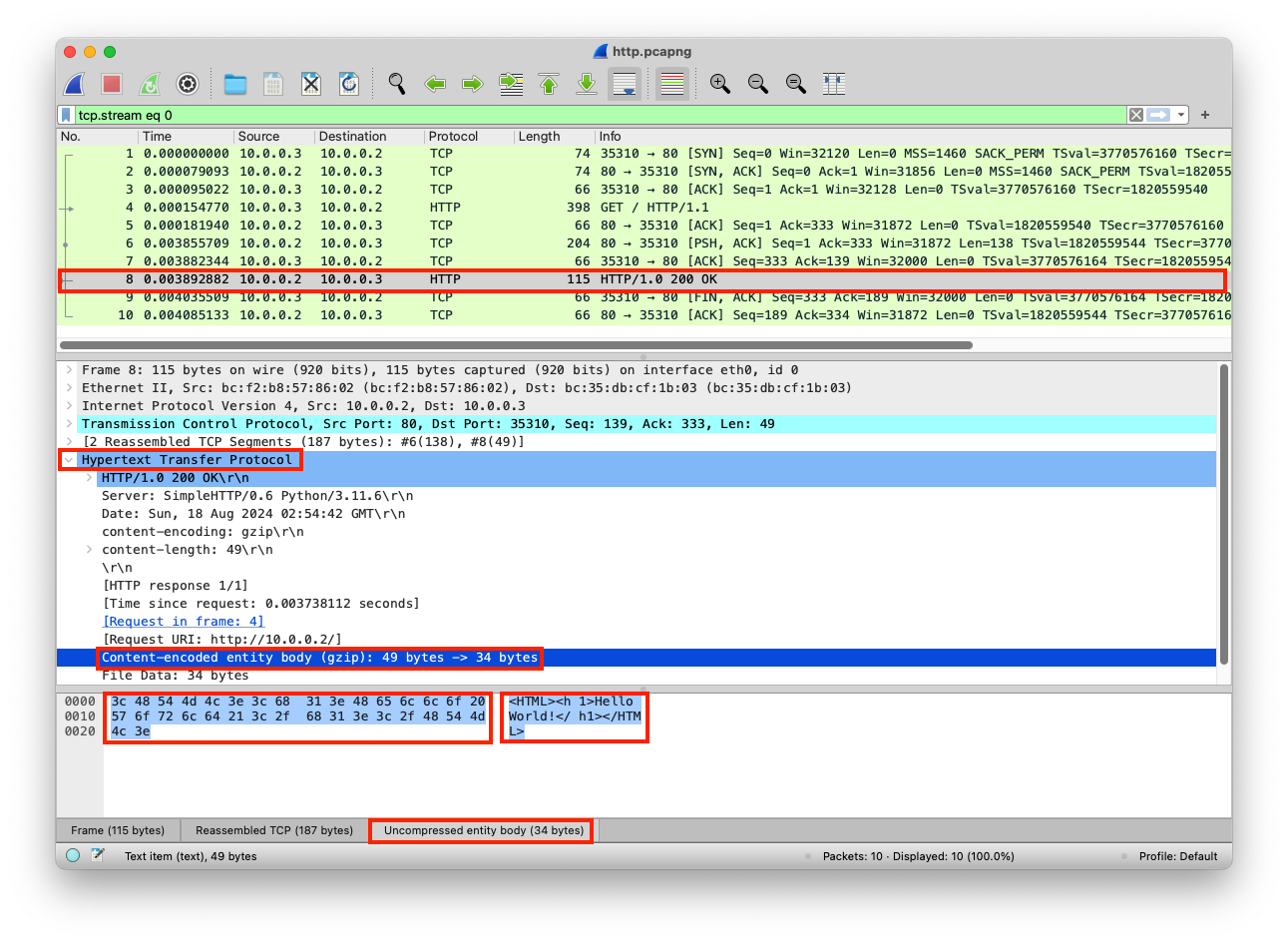
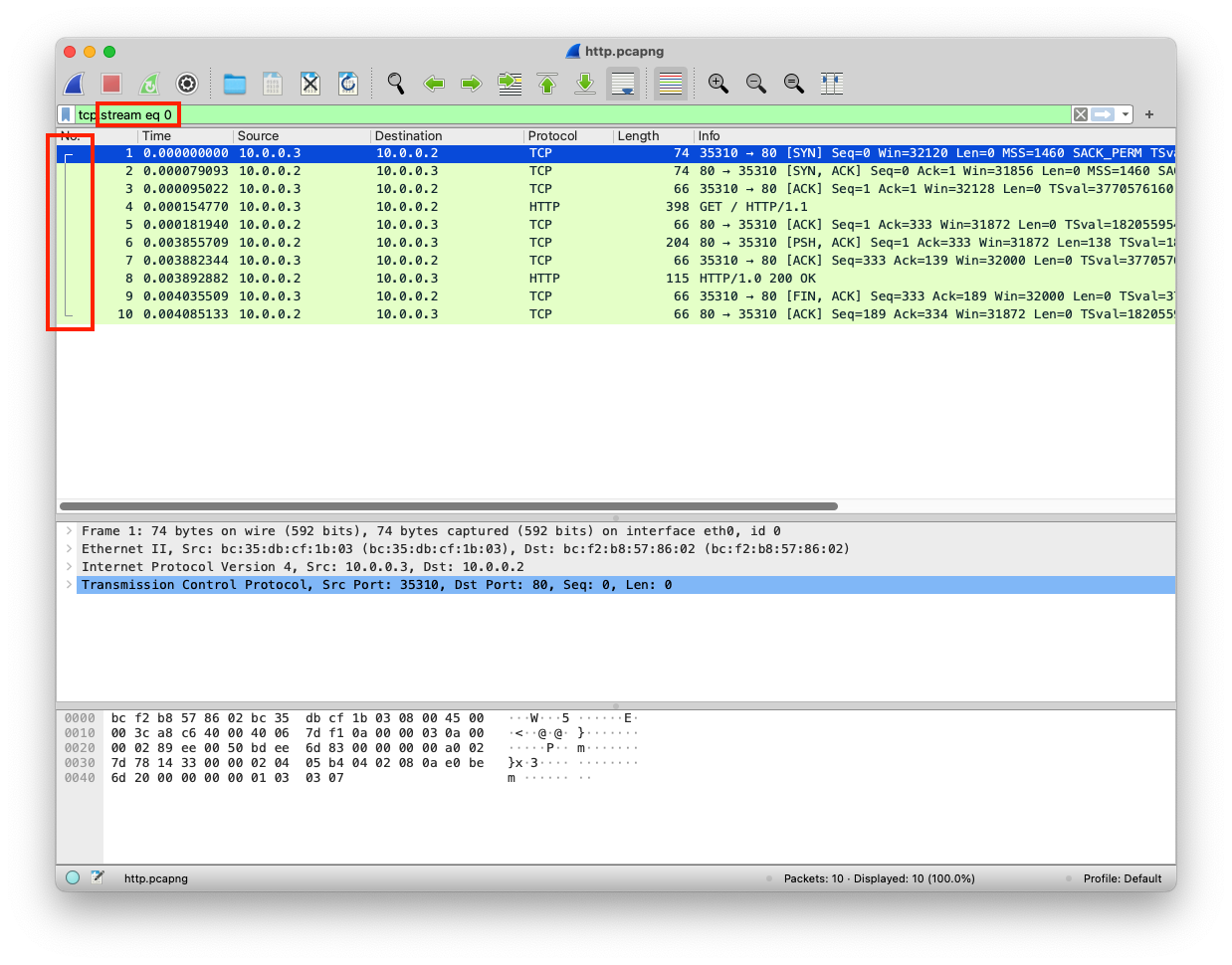
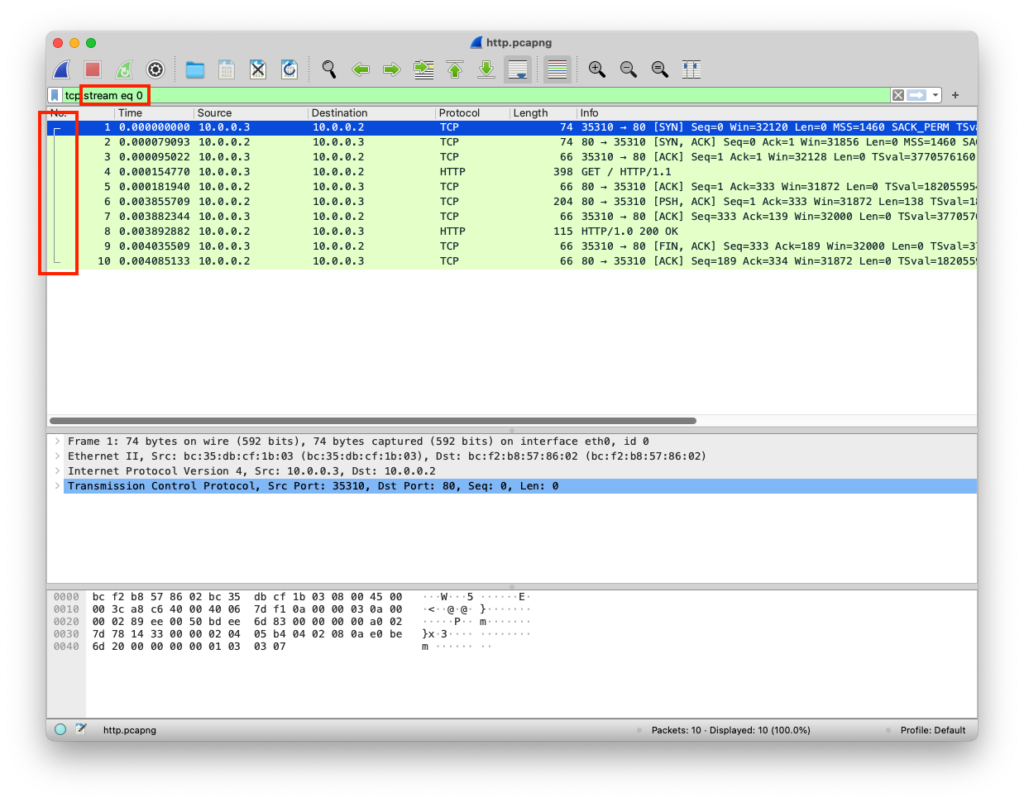
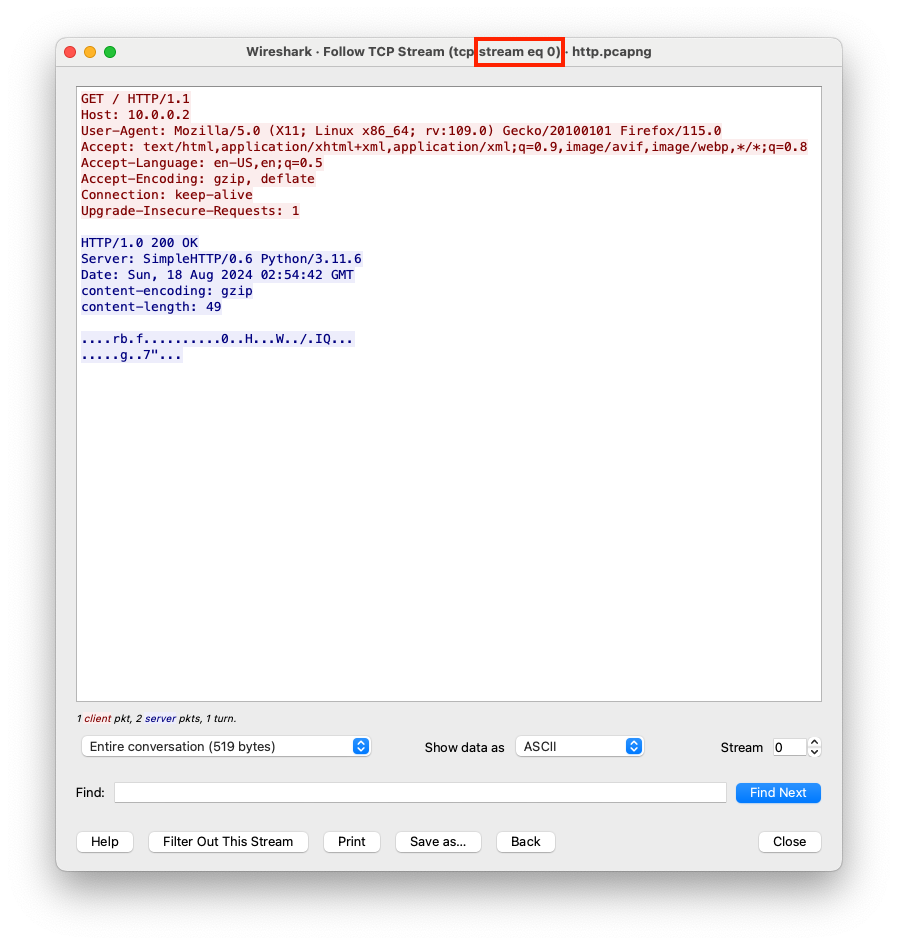
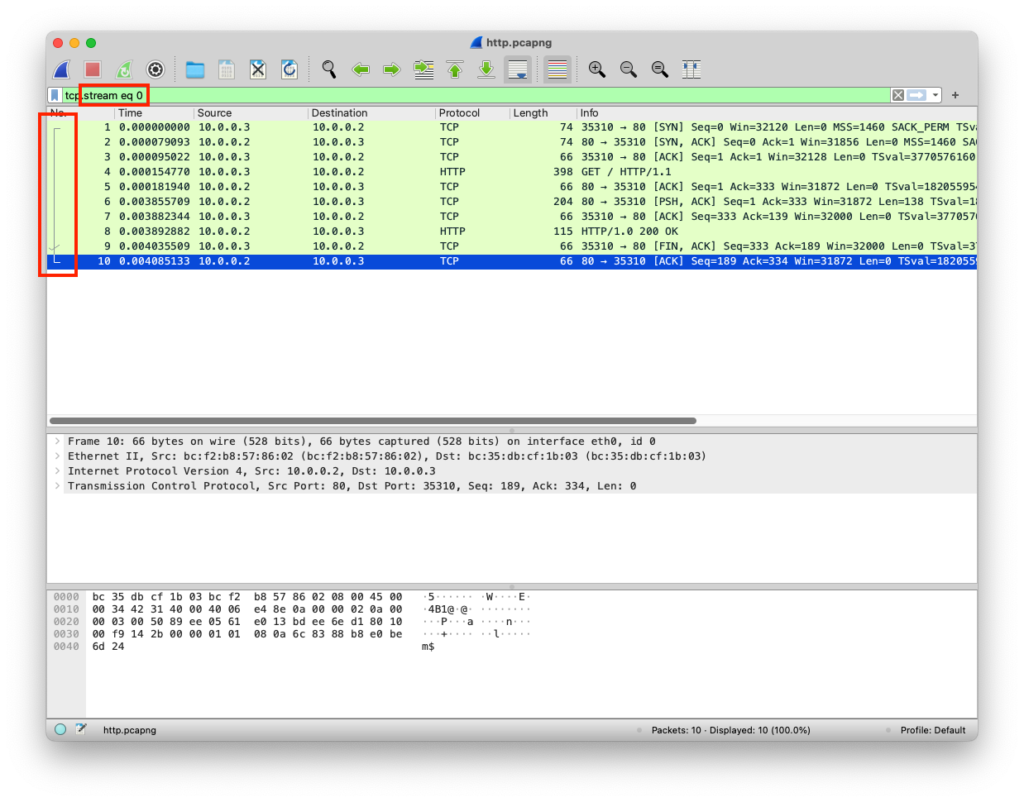
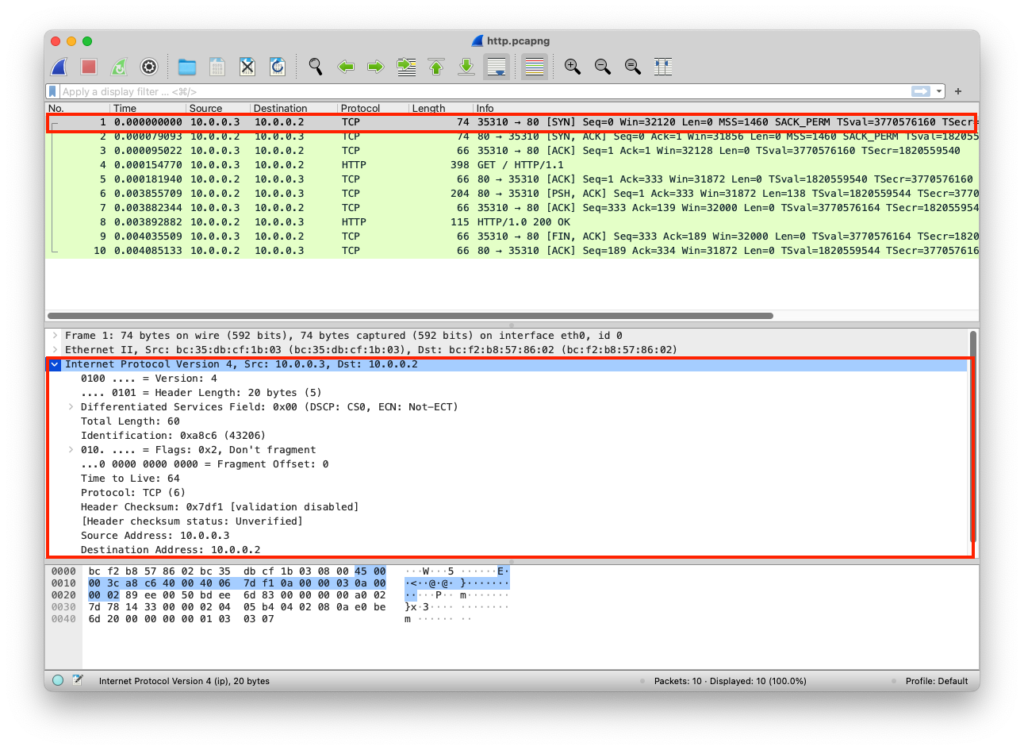
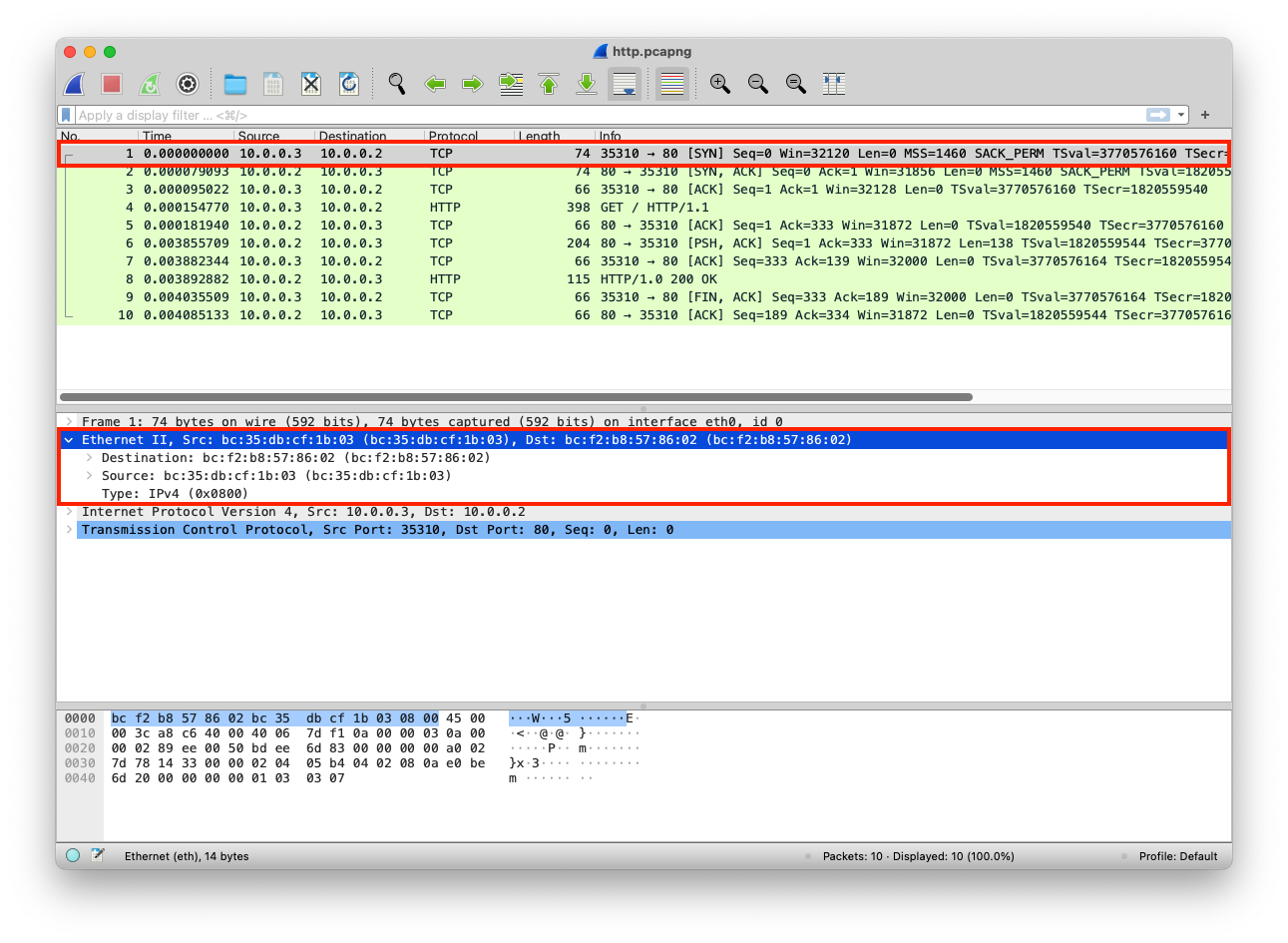
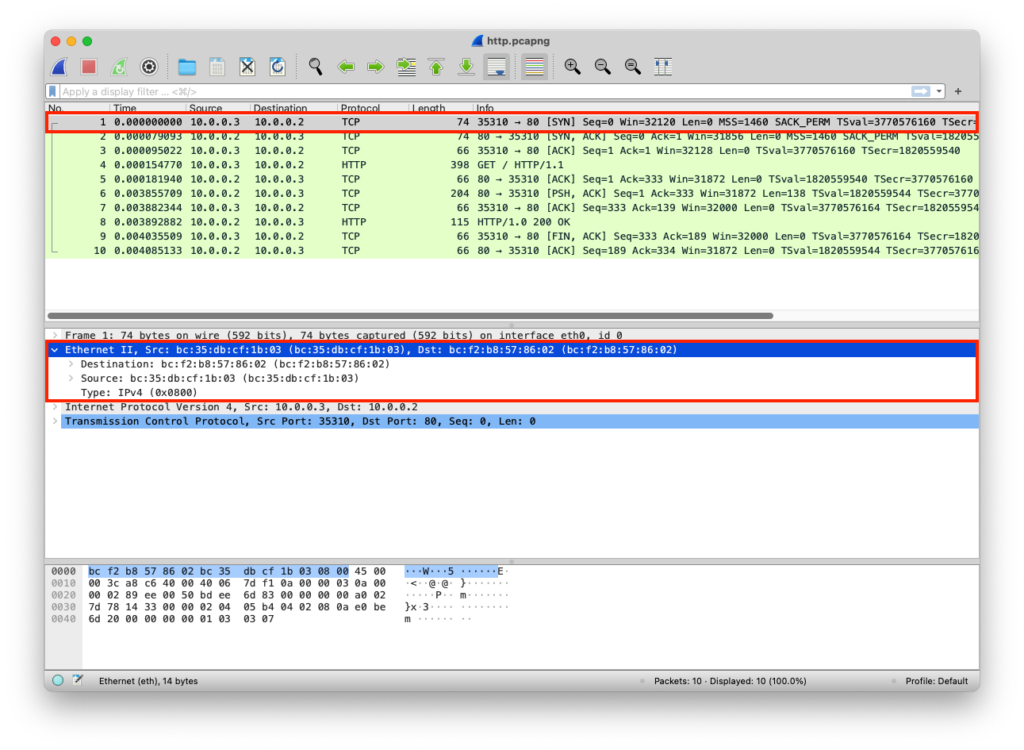
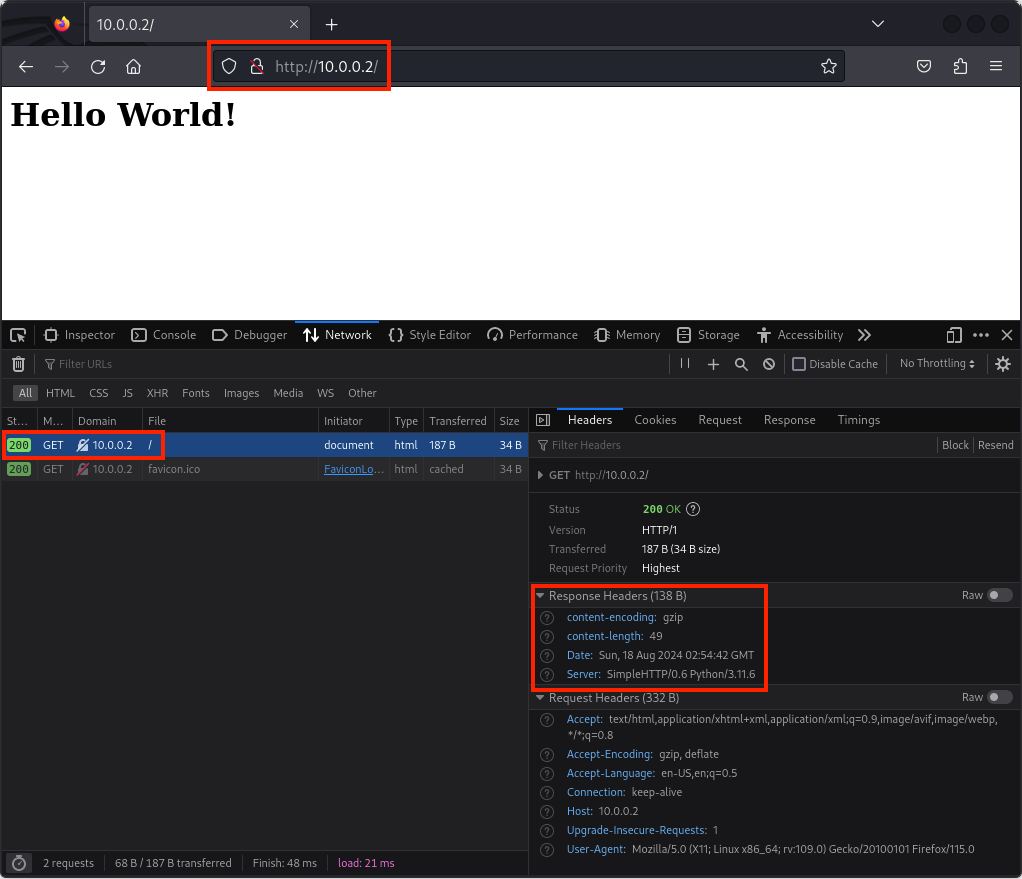
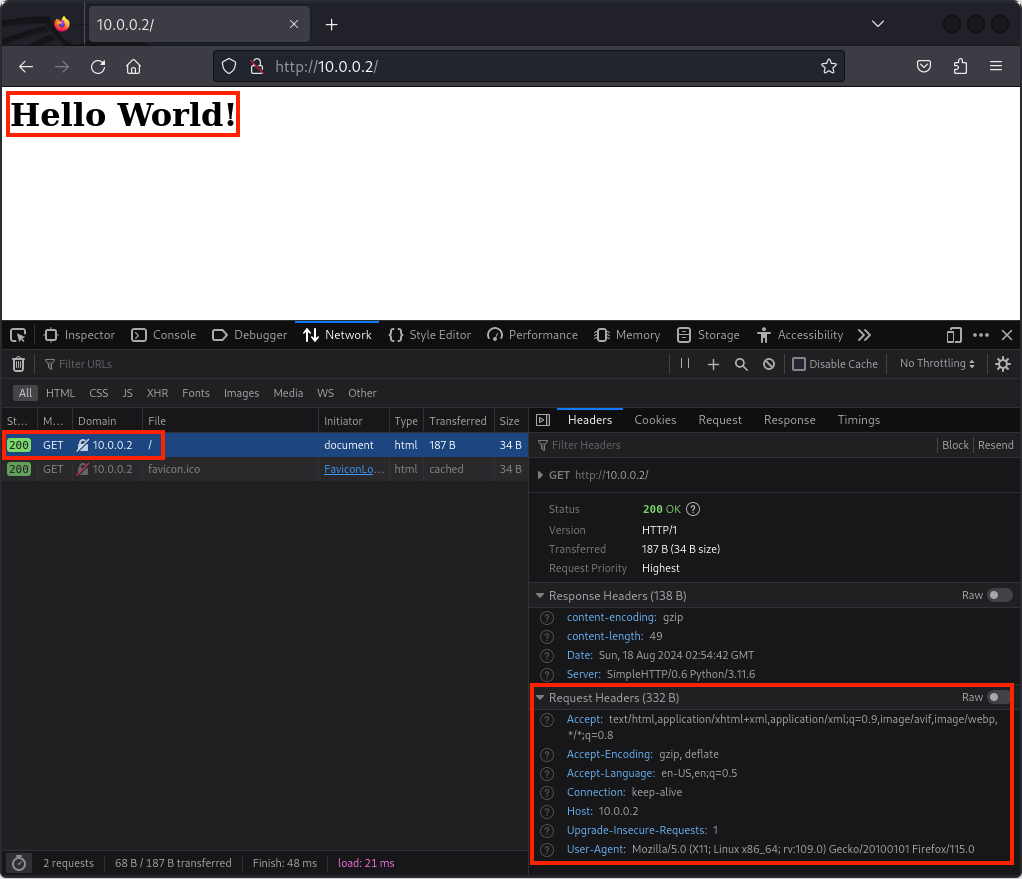
    The client requested web content from the server over an insecure protocol called HTTP, the server responded with the web content, the client received the web content and got rendered by the client’s web browser. Insecure protocols can be intercepted, and the data carried in them can be modified

    Client Sends Data

    The client requests specific web content over HTTP using the GET method

    LayerProtocolPDUInfoPortsIPsMACs
    Application LayerHTTPDataGET / HTTP/1.1 Host: 10.0.0.2 User-Agent: Mozilla/5.0 (X11; Linux x86_64; rv:109.0) Gecko/20100101 Firefox/115.0 Accept: text/html,application/xhtml+xml,application/xml;q=0.9,image/avif,image/webp,*/*;q=0.8 Accept-Language: en-US,en;q=0.5 Accept-Encoding: gzip, deflate Connection: keep-alive Upgrade-Insecure-Requests: 1
    Presentation LayerRawDataGET / HTTP/1.1\r\nHost: 10.0.0.2\r\nUser-Agent: Mozilla/5.0 (X11; Linux x86_64; rv:109.0) Gecko/20100101 Firefox/115.0\r\nAccept: text/html,application/xhtml+xml,application/xml;q=0.9,image/avif,image/webp,*/*;q=0.8\r\nAccept-Language: en-US,en;q=0.5\r\nAccept-Encoding: gzip, deflate\r\nConnection: keep-alive\r\nUpgrade-Insecure-Requests: 1
    Session LayerSocketDataGET / HTTP/1.1\r\nHost: 10.0.0.2\r\nUser-Agent: Mozilla/5.0 (X11; Linux x86_64; rv:109.0) Gecko/20100101 Firefox/115.0\r\nAccept: text/html,application/xhtml+xml,application/xml;q=0.9,image/avif,image/webp,*/*;q=0.8\r\nAccept-Language: en-US,en;q=0.5\r\nAccept-Encoding: gzip, deflate\r\nConnection: keep-alive\r\nUpgrade-Insecure-Requests: 1
    Transport LayerTCPSegmentsGET / HTTP/1.1\r\nHost: 10.0.0.2\r\nUser-Agent: Mozilla/5.0 (X11; Linux x86_64; rv:109.0) Gecko/20100101 Firefox/115.0\r\nAccept: text/html,application/xhtml+xml,application/xml;q=0.9,image/avif,image/webp,*/*;q=0.8\r\nAccept-Language: en-US,en;q=0.5\r\nAccept-Encoding: gzip, deflate\r\nConnection: keep-alive\r\nUpgrade-Insecure-Requests: 1Src Port: 35310
    Dst Port: 80
    Network LayerIPPacketsGET / HTTP/1.1\r\nHost: 10.0.0.2\r\nUser-Agent: Mozilla/5.0 (X11; Linux x86_64; rv:109.0) Gecko/20100101 Firefox/115.0\r\nAccept: text/html,application/xhtml+xml,application/xml;q=0.9,image/avif,image/webp,*/*;q=0.8\r\nAccept-Language: en-US,en;q=0.5\r\nAccept-Encoding: gzip, deflate\r\nConnection: keep-alive\r\nUpgrade-Insecure-Requests: 1Src Port: 35310
    Dst Port: 80
    Src IP: 10.0.0.3
    Dst IP: 10.0.0.2
    Data Link LayerEthernetFramesGET / HTTP/1.1\r\nHost: 10.0.0.2\r\nUser-Agent: Mozilla/5.0 (X11; Linux x86_64; rv:109.0) Gecko/20100101 Firefox/115.0\r\nAccept: text/html,application/xhtml+xml,application/xml;q=0.9,image/avif,image/webp,*/*;q=0.8\r\nAccept-Language: en-US,en;q=0.5\r\nAccept-Encoding: gzip, deflate\r\nConnection: keep-alive\r\nUpgrade-Insecure-Requests: 1Src Port: 35310
    Dst Port: 80
    Src IP: 10.0.0.3
    Dst IP: 10.0.0.2
    Src MAC: bc:35:db:cf:1b:03
    Dst MAC: bc:f2:b8:57:86:02
    Physical LayerCoaxBits01001000 01010100 01010100 01010000 00101111 00110001 00101110 00110000 00100000 01001000 0101010001001000 0101010001001000 01010100

    Server Receives Data

    The server receives the client’s HTTP GET request

    LayerProtocolPDUInfoPortsIPsMACs
    Physical LayerCoaxBits01001000 01010100 01010100 01010000 00101111 00110001 00101110 00110000 00100000 01001000 0101010001001000 0101010001001000 01010100
    Data Link LayerEthernetFramesGET / HTTP/1.1\r\nHost: 10.0.0.2\r\nUser-Agent: Mozilla/5.0 (X11; Linux x86_64; rv:109.0) Gecko/20100101 Firefox/115.0\r\nAccept: text/html,application/xhtml+xml,application/xml;q=0.9,image/avif,image/webp,*/*;q=0.8\r\nAccept-Language: en-US,en;q=0.5\r\nAccept-Encoding: gzip, deflate\r\nConnection: keep-alive\r\nUpgrade-Insecure-Requests: 1Src Port: 35310
    Dst Port: 80
    Src IP: 10.0.0.3
    Dst IP: 10.0.0.2
    Src MAC: bc:35:db:cf:1b:03
    Dst MAC: bc:f2:b8:57:86:02
    Network LayerIPPacketsGET / HTTP/1.1\r\nHost: 10.0.0.2\r\nUser-Agent: Mozilla/5.0 (X11; Linux x86_64; rv:109.0) Gecko/20100101 Firefox/115.0\r\nAccept: text/html,application/xhtml+xml,application/xml;q=0.9,image/avif,image/webp,*/*;q=0.8\r\nAccept-Language: en-US,en;q=0.5\r\nAccept-Encoding: gzip, deflate\r\nConnection: keep-alive\r\nUpgrade-Insecure-Requests: 1Src Port: 35310
    Dst Port: 80
    Src IP: 10.0.0.3
    Dst IP: 10.0.0.2
    Transport LayerTCPSegmentsGET / HTTP/1.1\r\nHost: 10.0.0.2\r\nUser-Agent: Mozilla/5.0 (X11; Linux x86_64; rv:109.0) Gecko/20100101 Firefox/115.0\r\nAccept: text/html,application/xhtml+xml,application/xml;q=0.9,image/avif,image/webp,*/*;q=0.8\r\nAccept-Language: en-US,en;q=0.5\r\nAccept-Encoding: gzip, deflate\r\nConnection: keep-alive\r\nUpgrade-Insecure-Requests: 1Src Port: 35310
    Dst Port: 80
    Session LayerSocketDataGET / HTTP/1.1\r\nHost: 10.0.0.2\r\nUser-Agent: Mozilla/5.0 (X11; Linux x86_64; rv:109.0) Gecko/20100101 Firefox/115.0\r\nAccept: text/html,application/xhtml+xml,application/xml;q=0.9,image/avif,image/webp,*/*;q=0.8\r\nAccept-Language: en-US,en;q=0.5\r\nAccept-Encoding: gzip, deflate\r\nConnection: keep-alive\r\nUpgrade-Insecure-Requests: 1
    Presentation LayerRawDataGET / HTTP/1.1\r\nHost: 10.0.0.2\r\nUser-Agent: Mozilla/5.0 (X11; Linux x86_64; rv:109.0) Gecko/20100101 Firefox/115.0\r\nAccept: text/html,application/xhtml+xml,application/xml;q=0.9,image/avif,image/webp,*/*;q=0.8\r\nAccept-Language: en-US,en;q=0.5\r\nAccept-Encoding: gzip, deflate\r\nConnection: keep-alive\r\nUpgrade-Insecure-Requests: 1
    Application LayerHTTPDataGET / HTTP/1.1 Host: 10.0.0.2 User-Agent: Mozilla/5.0 (X11; Linux x86_64; rv:109.0) Gecko/20100101 Firefox/115.0 Accept: text/html,application/xhtml+xml,application/xml;q=0.9,image/avif,image/webp,*/*;q=0.8 Accept-Language: en-US,en;q=0.5 Accept-Encoding: gzip, deflate Connection: keep-alive Upgrade-Insecure-Requests: 1

    from http.server import SimpleHTTPRequestHandler # Import the built-in HTTP request handler
    from socketserver import TCPServer # Import a basic TCP server implementation
    from io import BytesIO # Import BytesIO to handle bytes in memory (for gzip compression)
    from gzip import GzipFile # Import GzipFile to compress HTTP response 
    from datetime import datetime # Import datetime to generate timestamps for logging
    from contextlib import suppress # Import suppress to prevent crashes

    with suppress(Exception): # Try importing network interface details
        from netifaces import gateways, ifaddresses, AF_INET, AF_LINK # Network interface utilities
        print(“The default network interface is: “, gateways()[‘default’][AF_INET][1]) # Display default network interface name
        print(“The default network interface mac address is: “, ifaddresses(gateways()[‘default’][AF_INET][1])[AF_LINK]) # Display MAC address of the default network interface

    class Server(SimpleHTTPRequestHandler): # Define a custom HTTP server

        def do_GET(self): # Handle HTTP GET requests
            compressed = False # Track whether gzip compression is used
            content = b'<HTML><h1>Hello World!</h1></HTML>’ # HTTP response body (bytes)

            if len(content) > 0: # Only attempt compression if content exists
                if ‘accept-encoding’ in self.headers: # Check if client sent Accept-Encoding header
                    if ‘gzip’ in self.headers[‘accept-encoding’]: # Client supports gzip
                        bytes_ = BytesIO() # Create an in-memory byte buffer
                        with GzipFile(fileobj=bytes_, mode=’w’, compresslevel=5) as f: # Gzip wrapper
                            f.write(content) # Compress the response body
                        content = bytes_.getvalue() # Replace content with compressed bytes
                        compressed = True # Mark response as compressed

            self.send_response(200) # Send HTTP 200 OK status
            if compressed:
                self.send_header(‘content-encoding’, ‘gzip’) # Notify client of gzip encoding
            self.send_header(‘content-length’, len(content)) # Send content length header
            self.end_headers() # End HTTP headers
            self.wfile.write(content) # Write response body to client

        def log_message(self, format, *args): # Override default request logging
            print(“[{}] – {}:{} – {} {}”.format( # Custom log format
                datetime.now().strftime(“%m/%d/%Y %H:%M:%S”), # Timestamp
                self.client_address[0], # Client IP address
                self.client_address[1], # Client source port
                args[0], # HTTP method
                args[1] # Requested path
            ))

    TCPServer((‘0.0.0.0’, 80), Server).serve_forever() # Start server on all interfaces, port 80

    from http.server import SimpleHTTPRequestHandler
    from socketserver import TCPServer
    from io import BytesIO
    from gzip import GzipFile
    from datetime import datetime
    from contextlib import suppress

    with suppress(Exception):
        from netifaces import gateways, ifaddresses, AF_INET, AF_LINK
        print("The default network interface is: ",gateways()['default'][AF_INET][1])
        print("The default network interface mac address is: ",ifaddresses(gateways()['default'][AF_INET][1])[AF_LINK])

    class Server(SimpleHTTPRequestHandler):
        def do_GET(self):
            compressed = False
            content = b'<HTML><h1>Hello World!</h1></HTML>'
            if len(content) > 0:
                if 'accept-encoding' in self.headers:
                    if 'gzip' in self.headers['accept-encoding']:
                        bytes_ = BytesIO()
                        with GzipFile(fileobj=bytes_, mode='w', compresslevel=5) as f:
                            f.write(content)
                            f.close()
                            content = bytes_.getvalue()
                            compressed = True
            self.send_response(200)
            if compressed:
                self.send_header('content-encoding', 'gzip')
            self.send_header('content-length', len(content))
            self.end_headers()
            self.wfile.write(content)

        def log_message(self, format, *args):
            print("[{}] - {}:{} - {} {}".format(datetime.now().strftime("%m/%d/%Y %H:%M:%S"), self.client_address[0],self.client_address[1],args[0],args[1]))

    TCPServer(('0.0.0.0', 80), Server).serve_forever()

    Server Sends Data

    The server sends the client the requested web content over HTTP

    LayerProtocolPDUInfoPortsIPsMACs
    Application LayerHTTPDataHTTP/1.0 200 OK Server: SimpleHTTP/0.6 Python/3.11.6 Date: Sun, 18 Aug 2024 02:54:42 GMT content-encoding: gzip content-length: 49

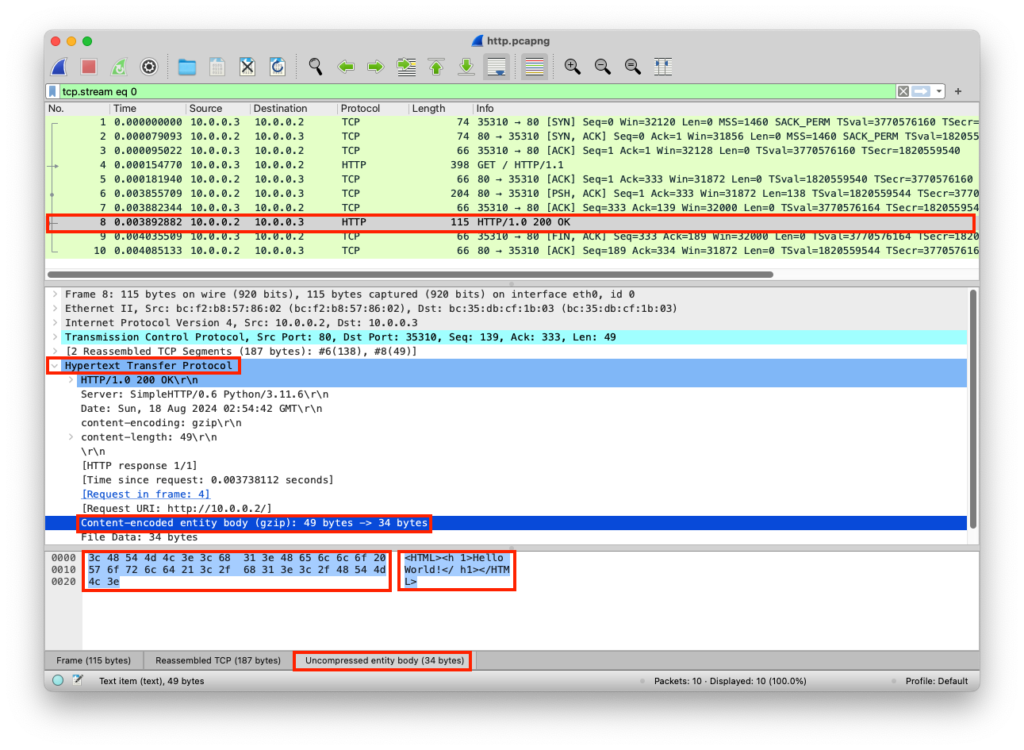
    <HTML><h1>Hello World!</h1></HTML>
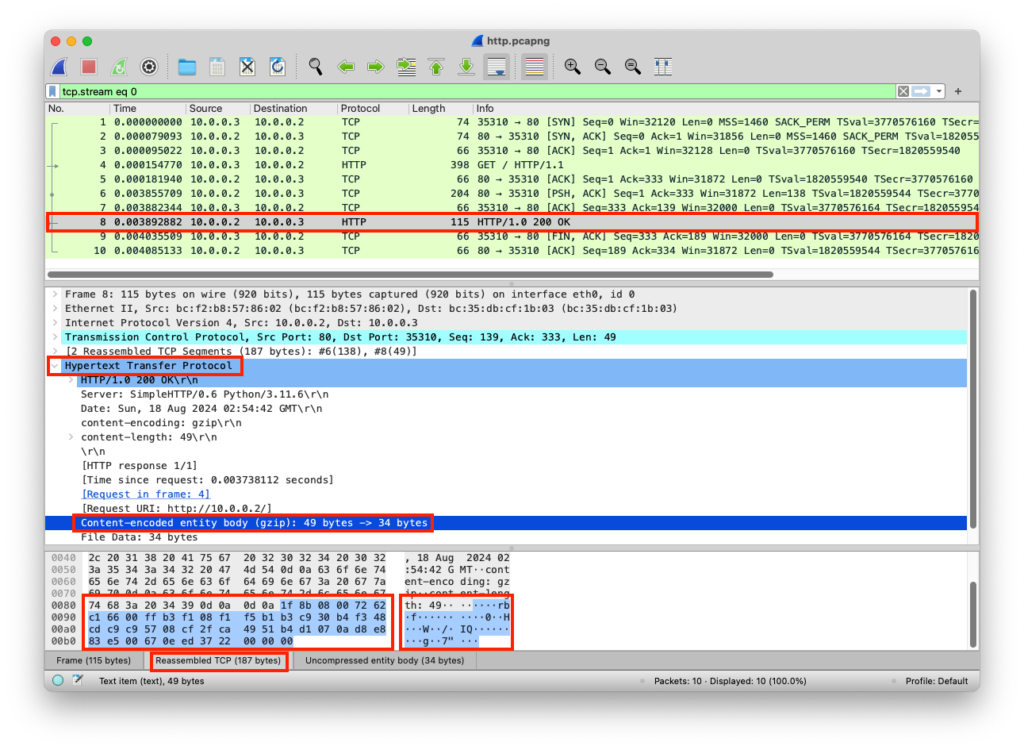
    Presentation LayerGZIPDataHTTP/1.0 200 OK\r\nServer: SimpleHTTP/0.6 Python/3.11.6\r\nDate: Sun, 18 Aug 2024 02:54:42 GMT\r\ncontent-encoding: gzip\r\ncontent-length: 49\r\n\r\n….rb.f……….0..H…W../.IQ……..g..7″…
    Session LayerSocketDataHTTP/1.0 200 OK\r\nServer: SimpleHTTP/0.6 Python/3.11.6\r\nDate: Sun, 18 Aug 2024 02:54:42 GMT\r\ncontent-encoding: gzip\r\ncontent-length: 49\r\n\r\n….rb.f……….0..H…W../.IQ……..g..7″…
    Transport LayerTCPSegmentsHTTP/1.0 200 OK\r\nServer: SimpleHTTP/0.6 Python/3.11.6\r\nDate: Sun, 18 Aug 2024 02:54:42 GMT\r\ncontent-encoding: gzip\r\ncontent-length: 49\r\n\r\n….rb.f……….0..H…W../.IQ……..g..7″…Src Port: 80
    Dst Port: 35310
    Network LayerIPPacketsHTTP/1.0 200 OK\r\nServer: SimpleHTTP/0.6 Python/3.11.6\r\nDate: Sun, 18 Aug 2024 02:54:42 GMT\r\ncontent-encoding: gzip\r\ncontent-length: 49\r\n\r\n….rb.f……….0..H…W../.IQ……..g..7″…Src Port: 80
    Dst Port: 35310
    Src IP: 10.0.0.2
    Dst IP: 10.0.0.3
    Data Link LayerEthernetFramesHTTP/1.0 200 OK\r\nServer: SimpleHTTP/0.6 Python/3.11.6\r\nDate: Sun, 18 Aug 2024 02:54:42 GMT\r\ncontent-encoding: gzip\r\ncontent-length: 49\r\n\r\n….rb.f……….0..H…W../.IQ……..g..7″…Src Port: 80
    Dst Port: 35310
    Src IP: 10.0.0.2
    Dst IP: 10.0.0.3
    Src MAC: bc:f2:b8:57:86:02
    Dst MAC: bc:35:db:cf:1b:03
    Physical LayerCoaxBits01001000 01010100 01010100 01010000 00101111 00110001 00101110 00110000 00100000 01001000 0101010001001000 0101010001001000 01010100

    from http.server import SimpleHTTPRequestHandler # Import the built-in HTTP request handler
    from socketserver import TCPServer # Import a basic TCP server implementation
    from io import BytesIO # Import BytesIO to handle bytes in memory (for gzip compression)
    from gzip import GzipFile # Import GzipFile to compress HTTP response 
    from datetime import datetime # Import datetime to generate timestamps for logging
    from contextlib import suppress # Import suppress to prevent crashes

    with suppress(Exception): # Try importing network interface details
        from netifaces import gateways, ifaddresses, AF_INET, AF_LINK # Network interface utilities
        print(“The default network interface is: “, gateways()[‘default’][AF_INET][1]) # Display default network interface name
        print(“The default network interface mac address is: “, ifaddresses(gateways()[‘default’][AF_INET][1])[AF_LINK]) # Display MAC address of the default network interface

    class Server(SimpleHTTPRequestHandler): # Define a custom HTTP server

        def do_GET(self): # Handle HTTP GET requests
            compressed = False # Track whether gzip compression is used
            content = b'<HTML><h1>Hello World!</h1></HTML>’ # HTTP response body (bytes)

            if len(content) > 0: # Only attempt compression if content exists
                if ‘accept-encoding’ in self.headers: # Check if client sent Accept-Encoding header
                    if ‘gzip’ in self.headers[‘accept-encoding’]: # Client supports gzip
                        bytes_ = BytesIO() # Create an in-memory byte buffer
                        with GzipFile(fileobj=bytes_, mode=’w’, compresslevel=5) as f: # Gzip wrapper
                            f.write(content) # Compress the response body
                        content = bytes_.getvalue() # Replace content with compressed bytes
                        compressed = True # Mark response as compressed

            self.send_response(200) # Send HTTP 200 OK status
            if compressed:
                self.send_header(‘content-encoding’, ‘gzip’) # Notify client of gzip encoding
            self.send_header(‘content-length’, len(content)) # Send content length header
            self.end_headers() # End HTTP headers
            self.wfile.write(content) # Write response body to client

        def log_message(self, format, *args): # Override default request logging
            print(“[{}] – {}:{} – {} {}”.format( # Custom log format
                datetime.now().strftime(“%m/%d/%Y %H:%M:%S”), # Timestamp
                self.client_address[0], # Client IP address
                self.client_address[1], # Client source port
                args[0], # HTTP method
                args[1] # Requested path
            ))

    TCPServer((‘0.0.0.0’, 80), Server).serve_forever() # Start server on all interfaces, port 80

    from http.server import SimpleHTTPRequestHandler
    from socketserver import TCPServer
    from io import BytesIO
    from gzip import GzipFile
    from datetime import datetime
    from contextlib import suppress

    with suppress(Exception):
        from netifaces import gateways, ifaddresses, AF_INET, AF_LINK
        print("The default network interface is: ",gateways()['default'][AF_INET][1])
        print("The default network interface mac address is: ",ifaddresses(gateways()['default'][AF_INET][1])[AF_LINK])

    class Server(SimpleHTTPRequestHandler):
        def do_GET(self):
            compressed = False
            content = b'<HTML><h1>Hello World!</h1></HTML>'
            if len(content) > 0:
                if 'accept-encoding' in self.headers:
                    if 'gzip' in self.headers['accept-encoding']:
                        bytes_ = BytesIO()
                        with GzipFile(fileobj=bytes_, mode='w', compresslevel=5) as f:
                            f.write(content)
                            f.close()
                            content = bytes_.getvalue()
                            compressed = True
            self.send_response(200)
            if compressed:
                self.send_header('content-encoding', 'gzip')
            self.send_header('content-length', len(content))
            self.end_headers()
            self.wfile.write(content)

        def log_message(self, format, *args):
            print("[{}] - {}:{} - {} {}".format(datetime.now().strftime("%m/%d/%Y %H:%M:%S"), self.client_address[0],self.client_address[1],args[0],args[1]))

    TCPServer(('0.0.0.0', 80), Server).serve_forever()

    Client Receives Data

    The client receives the specific web content over HTTP and the web browser renders the HTML content

    LayerProtocolPDUInfoPortsIPsMACs
    Physical LayerCoaxBits01001000 01010100 01010100 01010000 00101111 00110001 00101110 00110000 00100000 01001000 0101010001001000 0101010001001000 01010100
    Data Link LayerEthernetFramesHTTP/1.0 200 OK\r\nServer: SimpleHTTP/0.6 Python/3.11.6\r\nDate: Sun, 18 Aug 2024 02:54:42 GMT\r\ncontent-encoding: gzip\r\ncontent-length: 49\r\n\r\n….rb.f……….0..H…W../.IQ……..g..7″…Src Port: 80
    Dst Port: 35310
    Src IP: 10.0.0.2
    Dst IP: 10.0.0.3
    Src MAC: bc:f2:b8:57:86:02
    Dst MAC: bc:35:db:cf:1b:03
    Network LayerIPPacketsHTTP/1.0 200 OK\r\nServer: SimpleHTTP/0.6 Python/3.11.6\r\nDate: Sun, 18 Aug 2024 02:54:42 GMT\r\ncontent-encoding: gzip\r\ncontent-length: 49\r\n\r\n….rb.f……….0..H…W../.IQ……..g..7″…Src Port: 80
    Dst Port: 35310
    Src IP: 10.0.0.2
    Dst IP: 10.0.0.3
    Transport LayerTCPSegmentsHTTP/1.0 200 OK\r\nServer: SimpleHTTP/0.6 Python/3.11.6\r\nDate: Sun, 18 Aug 2024 02:54:42 GMT\r\ncontent-encoding: gzip\r\ncontent-length: 49\r\n\r\n….rb.f……….0..H…W../.IQ……..g..7″…Src Port: 80
    Dst Port: 35310
    Session LayerSocketDataHTTP/1.0 200 OK\r\nServer: SimpleHTTP/0.6 Python/3.11.6\r\nDate: Sun, 18 Aug 2024 02:54:42 GMT\r\ncontent-encoding: gzip\r\ncontent-length: 49\r\n\r\n….rb.f……….0..H…W../.IQ……..g..7″…
    Presentation LayerGZIPDataHTTP/1.0 200 OK\r\nServer: SimpleHTTP/0.6 Python/3.11.6\r\nDate: Sun, 18 Aug 2024 02:54:42 GMT\r\ncontent-encoding: gzip\r\ncontent-length: 49\r\n\r\n….rb.f……….0..H…W../.IQ……..g..7″…
    Application LayerHTTPDataHTTP/1.0 200 OK Server: SimpleHTTP/0.6 Python/3.11.6 Date: Sun, 18 Aug 2024 02:54:42 GMT content-encoding: gzip content-length: 49

    <HTML><h1>Hello World!</h1></HTML>
  • Presentation Layer

    Presentation Layer

    The Presentation Layer, which is Layer 6 of the OSI model, translates data between the application layer and the network transmission format. This ensures that data sent from one device can be correctly interpreted by another, even if they use different data representations. For example, it handles conversions between character encodings such as ASCII and EBCDIC, translates between different data structures, and converts multimedia formats such as audio or video streams.

    By providing this translation function, the Presentation Layer enables applications on heterogeneous systems to communicate effectively.

    In addition to data translation, the Presentation Layer is responsible for data encryption and compression. Encryption transforms data into a secure format to protect it during transmission, while compression reduces data size to improve efficiency and save bandwidth.

    These functions ensure that data is interpretable, secure, and optimized for network transport. By handling these tasks independently of the application layer, the Presentation Layer standardizes data handling and promotes interoperability between different software and hardware systems.

    Although conceptually important, the Presentation Layer is often not explicitly implemented in modern network protocol stacks. Many of its functions, such as encryption, compression, and data formatting, are integrated into the application layer or handled by specific libraries and frameworks. This is why some protocol stacks omit a distinct Presentation Layer, but the responsibilities it defines remain essential for consistent, secure, and interpretable data exchange.

    The optional functions of the Presentation Layer include:

    • Encryption: Converting plaintext to ciphertext using a secret key
    • Decryption: Converting ciphertext back to plaintext using the same secret key
    • Compression: Reducing the number of symbols required to represent data
    • Decompression: Restoring compressed data to its original form
    • Formatting: Converting data into a standardized format for easy transmission

    GNU ZIP (GZIP)

    GNU ZIP (GZIP) is a widely used compression technology designed to reduce file size for efficient storage and transfer over networks, especially the internet. It uses the DEFLATE algorithm, which combines LZ77 compression and Huffman coding to achieve high compression ratios while maintaining reasonable processing speed.

    GZIP files are easily recognizable by their magic header 1F 8B, which identifies the format and allows software to interpret and decompress the data correctly. Commonly used in web servers, APIs, and data archival, GZIP helps reduce bandwidth usage and speeds up data transmission, making it a key tool for improving network efficiency and performance.

    To compress data using GZIP

    from gzip import compress
    compressed = compress(b"Test")
    print("Output: {}\nHex: {}".format(compressed,compressed.hex(' ')))

    Output

    Output: b'\x1f\x8b\x08\x00\xc0\xc9\xc2f\x02\xff\x0bI-.\x01\x002\xd1Mx\x04\x00\x00\x00'
    Hex: 1f 8b 08 00 c0 c9 c2 66 02 ff 0b 49 2d 2e 01 00 32 d1 4d 78 04 00 00 00

    To decompress data using GZIP

    from gzip import decompress
    compressed = decompress(b'\x1f\x8b\x08\x00\xc0\xc9\xc2f\x02\xff\x0bI-.\x01\x002\xd1Mx\x04\x00\x00\x00')
    print("Output: {}\nHex: {}".format(compressed,compressed.hex(' ')))

    Output

    Output: b'Test'
    Hex: 54 65 73 74

    PCAP Example

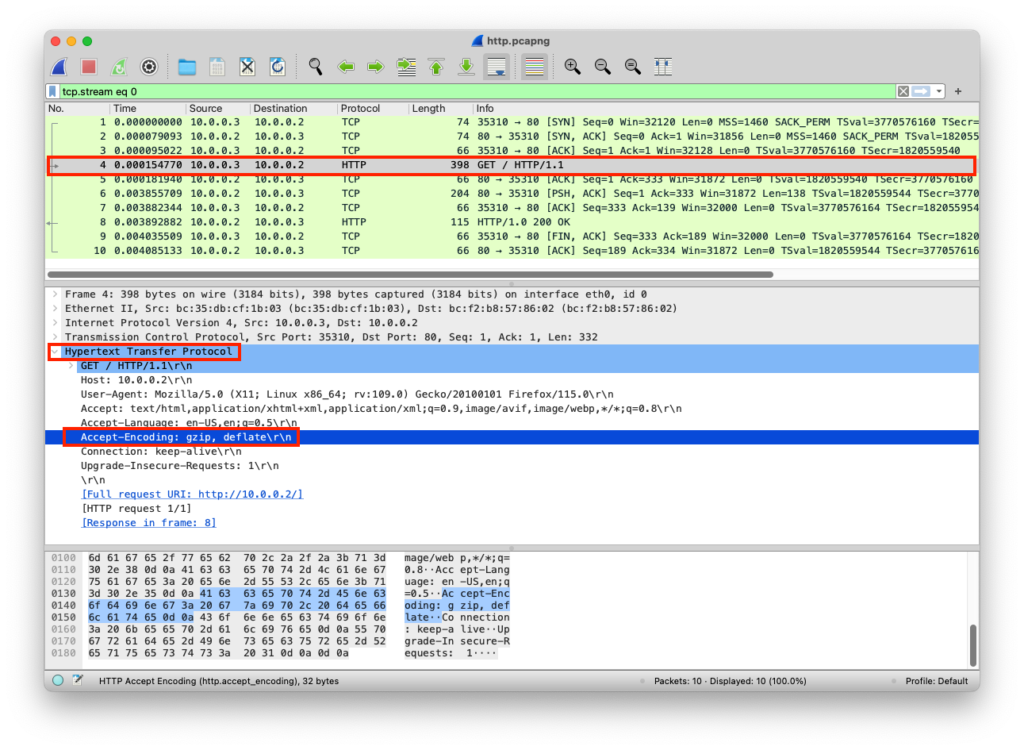
    The client requested web content from the server and indicated that it accepts GZIP content, the server responds with content that is compressed in GZIP, the client receives the GZIP and gets handled in the presentation layer

    Client Sends Data

    The client uses the HTTP Accept-Encoding header to indicate that GZIP is allowed

    LayerProtocolPDUInfoPortsIPsMACs
    Application LayerHTTPDataGET / HTTP/1.1 Host: 10.0.0.2 User-Agent: Mozilla/5.0 (X11; Linux x86_64; rv:109.0) Gecko/20100101 Firefox/115.0 Accept: text/html,application/xhtml+xml,application/xml;q=0.9,image/avif,image/webp,*/*;q=0.8 Accept-Language: en-US,en;q=0.5 Accept-Encoding: gzip, deflate Connection: keep-alive Upgrade-Insecure-Requests: 1
    Presentation LayerRawDataGET / HTTP/1.1\r\nHost: 10.0.0.2\r\nUser-Agent: Mozilla/5.0 (X11; Linux x86_64; rv:109.0) Gecko/20100101 Firefox/115.0\r\nAccept: text/html,application/xhtml+xml,application/xml;q=0.9,image/avif,image/webp,*/*;q=0.8\r\nAccept-Language: en-US,en;q=0.5\r\nAccept-Encoding: gzip, deflate\r\nConnection: keep-alive\r\nUpgrade-Insecure-Requests: 1
    Session LayerSocketDataGET / HTTP/1.1\r\nHost: 10.0.0.2\r\nUser-Agent: Mozilla/5.0 (X11; Linux x86_64; rv:109.0) Gecko/20100101 Firefox/115.0\r\nAccept: text/html,application/xhtml+xml,application/xml;q=0.9,image/avif,image/webp,*/*;q=0.8\r\nAccept-Language: en-US,en;q=0.5\r\nAccept-Encoding: gzip, deflate\r\nConnection: keep-alive\r\nUpgrade-Insecure-Requests: 1
    Transport LayerTCPSegmentsGET / HTTP/1.1\r\nHost: 10.0.0.2\r\nUser-Agent: Mozilla/5.0 (X11; Linux x86_64; rv:109.0) Gecko/20100101 Firefox/115.0\r\nAccept: text/html,application/xhtml+xml,application/xml;q=0.9,image/avif,image/webp,*/*;q=0.8\r\nAccept-Language: en-US,en;q=0.5\r\nAccept-Encoding: gzip, deflate\r\nConnection: keep-alive\r\nUpgrade-Insecure-Requests: 1Src Port: 35310
    Dst Port: 80
    Network LayerIPPacketsGET / HTTP/1.1\r\nHost: 10.0.0.2\r\nUser-Agent: Mozilla/5.0 (X11; Linux x86_64; rv:109.0) Gecko/20100101 Firefox/115.0\r\nAccept: text/html,application/xhtml+xml,application/xml;q=0.9,image/avif,image/webp,*/*;q=0.8\r\nAccept-Language: en-US,en;q=0.5\r\nAccept-Encoding: gzip, deflate\r\nConnection: keep-alive\r\nUpgrade-Insecure-Requests: 1Src Port: 35310
    Dst Port: 80
    Src IP: 10.0.0.3
    Dst IP: 10.0.0.2
    Data Link LayerEthernetFramesGET / HTTP/1.1\r\nHost: 10.0.0.2\r\nUser-Agent: Mozilla/5.0 (X11; Linux x86_64; rv:109.0) Gecko/20100101 Firefox/115.0\r\nAccept: text/html,application/xhtml+xml,application/xml;q=0.9,image/avif,image/webp,*/*;q=0.8\r\nAccept-Language: en-US,en;q=0.5\r\nAccept-Encoding: gzip, deflate\r\nConnection: keep-alive\r\nUpgrade-Insecure-Requests: 1Src Port: 35310
    Dst Port: 80
    Src IP: 10.0.0.3
    Dst IP: 10.0.0.2
    Src MAC: bc:35:db:cf:1b:03
    Dst MAC: bc:f2:b8:57:86:02
    Physical LayerCoaxBits01001000 01010100 01010100 01010000 00101111 00110001 00101110 00110000 00100000 01001000 0101010001001000 0101010001001000 01010100

    Server Receives Data

    The server receives the client’s HTTP Accept-Encoding request

    LayerProtocolPDUInfoPortsIPsMACs
    Physical LayerCoaxBits01001000 01010100 01010100 01010000 00101111 00110001 00101110 00110000 00100000 01001000 0101010001001000 0101010001001000 01010100
    Data Link LayerEthernetFramesGET / HTTP/1.1\r\nHost: 10.0.0.2\r\nUser-Agent: Mozilla/5.0 (X11; Linux x86_64; rv:109.0) Gecko/20100101 Firefox/115.0\r\nAccept: text/html,application/xhtml+xml,application/xml;q=0.9,image/avif,image/webp,*/*;q=0.8\r\nAccept-Language: en-US,en;q=0.5\r\nAccept-Encoding: gzip, deflate\r\nConnection: keep-alive\r\nUpgrade-Insecure-Requests: 1Src Port: 35310
    Dst Port: 80
    Src IP: 10.0.0.3
    Dst IP: 10.0.0.2
    Src MAC: bc:35:db:cf:1b:03
    Dst MAC: bc:f2:b8:57:86:02
    Network LayerIPPacketsGET / HTTP/1.1\r\nHost: 10.0.0.2\r\nUser-Agent: Mozilla/5.0 (X11; Linux x86_64; rv:109.0) Gecko/20100101 Firefox/115.0\r\nAccept: text/html,application/xhtml+xml,application/xml;q=0.9,image/avif,image/webp,*/*;q=0.8\r\nAccept-Language: en-US,en;q=0.5\r\nAccept-Encoding: gzip, deflate\r\nConnection: keep-alive\r\nUpgrade-Insecure-Requests: 1Src Port: 35310
    Dst Port: 80
    Src IP: 10.0.0.3
    Dst IP: 10.0.0.2
    Transport LayerTCPSegmentsGET / HTTP/1.1\r\nHost: 10.0.0.2\r\nUser-Agent: Mozilla/5.0 (X11; Linux x86_64; rv:109.0) Gecko/20100101 Firefox/115.0\r\nAccept: text/html,application/xhtml+xml,application/xml;q=0.9,image/avif,image/webp,*/*;q=0.8\r\nAccept-Language: en-US,en;q=0.5\r\nAccept-Encoding: gzip, deflate\r\nConnection: keep-alive\r\nUpgrade-Insecure-Requests: 1Src Port: 35310
    Dst Port: 80
    Session LayerSocketDataGET / HTTP/1.1\r\nHost: 10.0.0.2\r\nUser-Agent: Mozilla/5.0 (X11; Linux x86_64; rv:109.0) Gecko/20100101 Firefox/115.0\r\nAccept: text/html,application/xhtml+xml,application/xml;q=0.9,image/avif,image/webp,*/*;q=0.8\r\nAccept-Language: en-US,en;q=0.5\r\nAccept-Encoding: gzip, deflate\r\nConnection: keep-alive\r\nUpgrade-Insecure-Requests: 1
    Presentation LayerRawDataGET / HTTP/1.1\r\nHost: 10.0.0.2\r\nUser-Agent: Mozilla/5.0 (X11; Linux x86_64; rv:109.0) Gecko/20100101 Firefox/115.0\r\nAccept: text/html,application/xhtml+xml,application/xml;q=0.9,image/avif,image/webp,*/*;q=0.8\r\nAccept-Language: en-US,en;q=0.5\r\nAccept-Encoding: gzip, deflate\r\nConnection: keep-alive\r\nUpgrade-Insecure-Requests: 1
    Application LayerHTTPDataGET / HTTP/1.1 Host: 10.0.0.2 User-Agent: Mozilla/5.0 (X11; Linux x86_64; rv:109.0) Gecko/20100101 Firefox/115.0 Accept: text/html,application/xhtml+xml,application/xml;q=0.9,image/avif,image/webp,*/*;q=0.8 Accept-Language: en-US,en;q=0.5 Accept-Encoding: gzip, deflate Connection: keep-alive Upgrade-Insecure-Requests: 1

    from http.server import SimpleHTTPRequestHandler # Import the built-in HTTP request handler
    from socketserver import TCPServer # Import a basic TCP server implementation
    from io import BytesIO # Import BytesIO to handle bytes in memory (for gzip compression)
    from gzip import GzipFile # Import GzipFile to compress HTTP response 
    from datetime import datetime # Import datetime to generate timestamps for logging
    from contextlib import suppress # Import suppress to prevent crashes

    with suppress(Exception): # Try importing network interface details
        from netifaces import gateways, ifaddresses, AF_INET, AF_LINK # Network interface utilities
        print(“The default network interface is: “, gateways()[‘default’][AF_INET][1]) # Display default network interface name
        print(“The default network interface mac address is: “, ifaddresses(gateways()[‘default’][AF_INET][1])[AF_LINK]) # Display MAC address of the default network interface

    class Server(SimpleHTTPRequestHandler): # Define a custom HTTP server

        def do_GET(self): # Handle HTTP GET requests
            compressed = False # Track whether gzip compression is used
            content = b'<HTML><h1>Hello World!</h1></HTML>’ # HTTP response body (bytes)

            if len(content) > 0: # Only attempt compression if content exists
                if ‘accept-encoding’ in self.headers: # Check if client sent Accept-Encoding header
                    if ‘gzip’ in self.headers[‘accept-encoding’]: # Client supports gzip
                        bytes_ = BytesIO() # Create an in-memory byte buffer
                        with GzipFile(fileobj=bytes_, mode=’w’, compresslevel=5) as f: # Gzip wrapper
                            f.write(content) # Compress the response body
                        content = bytes_.getvalue() # Replace content with compressed bytes
                        compressed = True # Mark response as compressed

            self.send_response(200) # Send HTTP 200 OK status
            if compressed:
                self.send_header(‘content-encoding’, ‘gzip’) # Notify client of gzip encoding
            self.send_header(‘content-length’, len(content)) # Send content length header
            self.end_headers() # End HTTP headers
            self.wfile.write(content) # Write response body to client

        def log_message(self, format, *args): # Override default request logging
            print(“[{}] – {}:{} – {} {}”.format( # Custom log format
                datetime.now().strftime(“%m/%d/%Y %H:%M:%S”), # Timestamp
                self.client_address[0], # Client IP address
                self.client_address[1], # Client source port
                args[0], # HTTP method
                args[1] # Requested path
            ))

    TCPServer((‘0.0.0.0’, 80), Server).serve_forever() # Start server on all interfaces, port 80

    from http.server import SimpleHTTPRequestHandler
    from socketserver import TCPServer
    from io import BytesIO
    from gzip import GzipFile
    from datetime import datetime
    from contextlib import suppress

    with suppress(Exception):
        from netifaces import gateways, ifaddresses, AF_INET, AF_LINK
        print("The default network interface is: ",gateways()['default'][AF_INET][1])
        print("The default network interface mac address is: ",ifaddresses(gateways()['default'][AF_INET][1])[AF_LINK])

    class Server(SimpleHTTPRequestHandler):
        def do_GET(self):
            compressed = False
            content = b'<HTML><h1>Hello World!</h1></HTML>'
            if len(content) > 0:
                if 'accept-encoding' in self.headers:
                    if 'gzip' in self.headers['accept-encoding']:
                        bytes_ = BytesIO()
                        with GzipFile(fileobj=bytes_, mode='w', compresslevel=5) as f:
                            f.write(content)
                            f.close()
                            content = bytes_.getvalue()
                            compressed = True
            self.send_response(200)
            if compressed:
                self.send_header('content-encoding', 'gzip')
            self.send_header('content-length', len(content))
            self.end_headers()
            self.wfile.write(content)

        def log_message(self, format, *args):
            print("[{}] - {}:{} - {} {}".format(datetime.now().strftime("%m/%d/%Y %H:%M:%S"), self.client_address[0],self.client_address[1],args[0],args[1]))

    TCPServer(('0.0.0.0', 80), Server).serve_forever()

    Server Sends Data

    The server compresses and sends the compressed web content

    LayerProtocolPDUInfoPortsIPsMACs
    Application LayerHTTPDataHTTP/1.0 200 OK Server: SimpleHTTP/0.6 Python/3.11.6 Date: Sun, 18 Aug 2024 02:54:42 GMT content-encoding: gzip content-length: 49

    <HTML><h1>Hello World!</h1></HTML>
    Presentation LayerGZIPDataHTTP/1.0 200 OK\r\nServer: SimpleHTTP/0.6 Python/3.11.6\r\nDate: Sun, 18 Aug 2024 02:54:42 GMT\r\ncontent-encoding: gzip\r\ncontent-length: 49\r\n\r\n….rb.f……….0..H…W../.IQ……..g..7″…
    Session LayerSocketDataHTTP/1.0 200 OK\r\nServer: SimpleHTTP/0.6 Python/3.11.6\r\nDate: Sun, 18 Aug 2024 02:54:42 GMT\r\ncontent-encoding: gzip\r\ncontent-length: 49\r\n\r\n….rb.f……….0..H…W../.IQ……..g..7″…
    Transport LayerTCPSegmentsHTTP/1.0 200 OK\r\nServer: SimpleHTTP/0.6 Python/3.11.6\r\nDate: Sun, 18 Aug 2024 02:54:42 GMT\r\ncontent-encoding: gzip\r\ncontent-length: 49\r\n\r\n….rb.f……….0..H…W../.IQ……..g..7″…Src Port: 80
    Dst Port: 35310
    Network LayerIPPacketsHTTP/1.0 200 OK\r\nServer: SimpleHTTP/0.6 Python/3.11.6\r\nDate: Sun, 18 Aug 2024 02:54:42 GMT\r\ncontent-encoding: gzip\r\ncontent-length: 49\r\n\r\n….rb.f……….0..H…W../.IQ……..g..7″…Src Port: 80
    Dst Port: 35310
    Src IP: 10.0.0.2
    Dst IP: 10.0.0.3
    Data Link LayerEthernetFramesHTTP/1.0 200 OK\r\nServer: SimpleHTTP/0.6 Python/3.11.6\r\nDate: Sun, 18 Aug 2024 02:54:42 GMT\r\ncontent-encoding: gzip\r\ncontent-length: 49\r\n\r\n….rb.f……….0..H…W../.IQ……..g..7″…Src Port: 80
    Dst Port: 35310
    Src IP: 10.0.0.2
    Dst IP: 10.0.0.3
    Src MAC: bc:f2:b8:57:86:02
    Dst MAC: bc:35:db:cf:1b:03
    Physical LayerCoaxBits01001000 01010100 01010100 01010000 00101111 00110001 00101110 00110000 00100000 01001000 0101010001001000 0101010001001000 01010100

    from http.server import SimpleHTTPRequestHandler # Import the built-in HTTP request handler
    from socketserver import TCPServer # Import a basic TCP server implementation
    from io import BytesIO # Import BytesIO to handle bytes in memory (for gzip compression)
    from gzip import GzipFile # Import GzipFile to compress HTTP response 
    from datetime import datetime # Import datetime to generate timestamps for logging
    from contextlib import suppress # Import suppress to prevent crashes

    with suppress(Exception): # Try importing network interface details
        from netifaces import gateways, ifaddresses, AF_INET, AF_LINK # Network interface utilities
        print(“The default network interface is: “, gateways()[‘default’][AF_INET][1]) # Display default network interface name
        print(“The default network interface mac address is: “, ifaddresses(gateways()[‘default’][AF_INET][1])[AF_LINK]) # Display MAC address of the default network interface

    class Server(SimpleHTTPRequestHandler): # Define a custom HTTP server

        def do_GET(self): # Handle HTTP GET requests
            compressed = False # Track whether gzip compression is used
            content = b'<HTML><h1>Hello World!</h1></HTML>’ # HTTP response body (bytes)

            if len(content) > 0: # Only attempt compression if content exists
                if ‘accept-encoding’ in self.headers: # Check if client sent Accept-Encoding header
                    if ‘gzip’ in self.headers[‘accept-encoding’]: # Client supports gzip
                        bytes_ = BytesIO() # Create an in-memory byte buffer
                        with GzipFile(fileobj=bytes_, mode=’w’, compresslevel=5) as f: # Gzip wrapper
                            f.write(content) # Compress the response body
                        content = bytes_.getvalue() # Replace content with compressed bytes
                        compressed = True # Mark response as compressed

            self.send_response(200) # Send HTTP 200 OK status
            if compressed:
                self.send_header(‘content-encoding’, ‘gzip’) # Notify client of gzip encoding
            self.send_header(‘content-length’, len(content)) # Send content length header
            self.end_headers() # End HTTP headers
            self.wfile.write(content) # Write response body to client

        def log_message(self, format, *args): # Override default request logging
            print(“[{}] – {}:{} – {} {}”.format( # Custom log format
                datetime.now().strftime(“%m/%d/%Y %H:%M:%S”), # Timestamp
                self.client_address[0], # Client IP address
                self.client_address[1], # Client source port
                args[0], # HTTP method
                args[1] # Requested path
            ))

    TCPServer((‘0.0.0.0’, 80), Server).serve_forever() # Start server on all interfaces, port 80

    from http.server import SimpleHTTPRequestHandler
    from socketserver import TCPServer
    from io import BytesIO
    from gzip import GzipFile
    from datetime import datetime
    from contextlib import suppress

    with suppress(Exception):
        from netifaces import gateways, ifaddresses, AF_INET, AF_LINK
        print("The default network interface is: ",gateways()['default'][AF_INET][1])
        print("The default network interface mac address is: ",ifaddresses(gateways()['default'][AF_INET][1])[AF_LINK])

    class Server(SimpleHTTPRequestHandler):
        def do_GET(self):
            compressed = False
            content = b'<HTML><h1>Hello World!</h1></HTML>'
            if len(content) > 0:
                if 'accept-encoding' in self.headers:
                    if 'gzip' in self.headers['accept-encoding']:
                        bytes_ = BytesIO()
                        with GzipFile(fileobj=bytes_, mode='w', compresslevel=5) as f:
                            f.write(content)
                            f.close()
                            content = bytes_.getvalue()
                            compressed = True
            self.send_response(200)
            if compressed:
                self.send_header('content-encoding', 'gzip')
            self.send_header('content-length', len(content))
            self.end_headers()
            self.wfile.write(content)

        def log_message(self, format, *args):
            print("[{}] - {}:{} - {} {}".format(datetime.now().strftime("%m/%d/%Y %H:%M:%S"), self.client_address[0],self.client_address[1],args[0],args[1]))

    TCPServer(('0.0.0.0', 80), Server).serve_forever()

    Client Receives Data

    Wireshark decompresses the content (The web browser does that as well in the background, and there will be a tab at the bottom that has the decompressed content)

    LayerProtocolPDUInfoPortsIPsMACs
    Physical LayerCoaxBits01001000 01010100 01010100 01010000 00101111 00110001 00101110 00110000 00100000 01001000 0101010001001000 0101010001001000 01010100
    Data Link LayerEthernetFramesHTTP/1.0 200 OK\r\nServer: SimpleHTTP/0.6 Python/3.11.6\r\nDate: Sun, 18 Aug 2024 02:54:42 GMT\r\ncontent-encoding: gzip\r\ncontent-length: 49\r\n\r\n….rb.f……….0..H…W../.IQ……..g..7″…Src Port: 80
    Dst Port: 35310
    Src IP: 10.0.0.2
    Dst IP: 10.0.0.3
    Src MAC: bc:f2:b8:57:86:02
    Dst MAC: bc:35:db:cf:1b:03
    Network LayerIPPacketsHTTP/1.0 200 OK\r\nServer: SimpleHTTP/0.6 Python/3.11.6\r\nDate: Sun, 18 Aug 2024 02:54:42 GMT\r\ncontent-encoding: gzip\r\ncontent-length: 49\r\n\r\n….rb.f……….0..H…W../.IQ……..g..7″…Src Port: 80
    Dst Port: 35310
    Src IP: 10.0.0.2
    Dst IP: 10.0.0.3
    Transport LayerTCPSegmentsHTTP/1.0 200 OK\r\nServer: SimpleHTTP/0.6 Python/3.11.6\r\nDate: Sun, 18 Aug 2024 02:54:42 GMT\r\ncontent-encoding: gzip\r\ncontent-length: 49\r\n\r\n….rb.f……….0..H…W../.IQ……..g..7″…Src Port: 80
    Dst Port: 35310
    Session LayerSocketDataHTTP/1.0 200 OK\r\nServer: SimpleHTTP/0.6 Python/3.11.6\r\nDate: Sun, 18 Aug 2024 02:54:42 GMT\r\ncontent-encoding: gzip\r\ncontent-length: 49\r\n\r\n….rb.f……….0..H…W../.IQ……..g..7″…
    Presentation LayerGZIPDataHTTP/1.0 200 OK\r\nServer: SimpleHTTP/0.6 Python/3.11.6\r\nDate: Sun, 18 Aug 2024 02:54:42 GMT\r\ncontent-encoding: gzip\r\ncontent-length: 49\r\n\r\n….rb.f……….0..H…W../.IQ……..g..7″…
    Application LayerHTTPDataHTTP/1.0 200 OK Server: SimpleHTTP/0.6 Python/3.11.6 Date: Sun, 18 Aug 2024 02:54:42 GMT content-encoding: gzip content-length: 49

    <HTML><h1>Hello World!</h1></HTML>

  • Session Layer

    Session Layer

    Session Layer

    The Session Layer, Layer 5 of the OSI model, manages communication sessions between networked devices. A session is a logical channel that enables two nodes to exchange data in an organized manner. This layer ensures reliable communication by controlling when conversations start and end, maintaining context for accurate data interpretation.

    Beyond opening and closing sessions, the Session Layer provides synchronization and checkpointing mechanisms. It inserts markers in data streams so interrupted sessions can resume from the last checkpoint instead of restarting. This is particularly beneficial for long-running processes such as file transfers, database queries, or video streaming, as it enhances efficiency and reliability by reducing retransmissions.

    While many modern protocols integrate session management into the Transport or Application layers, the Session Layer conceptually separates these responsibilities. It also interacts with authentication and security mechanisms to control access, ensuring only authorized applications or users can communicate. By handling these tasks, the Session Layer establishes a framework for reliable, organized, and stateful communication between devices.


    Socket

    A socket is a software interface that enables processes or applications to communicate with the Transport Layer of a network stack. It serves as an endpoint for sending and receiving data, providing a standardized way for programs to establish connections, transmit information, and interact with network services.

    Each socket is uniquely identified by a combination of an IP address and a port number, defining the communication channel between two devices. Using sockets, applications can leverage transport protocols like TCP or UDP to exchange data reliably or quickly, depending on the protocol. This approach allows applications to avoid managing low-level details such as packet transmission, routing, and error handling directly.

    Active Socket

    The client uses an active socket to initiate a TCP connection. The process involves:

    • Create a socket
    • Connect to a server

    nc # Netcat, a networking utility used to read/write data over TCP or UDP
    192.168.1.1 # Target IP address (usually a local network device like a router or server)
    1234 # Target port number to connect to on the remote system

    (Client) nc 192.168.1.1 1234

    Passive Socket

    The server uses a passive socket to wait for incoming TCP connections. The process involves:

    • Create a socket
    • Bind IP and Port
    • Listen to connections
    • Accept a connection

    nc # Netcat, networking utility for reading/writing data over TCP or UDP
    -l # Listen mode, wait for an incoming connection instead of initiating one
    1234 # Local port number to listen on

    (Server) nc -l 1234

    Authentication

    Authentication verifies that a claimed identity is valid by ensuring the person, device, or system is who or what it claims to be. This serves as a critical security measure, preventing unauthorized access to sensitive data, applications, or systems.

    Authentication can use various methods, including knowledge-based credentials (such as passwords or PINs), possession-based credentials (such as security tokens or smart cards), and inherent characteristics (such as fingerprints, facial recognition, or iris scans). By accurately verifying identities, authentication protects resources and establishes trust between users, devices, and systems in digital environments.


    Authorization

    Authorization determines whether a verified user, device, or system has the necessary permissions to access a resource or perform a specific action. After authentication confirms the identity, authorization enforces rules and policies to control what the entity can do, such as reading files, executing commands, or accessing certain network services.

    This process is managed through methods such as access control lists, role-based access controls, and policy-based systems. Effective authorization ensures that even authenticated users are restricted to only permitted operations, protecting sensitive data, maintaining system integrity, and preventing unauthorized actions in digital environments.


    Cyberattacks

    • Session Hijacking: A threat actor accesses the user’s account using a stolen or leaked valid (existing) session identifier
    • Session Fixation: A threat actor may trick a user into using a known session identifier to log in. after logging in, the session identifier is used to gain access to the user’s account.
    • Session Replay: A threat actor may re-use a stolen or leaked session identifier to access the user’s account

    PCAP Example

    The client requested web content from the server, the client created a session for handling the connection.

    Client initiates Session

    The client browser creates an active socket to communicate with the server

    LayerProtocolPDUInfoPortsIPsMACs
    Application LayerHTTPDataGET / HTTP/1.1 Host: 10.0.0.2 User-Agent: Mozilla/5.0 (X11; Linux x86_64; rv:109.0) Gecko/20100101 Firefox/115.0 Accept: text/html,application/xhtml+xml,application/xml;q=0.9,image/avif,image/webp,*/*;q=0.8 Accept-Language: en-US,en;q=0.5 Accept-Encoding: gzip, deflate Connection: keep-alive Upgrade-Insecure-Requests: 1
    Presentation LayerRawDataGET / HTTP/1.1\r\nHost: 10.0.0.2\r\nUser-Agent: Mozilla/5.0 (X11; Linux x86_64; rv:109.0) Gecko/20100101 Firefox/115.0\r\nAccept: text/html,application/xhtml+xml,application/xml;q=0.9,image/avif,image/webp,*/*;q=0.8\r\nAccept-Language: en-US,en;q=0.5\r\nAccept-Encoding: gzip, deflate\r\nConnection: keep-alive\r\nUpgrade-Insecure-Requests: 1
    Session LayerSocketDataGET / HTTP/1.1\r\nHost: 10.0.0.2\r\nUser-Agent: Mozilla/5.0 (X11; Linux x86_64; rv:109.0) Gecko/20100101 Firefox/115.0\r\nAccept: text/html,application/xhtml+xml,application/xml;q=0.9,image/avif,image/webp,*/*;q=0.8\r\nAccept-Language: en-US,en;q=0.5\r\nAccept-Encoding: gzip, deflate\r\nConnection: keep-alive\r\nUpgrade-Insecure-Requests: 1
    Transport LayerTCPSegmentsGET / HTTP/1.1\r\nHost: 10.0.0.2\r\nUser-Agent: Mozilla/5.0 (X11; Linux x86_64; rv:109.0) Gecko/20100101 Firefox/115.0\r\nAccept: text/html,application/xhtml+xml,application/xml;q=0.9,image/avif,image/webp,*/*;q=0.8\r\nAccept-Language: en-US,en;q=0.5\r\nAccept-Encoding: gzip, deflate\r\nConnection: keep-alive\r\nUpgrade-Insecure-Requests: 1Src Port: 35310
    Dst Port: 80
    Network LayerIPPacketsGET / HTTP/1.1\r\nHost: 10.0.0.2\r\nUser-Agent: Mozilla/5.0 (X11; Linux x86_64; rv:109.0) Gecko/20100101 Firefox/115.0\r\nAccept: text/html,application/xhtml+xml,application/xml;q=0.9,image/avif,image/webp,*/*;q=0.8\r\nAccept-Language: en-US,en;q=0.5\r\nAccept-Encoding: gzip, deflate\r\nConnection: keep-alive\r\nUpgrade-Insecure-Requests: 1Src Port: 35310
    Dst Port: 80
    Src IP: 10.0.0.3
    Dst IP: 10.0.0.2
    Data Link LayerEthernetFramesGET / HTTP/1.1\r\nHost: 10.0.0.2\r\nUser-Agent: Mozilla/5.0 (X11; Linux x86_64; rv:109.0) Gecko/20100101 Firefox/115.0\r\nAccept: text/html,application/xhtml+xml,application/xml;q=0.9,image/avif,image/webp,*/*;q=0.8\r\nAccept-Language: en-US,en;q=0.5\r\nAccept-Encoding: gzip, deflate\r\nConnection: keep-alive\r\nUpgrade-Insecure-Requests: 1Src Port: 35310
    Dst Port: 80
    Src IP: 10.0.0.3
    Dst IP: 10.0.0.2
    Src MAC: bc:35:db:cf:1b:03
    Dst MAC: bc:f2:b8:57:86:02
    Physical LayerCoaxBits01001000 01010100 01010100 01010000 00101111 00110001 00101110 00110000 00100000 01001000 0101010001001000 0101010001001000 01010100

    Server Accepts Session

    The server has a passive socket that accepts the client’s connection

    LayerProtocolPDUInfoPortsIPsMACs
    Physical LayerCoaxBits01001000 01010100 01010100 01010000 00101111 00110001 00101110 00110000 00100000 01001000 0101010001001000 0101010001001000 01010100
    Data Link LayerEthernetFramesGET / HTTP/1.1\r\nHost: 10.0.0.2\r\nUser-Agent: Mozilla/5.0 (X11; Linux x86_64; rv:109.0) Gecko/20100101 Firefox/115.0\r\nAccept: text/html,application/xhtml+xml,application/xml;q=0.9,image/avif,image/webp,*/*;q=0.8\r\nAccept-Language: en-US,en;q=0.5\r\nAccept-Encoding: gzip, deflate\r\nConnection: keep-alive\r\nUpgrade-Insecure-Requests: 1Src Port: 35310
    Dst Port: 80
    Src IP: 10.0.0.3
    Dst IP: 10.0.0.2
    Src MAC: bc:35:db:cf:1b:03
    Dst MAC: bc:f2:b8:57:86:02
    Network LayerIPPacketsGET / HTTP/1.1\r\nHost: 10.0.0.2\r\nUser-Agent: Mozilla/5.0 (X11; Linux x86_64; rv:109.0) Gecko/20100101 Firefox/115.0\r\nAccept: text/html,application/xhtml+xml,application/xml;q=0.9,image/avif,image/webp,*/*;q=0.8\r\nAccept-Language: en-US,en;q=0.5\r\nAccept-Encoding: gzip, deflate\r\nConnection: keep-alive\r\nUpgrade-Insecure-Requests: 1Src Port: 35310
    Dst Port: 80
    Src IP: 10.0.0.3
    Dst IP: 10.0.0.2
    Transport LayerTCPSegmentsGET / HTTP/1.1\r\nHost: 10.0.0.2\r\nUser-Agent: Mozilla/5.0 (X11; Linux x86_64; rv:109.0) Gecko/20100101 Firefox/115.0\r\nAccept: text/html,application/xhtml+xml,application/xml;q=0.9,image/avif,image/webp,*/*;q=0.8\r\nAccept-Language: en-US,en;q=0.5\r\nAccept-Encoding: gzip, deflate\r\nConnection: keep-alive\r\nUpgrade-Insecure-Requests: 1Src Port: 35310
    Dst Port: 80
    Session LayerSocketDataGET / HTTP/1.1\r\nHost: 10.0.0.2\r\nUser-Agent: Mozilla/5.0 (X11; Linux x86_64; rv:109.0) Gecko/20100101 Firefox/115.0\r\nAccept: text/html,application/xhtml+xml,application/xml;q=0.9,image/avif,image/webp,*/*;q=0.8\r\nAccept-Language: en-US,en;q=0.5\r\nAccept-Encoding: gzip, deflate\r\nConnection: keep-alive\r\nUpgrade-Insecure-Requests: 1
    Presentation LayerRawDataGET / HTTP/1.1\r\nHost: 10.0.0.2\r\nUser-Agent: Mozilla/5.0 (X11; Linux x86_64; rv:109.0) Gecko/20100101 Firefox/115.0\r\nAccept: text/html,application/xhtml+xml,application/xml;q=0.9,image/avif,image/webp,*/*;q=0.8\r\nAccept-Language: en-US,en;q=0.5\r\nAccept-Encoding: gzip, deflate\r\nConnection: keep-alive\r\nUpgrade-Insecure-Requests: 1
    Application LayerHTTPDataGET / HTTP/1.1 Host: 10.0.0.2 User-Agent: Mozilla/5.0 (X11; Linux x86_64; rv:109.0) Gecko/20100101 Firefox/115.0 Accept: text/html,application/xhtml+xml,application/xml;q=0.9,image/avif,image/webp,*/*;q=0.8 Accept-Language: en-US,en;q=0.5 Accept-Encoding: gzip, deflate Connection: keep-alive Upgrade-Insecure-Requests: 1

    from http.server import SimpleHTTPRequestHandler # Import the built-in HTTP request handler
    from socketserver import TCPServer # Import a basic TCP server implementation
    from io import BytesIO # Import BytesIO to handle bytes in memory (for gzip compression)
    from gzip import GzipFile # Import GzipFile to compress HTTP response 
    from datetime import datetime # Import datetime to generate timestamps for logging
    from contextlib import suppress # Import suppress to prevent crashes

    with suppress(Exception): # Try importing network interface details
        from netifaces import gateways, ifaddresses, AF_INET, AF_LINK # Network interface utilities
        print(“The default network interface is: “, gateways()[‘default’][AF_INET][1]) # Display default network interface name
        print(“The default network interface mac address is: “, ifaddresses(gateways()[‘default’][AF_INET][1])[AF_LINK]) # Display MAC address of the default network interface

    class Server(SimpleHTTPRequestHandler): # Define a custom HTTP server

        def do_GET(self): # Handle HTTP GET requests
            compressed = False # Track whether gzip compression is used
            content = b'<HTML><h1>Hello World!</h1></HTML>’ # HTTP response body (bytes)

            if len(content) > 0: # Only attempt compression if content exists
                if ‘accept-encoding’ in self.headers: # Check if client sent Accept-Encoding header
                    if ‘gzip’ in self.headers[‘accept-encoding’]: # Client supports gzip
                        bytes_ = BytesIO() # Create an in-memory byte buffer
                        with GzipFile(fileobj=bytes_, mode=’w’, compresslevel=5) as f: # Gzip wrapper
                            f.write(content) # Compress the response body
                        content = bytes_.getvalue() # Replace content with compressed bytes
                        compressed = True # Mark response as compressed

            self.send_response(200) # Send HTTP 200 OK status
            if compressed:
                self.send_header(‘content-encoding’, ‘gzip’) # Notify client of gzip encoding
            self.send_header(‘content-length’, len(content)) # Send content length header
            self.end_headers() # End HTTP headers
            self.wfile.write(content) # Write response body to client

        def log_message(self, format, *args): # Override default request logging
            print(“[{}] – {}:{} – {} {}”.format( # Custom log format
                datetime.now().strftime(“%m/%d/%Y %H:%M:%S”), # Timestamp
                self.client_address[0], # Client IP address
                self.client_address[1], # Client source port
                args[0], # HTTP method
                args[1] # Requested path
            ))

    TCPServer((‘0.0.0.0’, 80), Server).serve_forever() # Start server on all interfaces, port 80

    from http.server import SimpleHTTPRequestHandler
    from socketserver import TCPServer
    from io import BytesIO
    from gzip import GzipFile
    from datetime import datetime
    from contextlib import suppress

    with suppress(Exception):
        from netifaces import gateways, ifaddresses, AF_INET, AF_LINK
        print("The default network interface is: ",gateways()['default'][AF_INET][1])
        print("The default network interface mac address is: ",ifaddresses(gateways()['default'][AF_INET][1])[AF_LINK])

    class Server(SimpleHTTPRequestHandler):
        def do_GET(self):
            compressed = False
            content = b'<HTML><h1>Hello World!</h1></HTML>'
            if len(content) > 0:
                if 'accept-encoding' in self.headers:
                    if 'gzip' in self.headers['accept-encoding']:
                        bytes_ = BytesIO()
                        with GzipFile(fileobj=bytes_, mode='w', compresslevel=5) as f:
                            f.write(content)
                            f.close()
                            content = bytes_.getvalue()
                            compressed = True
            self.send_response(200)
            if compressed:
                self.send_header('content-encoding', 'gzip')
            self.send_header('content-length', len(content))
            self.end_headers()
            self.wfile.write(content)

        def log_message(self, format, *args):
            print("[{}] - {}:{} - {} {}".format(datetime.now().strftime("%m/%d/%Y %H:%M:%S"), self.client_address[0],self.client_address[1],args[0],args[1]))

    TCPServer(('0.0.0.0', 80), Server).serve_forever()

    Server Sends the Data

    The server sends data to the client

    LayerProtocolPDUInfoPortsIPsMACs
    Application LayerHTTPDataHTTP/1.0 200 OK Server: SimpleHTTP/0.6 Python/3.11.6 Date: Sun, 18 Aug 2024 02:54:42 GMT content-encoding: gzip content-length: 49

    <HTML><h1>Hello World!</h1></HTML>
    Presentation LayerGZIPDataHTTP/1.0 200 OK\r\nServer: SimpleHTTP/0.6 Python/3.11.6\r\nDate: Sun, 18 Aug 2024 02:54:42 GMT\r\ncontent-encoding: gzip\r\ncontent-length: 49\r\n\r\n….rb.f……….0..H…W../.IQ……..g..7″…
    Session LayerSocketDataHTTP/1.0 200 OK\r\nServer: SimpleHTTP/0.6 Python/3.11.6\r\nDate: Sun, 18 Aug 2024 02:54:42 GMT\r\ncontent-encoding: gzip\r\ncontent-length: 49\r\n\r\n….rb.f……….0..H…W../.IQ……..g..7″…
    Transport LayerTCPSegmentsHTTP/1.0 200 OK\r\nServer: SimpleHTTP/0.6 Python/3.11.6\r\nDate: Sun, 18 Aug 2024 02:54:42 GMT\r\ncontent-encoding: gzip\r\ncontent-length: 49\r\n\r\n….rb.f……….0..H…W../.IQ……..g..7″…Src Port: 80
    Dst Port: 35310
    Network LayerIPPacketsHTTP/1.0 200 OK\r\nServer: SimpleHTTP/0.6 Python/3.11.6\r\nDate: Sun, 18 Aug 2024 02:54:42 GMT\r\ncontent-encoding: gzip\r\ncontent-length: 49\r\n\r\n….rb.f……….0..H…W../.IQ……..g..7″…Src Port: 80
    Dst Port: 35310
    Src IP: 10.0.0.2
    Dst IP: 10.0.0.3
    Data Link LayerEthernetFramesHTTP/1.0 200 OK\r\nServer: SimpleHTTP/0.6 Python/3.11.6\r\nDate: Sun, 18 Aug 2024 02:54:42 GMT\r\ncontent-encoding: gzip\r\ncontent-length: 49\r\n\r\n….rb.f……….0..H…W../.IQ……..g..7″…Src Port: 80
    Dst Port: 35310
    Src IP: 10.0.0.2
    Dst IP: 10.0.0.3
    Src MAC: bc:f2:b8:57:86:02
    Dst MAC: bc:35:db:cf:1b:03
    Physical LayerCoaxBits01001000 01010100 01010100 01010000 00101111 00110001 00101110 00110000 00100000 01001000 0101010001001000 0101010001001000 01010100

    from http.server import SimpleHTTPRequestHandler # Import the built-in HTTP request handler
    from socketserver import TCPServer # Import a basic TCP server implementation
    from io import BytesIO # Import BytesIO to handle bytes in memory (for gzip compression)
    from gzip import GzipFile # Import GzipFile to compress HTTP response 
    from datetime import datetime # Import datetime to generate timestamps for logging
    from contextlib import suppress # Import suppress to prevent crashes

    with suppress(Exception): # Try importing network interface details
        from netifaces import gateways, ifaddresses, AF_INET, AF_LINK # Network interface utilities
        print(“The default network interface is: “, gateways()[‘default’][AF_INET][1]) # Display default network interface name
        print(“The default network interface mac address is: “, ifaddresses(gateways()[‘default’][AF_INET][1])[AF_LINK]) # Display MAC address of the default network interface

    class Server(SimpleHTTPRequestHandler): # Define a custom HTTP server

        def do_GET(self): # Handle HTTP GET requests
            compressed = False # Track whether gzip compression is used
            content = b'<HTML><h1>Hello World!</h1></HTML>’ # HTTP response body (bytes)

            if len(content) > 0: # Only attempt compression if content exists
                if ‘accept-encoding’ in self.headers: # Check if client sent Accept-Encoding header
                    if ‘gzip’ in self.headers[‘accept-encoding’]: # Client supports gzip
                        bytes_ = BytesIO() # Create an in-memory byte buffer
                        with GzipFile(fileobj=bytes_, mode=’w’, compresslevel=5) as f: # Gzip wrapper
                            f.write(content) # Compress the response body
                        content = bytes_.getvalue() # Replace content with compressed bytes
                        compressed = True # Mark response as compressed

            self.send_response(200) # Send HTTP 200 OK status
            if compressed:
                self.send_header(‘content-encoding’, ‘gzip’) # Notify client of gzip encoding
            self.send_header(‘content-length’, len(content)) # Send content length header
            self.end_headers() # End HTTP headers
            self.wfile.write(content) # Write response body to client

        def log_message(self, format, *args): # Override default request logging
            print(“[{}] – {}:{} – {} {}”.format( # Custom log format
                datetime.now().strftime(“%m/%d/%Y %H:%M:%S”), # Timestamp
                self.client_address[0], # Client IP address
                self.client_address[1], # Client source port
                args[0], # HTTP method
                args[1] # Requested path
            ))

    TCPServer((‘0.0.0.0’, 80), Server).serve_forever() # Start server on all interfaces, port 80

    from http.server import SimpleHTTPRequestHandler
    from socketserver import TCPServer
    from io import BytesIO
    from gzip import GzipFile
    from datetime import datetime
    from contextlib import suppress

    with suppress(Exception):
        from netifaces import gateways, ifaddresses, AF_INET, AF_LINK
        print("The default network interface is: ",gateways()['default'][AF_INET][1])
        print("The default network interface mac address is: ",ifaddresses(gateways()['default'][AF_INET][1])[AF_LINK])

    class Server(SimpleHTTPRequestHandler):
        def do_GET(self):
            compressed = False
            content = b'<HTML><h1>Hello World!</h1></HTML>'
            if len(content) > 0:
                if 'accept-encoding' in self.headers:
                    if 'gzip' in self.headers['accept-encoding']:
                        bytes_ = BytesIO()
                        with GzipFile(fileobj=bytes_, mode='w', compresslevel=5) as f:
                            f.write(content)
                            f.close()
                            content = bytes_.getvalue()
                            compressed = True
            self.send_response(200)
            if compressed:
                self.send_header('content-encoding', 'gzip')
            self.send_header('content-length', len(content))
            self.end_headers()
            self.wfile.write(content)

        def log_message(self, format, *args):
            print("[{}] - {}:{} - {} {}".format(datetime.now().strftime("%m/%d/%Y %H:%M:%S"), self.client_address[0],self.client_address[1],args[0],args[1]))

    TCPServer(('0.0.0.0', 80), Server).serve_forever()

    Client Receives Data

    The client receives the data within the session

    LayerProtocolPDUInfoPortsIPsMACs
    Physical LayerCoaxBits01001000 01010100 01010100 01010000 00101111 00110001 00101110 00110000 00100000 01001000 0101010001001000 0101010001001000 01010100
    Data Link LayerEthernetFramesHTTP/1.0 200 OK\r\nServer: SimpleHTTP/0.6 Python/3.11.6\r\nDate: Sun, 18 Aug 2024 02:54:42 GMT\r\ncontent-encoding: gzip\r\ncontent-length: 49\r\n\r\n….rb.f……….0..H…W../.IQ……..g..7″…Src Port: 80
    Dst Port: 35310
    Src IP: 10.0.0.2
    Dst IP: 10.0.0.3
    Src MAC: bc:f2:b8:57:86:02
    Dst MAC: bc:35:db:cf:1b:03
    Network LayerIPPacketsHTTP/1.0 200 OK\r\nServer: SimpleHTTP/0.6 Python/3.11.6\r\nDate: Sun, 18 Aug 2024 02:54:42 GMT\r\ncontent-encoding: gzip\r\ncontent-length: 49\r\n\r\n….rb.f……….0..H…W../.IQ……..g..7″…Src Port: 80
    Dst Port: 35310
    Src IP: 10.0.0.2
    Dst IP: 10.0.0.3
    Transport LayerTCPSegmentsHTTP/1.0 200 OK\r\nServer: SimpleHTTP/0.6 Python/3.11.6\r\nDate: Sun, 18 Aug 2024 02:54:42 GMT\r\ncontent-encoding: gzip\r\ncontent-length: 49\r\n\r\n….rb.f……….0..H…W../.IQ……..g..7″…Src Port: 80
    Dst Port: 35310
    Session LayerSocketDataHTTP/1.0 200 OK\r\nServer: SimpleHTTP/0.6 Python/3.11.6\r\nDate: Sun, 18 Aug 2024 02:54:42 GMT\r\ncontent-encoding: gzip\r\ncontent-length: 49\r\n\r\n….rb.f……….0..H…W../.IQ……..g..7″…
    Presentation LayerGZIPDataHTTP/1.0 200 OK\r\nServer: SimpleHTTP/0.6 Python/3.11.6\r\nDate: Sun, 18 Aug 2024 02:54:42 GMT\r\ncontent-encoding: gzip\r\ncontent-length: 49\r\n\r\n….rb.f……….0..H…W../.IQ……..g..7″…
    Application LayerHTTPDataHTTP/1.0 200 OK Server: SimpleHTTP/0.6 Python/3.11.6 Date: Sun, 18 Aug 2024 02:54:42 GMT content-encoding: gzip content-length: 49

    <HTML><h1>Hello World!</h1></HTML>

  • Transport Layer

    Transport Layer

    Transport Layer

    The Transport Layer is the fourth layer in the OSI model and ensures reliable and efficient data transmission between network nodes. Unlike lower layers that focus on moving raw data between devices, the Transport Layer manages communication between applications. It breaks large data streams into smaller segments for transmission and reassembles them at the receiving end to ensure completeness and correct order.

    This layer handles flow control to prevent a fast sender from overwhelming a slower receiver and provides error detection and correction to maintain data integrity.

    Two main protocols operate at this layer: Transmission Control Protocol (TCP) and User Datagram Protocol (UDP). TCP is connection-oriented, establishing a reliable session that guarantees delivery and ensures segments arrive in sequence. UDP, on the other hand, is connectionless and prioritizes speed over reliability by sending data without confirming receipt. This makes UDP suitable for applications such as video streaming or online gaming, where low latency is crucial.

    Both protocols use port numbers to direct data to the correct application or process on source and destination devices. Port numbers allow multiple applications on the same device to communicate simultaneously without interference, a process called multiplexing.

    By providing segmentation, error detection, flow control, and multiplexing, the Transport Layer enables seamless end-to-end communication between applications across diverse, complex networks.


    Transmission Control Protocol (TCP)

    Transmission Control Protocol (TCP) is a connection-oriented protocol that ensures reliable data transmission between processes on different devices over a network. Before any data transfer occurs, TCP establishes a connection using a three-way handshake to synchronize both the sender and receiver and ensure they are ready to communicate.

    Once the connection is established, TCP divides the data into segments for transmission. It verifies delivery by receiving acknowledgments from the receiving device. If any segment is lost or corrupted during transmission, TCP automatically retransmits it to ensure complete and accurate data delivery.

    This reliability makes TCP ideal for applications where data integrity and order are critical, such as web browsing, email, and file transfers.

    • Pros
      • Reliable
      • Error checking and recovery
    • Cons
      • Slow
      • Resource intensive
    • Uses
      • File sharing
      • Downloading
    • Flags
      • SYN: Starts a connection (It’s set at the beginning of TCP connection)
      • ACK: Confirms that data or initiation request has been received
      • RST: Aborts the connection immediately
      • FIN: Aborts the connection gracefully
      • PSH: Pushes the data to the application as soon as possible (No intermediate buffering)
      • URG: Prioritizes the data (This flag is obsolete)

    User Datagram Protocol (UDP)

    User Datagram Protocol (UDP) is a connectionless, message-oriented protocol that allows processes to send data over a network without establishing a prior connection or verifying delivery. Unlike TCP, UDP does not provide mechanisms for sequencing, acknowledgment, or retransmission. This means data packets may arrive out of order, be duplicated, or even be lost without notice.

    This lightweight approach reduces overhead and latency, making UDP ideal for applications that require fast, real-time communication. Such applications include video streaming, online gaming, voice over IP (VoIP), and broadcasting, where speed and efficiency are prioritized over guaranteed delivery.

    • Pros
      • Fast
      • Simple
    • Cons
      • Does not have any error recovery
    • Uses
      • Video streaming
      • Real-time services
    • Flags
      • None

    *Note, UDP does have error checking but doesn’t have any error-recovery


    Logical Ports

    Logical ports are virtual connection points within an operating system that facilitate the sending and receiving of data over a network. Each port is identified by a 16-bit number ranging from 0 to 65,535, allowing multiple services to operate simultaneously on the same device without conflict.

    Ports numbered below 1024 are known as privileged or well-known ports. Running services on these ports typically requires elevated system privileges, such as administrative rights, to ensure the security and proper management of critical services like web, email, or FTP servers.

    The assignment and use of these ports can vary slightly depending on the operating system. Still, in all cases, logical ports provide a structured way to direct network traffic to the correct application or process.

    Common Used Ports

    • File Transfer Protocol (ftp/21)
    • Secure Shell Protocol (ssh/22)
    • Teletype Network (telnet/23)
    • Simple Mail Transfer Protocol (SMTP/25)
    • Domain Name System Protocol (DNS/53)
    • Hypertext Transfer Protocol (http/80)
    • Hypertext Transfer Protocol Secure (https/443)
    • Microsoft Directory Services (microsoft-ds/445)
    • Remote Desktop Protocol (ms-wbt-server/3389
    • Viewer Remote Desktop (vnc/5900)

    Enumerate Ports (Locally)

    Enumerating ports locally involves identifying which ports are currently in use by services and applications on a computer. This can be done using commands such as netstat or lsof, which display all active and listening ports along with the associated processes.

    By running these commands, administrators can monitor network activity, troubleshoot connectivity issues, and verify that services are operating on the intended ports. For example, if you run a custom web server, you might observe it actively listening on port 80, the standard port for HTTP traffic, confirming that the service is properly bound and ready to receive incoming connections.

    This local enumeration is essential for network management, security auditing, and ensuring proper service configuration.

    lsof -i -P -n | grep -E "(LISTEN)"
    Python    1544   www    3u  IPv4 0x0      0t0  TCP *:80 (LISTEN)

    Enumerate Ports (Remote host)

    Enumerating ports on a remote host involves discovering which network services are reachable from outside the target and identifying the ports they listen on. Common techniques include TCP and UDP scanning (e.g., SYN/half-open or full-connect scans), service and version detection (banner grabbing), and targeted probes to identify specific application behavior. These tasks are often performed using tools like Nmap or Masscan for legitimate inventorying and threat hunting.

    This activity, described in the MITRE ATT&CK® Reconnaissance matrix as Network Service Discovery, helps defenders build asset inventories and prioritize patching, while attackers use the same information to plan exploitation. The results typically inform follow-up actions such as vulnerability assessment or access control changes.


    PCAP Example

    The web server is listening on port 80. The client can connect to this web server using the network adapter IP, but they do not need to specify port 80 in the web browser because it uses the HTTP protocol. If the web server port is 6789, the client can do http://<Network_Adapter_IP>:6789

    from http.server import SimpleHTTPRequestHandler # Import the built-in HTTP request handler
    from socketserver import TCPServer # Import a basic TCP server implementation
    from io import BytesIO # Import BytesIO to handle bytes in memory (for gzip compression)
    from gzip import GzipFile # Import GzipFile to compress HTTP response 
    from datetime import datetime # Import datetime to generate timestamps for logging
    from contextlib import suppress # Import suppress to prevent crashes

    with suppress(Exception): # Try importing network interface details
        from netifaces import gateways, ifaddresses, AF_INET, AF_LINK # Network interface utilities
        print(“The default network interface is: “, gateways()[‘default’][AF_INET][1]) # Display default network interface name
        print(“The default network interface mac address is: “, ifaddresses(gateways()[‘default’][AF_INET][1])[AF_LINK]) # Display MAC address of the default network interface

    class Server(SimpleHTTPRequestHandler): # Define a custom HTTP server

        def do_GET(self): # Handle HTTP GET requests
            compressed = False # Track whether gzip compression is used
            content = b'<HTML><h1>Hello World!</h1></HTML>’ # HTTP response body (bytes)

            if len(content) > 0: # Only attempt compression if content exists
                if ‘accept-encoding’ in self.headers: # Check if client sent Accept-Encoding header
                    if ‘gzip’ in self.headers[‘accept-encoding’]: # Client supports gzip
                        bytes_ = BytesIO() # Create an in-memory byte buffer
                        with GzipFile(fileobj=bytes_, mode=’w’, compresslevel=5) as f: # Gzip wrapper
                            f.write(content) # Compress the response body
                        content = bytes_.getvalue() # Replace content with compressed bytes
                        compressed = True # Mark response as compressed

            self.send_response(200) # Send HTTP 200 OK status
            if compressed:
                self.send_header(‘content-encoding’, ‘gzip’) # Notify client of gzip encoding
            self.send_header(‘content-length’, len(content)) # Send content length header
            self.end_headers() # End HTTP headers
            self.wfile.write(content) # Write response body to client

        def log_message(self, format, *args): # Override default request logging
            print(“[{}] – {}:{} – {} {}”.format( # Custom log format
                datetime.now().strftime(“%m/%d/%Y %H:%M:%S”), # Timestamp
                self.client_address[0], # Client IP address
                self.client_address[1], # Client source port
                args[0], # HTTP method
                args[1] # Requested path
            ))

    TCPServer((‘0.0.0.0’, 80), Server).serve_forever() # Start server on all interfaces, port 80

    from http.server import SimpleHTTPRequestHandler
    from socketserver import TCPServer
    from io import BytesIO
    from gzip import GzipFile
    from datetime import datetime
    from contextlib import suppress

    with suppress(Exception):
        from netifaces import gateways, ifaddresses, AF_INET, AF_LINK
        print("The default network interface is: ",gateways()['default'][AF_INET][1])
        print("The default network interface mac address is: ",ifaddresses(gateways()['default'][AF_INET][1])[AF_LINK])

    class Server(SimpleHTTPRequestHandler):
        def do_GET(self):
            compressed = False
            content = b'<HTML><h1>Hello World!</h1></HTML>'
            if len(content) > 0:
                if 'accept-encoding' in self.headers:
                    if 'gzip' in self.headers['accept-encoding']:
                        bytes_ = BytesIO()
                        with GzipFile(fileobj=bytes_, mode='w', compresslevel=5) as f:
                            f.write(content)
                            f.close()
                            content = bytes_.getvalue()
                            compressed = True
            self.send_response(200)
            if compressed:
                self.send_header('content-encoding', 'gzip')
            self.send_header('content-length', len(content))
            self.end_headers()
            self.wfile.write(content)

        def log_message(self, format, *args):
            print("[{}] - {}:{} - {} {}".format(datetime.now().strftime("%m/%d/%Y %H:%M:%S"), self.client_address[0],self.client_address[1],args[0],args[1]))

    TCPServer(('0.0.0.0', 80), Server).serve_forever()

    Client initiates 3-way handshake

    The client sends Synchronize Sequence Number (SYN) request

    LayerProtocolPDUInfoPortsIPsMACs
    Transport LayerTCPSegments3 Way handshake Process (SYN)Src Port: 35310
    Dst Port: 80
    Network LayerIPPackets3 Way handshake Process (SYN)Src Port: 35310
    Dst Port: 80
    Src IP: 10.0.0.3
    Dst IP: 10.0.0.2
    Data Link LayerEthernetFrames3 Way handshake Process (SYN)Src Port: 35310
    Dst Port: 80
    Src IP: 10.0.0.3
    Dst IP: 10.0.0.2
    Src MAC: bc:35:db:cf:1b:03
    Dst MAC: bc:f2:b8:57:86:02
    Physical LayerCoaxBits01001000 01010100 0101010001001000 0101010001001000 0101010001001000 01010100

    The server receives the SYN request

    LayerProtocolPDUInfoPortsIPsMACs
    Physical LayerCoaxBits01001000 01010100 0101010001001000 0101010001001000 0101010001001000 01010100
    Data Link LayerEthernetFrames3-Way handshake Process (SYN)Src Port: 35310
    Dst Port: 80
    Src IP: 10.0.0.3
    Dst IP: 10.0.0.2
    Src MAC: bc:35:db:cf:1b:03
    Dst MAC: bc:f2:b8:57:86:02
    Network LayerIPPackets3-Way handshake Process (SYN)Src Port: 35310
    Dst Port: 80
    Src IP: 10.0.0.3
    Dst IP: 10.0.0.2
    Transport LayerTCPSegments3-Way handshake Process (SYN)Src Port: 35310
    Dst Port: 80

    The server responds with Acknowledgement Sequence Number (SYN/ACK)

    LayerProtocolPDUInfoPortsIPsMACs
    Transport LayerTCPSegments3-Way handshake Process (SYN/ACK)Src Port: 80
    Dst Port: 35310
    Network LayerIPPackets3-Way handshake Process (SYN/ACK)Src Port: 80
    Dst Port: 35310
    Src IP: 10.0.0.2
    Dst IP: 10.0.0.3
    Data Link LayerEthernetFrames3-Way handshake Process (SYN/ACK)Src Port: 80
    Dst Port: 35310
    Src IP: 10.0.0.2
    Dst IP: 10.0.0.3
    Src MAC: bc:f2:b8:57:86:02
    Dst MAC: bc:35:db:cf:1b:03
    Physical LayerCoaxBits01001000 01010100 0101010101001000 0101010001001000 0101010001001000 01010100

    The client receives the SYN/ACK request

    LayerProtocolPDUInfoPortsIPsMACs
    Physical LayerCoaxBits01001000 01010100 0101010101001000 0101010001001000 0101010001001000 01010100
    Data Link LayerEthernetFrames3-Way handshake Process (SYN/ACK)Src Port: 80
    Dst Port: 35310
    Src IP: 10.0.0.2
    Dst IP: 10.0.0.3
    Src MAC: bc:f2:b8:57:86:02
    Dst MAC: bc:35:db:cf:1b:03
    Network LayerIPPackets3-Way handshake Process (SYN/ACK)Src Port: 80
    Dst Port: 35310
    Src IP: 10.0.0.2
    Dst IP: 10.0.0.3
    Transport LayerTCPSegments3-Way handshake Process (SYN/ACK)Src Port: 80
    Dst Port: 35310

    The client sends the ACK 

    LayerProtocolPDUInfoPortsIPsMACs
    Transport LayerTCPSegments3-Way handshake Process (ACK)Src Port: 35310
    Dst Port: 80
    Network LayerIPPackets3-Way handshake Process (ACK)Src Port: 35310
    Dst Port: 80
    Src IP: 10.0.0.3
    Dst IP: 10.0.0.2
    Data Link LayerEthernetFrames3-Way handshake Process (ACK)Src Port: 35310
    Dst Port: 80
    Src IP: 10.0.0.3
    Dst IP: 10.0.0.2
    Src MAC: bc:35:db:cf:1b:03
    Dst MAC: bc:f2:b8:57:86:02
    Physical LayerCoaxBits01001000 01010100 0101011101001000 0101010001001000 0101010001001000 01010100

    The server receives ACK request

    LayerProtocolPDUInfoPortsIPsMACs
    Physical LayerCoaxBits01001000 01010100 0101011101001000 0101010001001000 0101010001001000 01010100
    Data Link LayerEthernetFrames3-Way handshake Process (SYN/ACK)Src Port: 35310
    Dst Port: 80
    Src IP: 10.0.0.3
    Dst IP: 10.0.0.2
    Src MAC: bc:35:db:cf:1b:03
    Dst MAC: bc:f2:b8:57:86:02
    Network LayerIPPackets3-Way handshake Process (SYN/ACK)Src Port: 35310
    Dst Port: 80
    Src IP: 10.0.0.3
    Dst IP: 10.0.0.2
    Transport LayerTCPSegments3-Way handshake Process (SYN/ACK)Src Port: 35310
    Dst Port: 80
  • Network Layer

    Network Layer

    Network Layer

    The Network Layer is the third layer in the OSI (Open Systems Interconnection) model, responsible for enabling communication between devices on different networks. Unlike the Data Link Layer, which handles data transfer within a local network, the Network Layer ensures that data can travel across multiple interconnected networks to reach its intended destination.
    It abstracts the physical and logical complexities of underlying networks, enabling devices to communicate even when separated by routers or switches. The layer packages data into units called packets and adds logical addressing information (typically IP) to facilitate accurate delivery.

    One primary function is routing, which determines the most efficient path for data from the source to the destination across one or more networks. Routers operate at this layer, examining destination IP addresses and using routing tables and protocols like OSPF or BGP to forward packets.

    The Network Layer also handles fragmentation, breaking down large packets into smaller ones when required by the network’s maximum transmission unit (MTU), and reassembling them at the receiving end to ensure data integrity.

    Additionally, the Network Layer plays a crucial role in error handling, congestion control, and logical addressing. It provides unique IP addresses to devices and manages packet traversal across networks, enabling efficient and reliable operation of complex topologies. The layer supports important network services, such as Quality of Service (QoS), which prioritizes certain types of traffic, and security features, such as IP filtering and access control.

    Overall, the Network Layer forms the backbone of internetwork communication, ensuring seamless data movement between devices regardless of their physical or geographical location.


    Internet Protocol (IP)

    The Internet Protocol (IP) is a fundamental set of rules that govern how data is addressed, routed, and transmitted across interconnected networks, enabling communication and information exchange over the internet. IP assigns unique logical addresses, known as IP addresses, to devices, allowing each device to be identified and located within a network.

    When data is sent, it is broken into packets, each containing source and destination IP addresses. These addresses guide packets through multiple networks and intermediate devices, such as routers, to reach their intended destinations. IP defines how packets are formatted, addressed, and handled during transmission, ensuring reliable traversal of complex network paths.

    By providing a standardized method for addressing and routing, IP forms the backbone of internet communication and underpins virtually all modern networking protocols and services.


    Internet Protocol Address V4 (IPv4)

    IPv4 is a network address used to identify and locate devices on a network uniquely. It uses a 32-bit addressing system, allowing approximately 4.3 billion unique addresses. These addresses are typically represented in dotted-decimal notation, consisting of four octets separated by periods (e.g., 192.168.1.1).

    IPv4 addresses are essential for routing data packets between different devices and networks, ensuring that information is delivered to the correct destination.

    Binary

    A numbering scheme that expressed in the base-2 numeral system (0 or 1)

    11000000.10101000.00000001.00000001

    Decimal

    A numbering scheme that expressed in the base-10 system (0, 1, 2, 3, 4, 5, 6, 7, 8, 9)

    192.168.1.1


    IPv4 Addresses Classification

    • Public addresses
      • Used for external communication (access the Internet)
    • Private addresses
      • Used for internal communication (access resources in a local network)

    IPv4 Addresses Classes

    • Class A
      • 1.0.0.1 to 126.255.255.254
      • Networks: 126
      • Host per 1 a networks: 16,777,214
      • Subnet Mask: 255.0.0.0
      • Private Range
        • 10.0.0.0 to 10.255.255.255
      • Used for very large networks
    • Class B
      • 128.1.0.1 to 191.255.255.254
      • Networks: 16,382
      • Host per 1 a networks: 65,534
      • Subnet Mask: 255.255.0.0
      • Private Range
        • 172.16.0.0 to 172.31.255.255
        • 169.254.0.0 to 169.254.255.255
          • Automatic Private IP Addressing (APIPA)
          • A device will assign itself an IP address within that range if Dynamic Host Configuration Protocol (DHCP) does not work or failed
      • Used for small networks
    • Class C
      • 192.0.1.1 to 223.255.254.254
      • Networks: 2,097,150
      • Host per 1 a networks: 254
      • Subnet Mask: 255.255.255.0
      • Private Range
        • 192.168.0.0 to 192.168.255.255
      • Used for very small-sized network
    • Class D
      • 224.0.0.0 to 239.255.255.255
      • Reserved for multicast groups.
    • Class E
      • 240.0.0.0 to 254.255.255.254
      • Research/Reserved/Experimental

    Note: Class A also has 127.0.0.0 to 127.255.255.255 are reserved for loopback and diagnostic (Those addresses cannot be used)


    Subnet 

    A subnet, or subnetwork, divides a larger network into smaller, more manageable segments to improve performance, security, and organization. Each subnet is a distinct logical network with its own range of IP addresses, allowing devices within the subnet to communicate efficiently while controlling traffic flow between different subnets.

    Subnetting reduces network congestion by limiting broadcast traffic to each segment, making it easier for administrators to implement policies, manage resources, and isolate issues. It also enhances security by segmenting sensitive areas, controlling access, and minimizing exposure of critical devices to the entire network. Overall, subnets provide flexibility and scalability, enabling large networks to function smoothly while maintaining structure and control.

    • 255.0.0.0 – /8 – 1 network – 16,777,214 hosts in the network
    • 255.128.0.0 – /9 – 2 subnets – 8,388,606 hosts in each network
    • 255.192.0.0 – /10 –  4 subnets – 4,194,302 hosts in each network
    • 255.224.0.0 – /11 –  8 subnets – 2,097,150 hosts in each network
    • 255.240.0.0 – /12 –  16 subnets – 1,048,574 hosts in each network
    • 255.248.0.0 – /13 –  32 subnets – 524,286 hosts in each network
    • 255.252.0.0 – /14 –  64 subnets – 262,142 hosts in each network
    • 255.254.0.0 – /15 –  128 subnets – 131,070 hosts in each network
    • 255.255.0.0 – /16 –  256 subnets – 65,534 hosts in each network
    • 255.255.128.0 – /17 –  512 subnets – 32,766 hosts in each network
    • 255.255.192.0 – /18 –  1,024 subnets – 16,384 hosts in each network
    • 255.255.224.0 – /19 –  2,048 subnets – 8,190 hosts in each network
    • 255.255.240.0 – /20 –  4,096 subnets – 4,094 hosts in each network
    • 255.255.248.0 – /21 –  8,192 subnets – 2,046 hosts in each network
    • 255.255.252.0 – /22 –  16,384 subnets – 1,022 hosts in each network
    • 255.255.254.0 – /23 –  32,768 subnets – 510 hosts in each network
    • 255.255.255.0 – /24 –  65,536 subnets – 254 hosts in each network
    • 255.255.255.128 – /25 –  131,072 subnets – 126 hosts in each network
    • 255.255.255.192 – /26 –  262,144 subnets – 62 hosts in each network
    • 255.255.255.224 – /27 –  524,288 subnets – 30 hosts in each network
    • 255.255.255.240 – /28 –  1,048,576 subnets – 14 hosts in each network
    • 255.255.255.248 – /29 –  2,097,152 subnets – 6 hosts in each network
    • 255.255.255.252 – /30 –  4,194,304 subnets – 2 hosts in each network

    Internet Protocol Address V4 (IPv4) Example

    192.168.1.0/25, the first node starts at 0, and the last one is 126

    • 192.168.1.0
      • 0 is the network address (network identifier)
    • 192.168.1.2
      • A node on the network
    • 192.168.1.126
      • Last node on the network
    • 192.168.1.127
      • Broadcast address (All nodes in that subnet respond to it)

    Router

    A router is a physical or virtual networking device that connects multiple computer networks and forwards data packets between them. Operating at the Network Layer of the OSI model, routers use IP addresses to determine the best path for each packet to reach its destination. They maintain a routing table containing information about network paths and routes, enabling them to make intelligent forwarding decisions based on factors such as network topology, congestion, and cost.

    Routers enable communication between different networks, such as connecting a home network to the internet. They also provide important services, such as network traffic management, segmentation, and security, through features like firewalls and access control lists. By directing data efficiently and ensuring it reaches the correct destination, routers are a critical component of modern network infrastructure.


    VLAN Interconnection

    VLAN interconnection is a networking technique that enables communication and routing between multiple Virtual Local Area Networks (VLANs) that are otherwise logically isolated from each other. While VLANs segment a physical network into separate virtual networks to improve security, reduce broadcast traffic, and organize devices, devices on different VLANs cannot communicate directly without a method for interconnection.

    This is achieved through routing, either with a Layer 3 switch that supports inter-VLAN routing or a router configured to handle traffic between VLANs. VLAN interconnection allows organizations to maintain the benefits of network segmentation while enabling controlled data exchange between departments, services, or applications. This ensures both efficiency and security in complex network environments.


    VLAN Interconnection (Router on stick – Trunk port)

    VLAN interconnection using the “Router on a Stick” method is a networking technique that allows routing between multiple VLANs through a single physical router interface. In this setup, a trunk port on the router carries traffic for all VLANs. Each packet is tagged to indicate its VLAN membership using a protocol such as IEEE 802.1Q.

    The router inspects the VLAN tag, determines the destination VLAN, and routes the traffic accordingly. This enables devices on different VLANs to communicate while maintaining logical segmentation. 

    This approach is cost-effective because it eliminates the need for multiple physical interfaces on the router, making it a popular solution in small-to medium-sized networks where efficient hardware use and simplified configuration are priorities.


    Cyberattacks

    • Man in the Middle (MITM)
      • A threat actor intercepts and relays messages between 2 targets
        • Eavesdropping attack – Evil Twin
        • Spoofing attack
          • ARP Spoofing
            • A threat utilizing the victim’s MAC – This happens after the ARP poising, and the threat actor can carry the end goal of the cyberattack like a man in the middle (T1557.002  Adversary-in-the-Middle: ARP Cache Poisoning)
          • DNS Spoofing
            • When a victim gets directed to a malicious website (This happens after DNS poising)

    PCAP Example

    The web server here uses 0.0.0.0 IP; this is a placeholder that means listen to all, it accepts incoming connections from all network adapters (If this was 127.0.0.1, it would only be accessible to processes running on the device itself). A client can connect to this web server using the network adapter IP, in this case, the network adapter IP is 10.0.0.2 as shown in the Wireshark image

    from http.server import SimpleHTTPRequestHandler # Import the built-in HTTP request handler
    from socketserver import TCPServer # Import a basic TCP server implementation
    from io import BytesIO # Import BytesIO to handle bytes in memory (for gzip compression)
    from gzip import GzipFile # Import GzipFile to compress HTTP response 
    from datetime import datetime # Import datetime to generate timestamps for logging
    from contextlib import suppress # Import suppress to prevent crashes

    with suppress(Exception): # Try importing network interface details
        from netifaces import gateways, ifaddresses, AF_INET, AF_LINK # Network interface utilities
        print(“The default network interface is: “, gateways()[‘default’][AF_INET][1]) # Display default network interface name
        print(“The default network interface mac address is: “, ifaddresses(gateways()[‘default’][AF_INET][1])[AF_LINK]) # Display MAC address of the default network interface

    class Server(SimpleHTTPRequestHandler): # Define a custom HTTP server

        def do_GET(self): # Handle HTTP GET requests
            compressed = False # Track whether gzip compression is used
            content = b'<HTML><h1>Hello World!</h1></HTML>’ # HTTP response body (bytes)

            if len(content) > 0: # Only attempt compression if content exists
                if ‘accept-encoding’ in self.headers: # Check if client sent Accept-Encoding header
                    if ‘gzip’ in self.headers[‘accept-encoding’]: # Client supports gzip
                        bytes_ = BytesIO() # Create an in-memory byte buffer
                        with GzipFile(fileobj=bytes_, mode=’w’, compresslevel=5) as f: # Gzip wrapper
                            f.write(content) # Compress the response body
                        content = bytes_.getvalue() # Replace content with compressed bytes
                        compressed = True # Mark response as compressed

            self.send_response(200) # Send HTTP 200 OK status
            if compressed:
                self.send_header(‘content-encoding’, ‘gzip’) # Notify client of gzip encoding
            self.send_header(‘content-length’, len(content)) # Send content length header
            self.end_headers() # End HTTP headers
            self.wfile.write(content) # Write response body to client

        def log_message(self, format, *args): # Override default request logging
            print(“[{}] – {}:{} – {} {}”.format( # Custom log format
                datetime.now().strftime(“%m/%d/%Y %H:%M:%S”), # Timestamp
                self.client_address[0], # Client IP address
                self.client_address[1], # Client source port
                args[0], # HTTP method
                args[1] # Requested path
            ))

    TCPServer((‘0.0.0.0’, 80), Server).serve_forever() # Start server on all interfaces, port 80

    from http.server import SimpleHTTPRequestHandler
    from socketserver import TCPServer
    from io import BytesIO
    from gzip import GzipFile
    from datetime import datetime
    from contextlib import suppress

    with suppress(Exception):
        from netifaces import gateways, ifaddresses, AF_INET, AF_LINK
        print("The default network interface is: ",gateways()['default'][AF_INET][1])
        print("The default network interface mac address is: ",ifaddresses(gateways()['default'][AF_INET][1])[AF_LINK])

    class Server(SimpleHTTPRequestHandler):
        def do_GET(self):
            compressed = False
            content = b'<HTML><h1>Hello World!</h1></HTML>'
            if len(content) > 0:
                if 'accept-encoding' in self.headers:
                    if 'gzip' in self.headers['accept-encoding']:
                        bytes_ = BytesIO()
                        with GzipFile(fileobj=bytes_, mode='w', compresslevel=5) as f:
                            f.write(content)
                            f.close()
                            content = bytes_.getvalue()
                            compressed = True
            self.send_response(200)
            if compressed:
                self.send_header('content-encoding', 'gzip')
            self.send_header('content-length', len(content))
            self.end_headers()
            self.wfile.write(content)

        def log_message(self, format, *args):
            print("[{}] - {}:{} - {} {}".format(datetime.now().strftime("%m/%d/%Y %H:%M:%S"), self.client_address[0],self.client_address[1],args[0],args[1]))

    TCPServer(('0.0.0.0', 80), Server).serve_forever()

    Clint/Server IP Addresses

    The IPs are added to each packet

    LayerProtocolPDUInfoPortsIPsMACs
    Transport LayerTCPSegments3 Way handshake Process (SYN)Src Port: 35310
    Dst Port: 80
    Network LayerIPPackets3 Way handshake Process (SYN)Src Port: 35310
    Dst Port: 80
    Src IP: 10.0.0.3
    Dst IP: 10.0.0.2
    Data Link LayerEthernetFrames3 Way handshake Process (SYN)Src Port: 35310
    Dst Port: 80
    Src IP: 10.0.0.3
    Dst IP: 10.0.0.2
    Src MAC: bc:35:db:cf:1b:03
    Dst MAC: bc:f2:b8:57:86:02
    Physical LayerCoaxBits01001000 01010100 0101010001001000 0101010001001000 0101010001001000 01010100
  • Data Link Layer

    Data Link Layer

    Data Link

    The Data Link Layer is the second layer in the OSI model. It enables reliable data transmission between two directly connected devices on the same network. This layer takes the raw bit-stream from the Physical Layer and organizes it into structured units called frames. These frames include not only the data being sent but also important control information, such as source and destination addresses, error-detection codes, and sequencing details. This ensures that data is properly packaged for accurate delivery and helps detect or correct transmission errors.

    In addition to framing, the Data Link Layer manages data flow to prevent network congestion and collisions, especially in shared networks. It uses protocols such as Ethernet for wired networks and Wi-Fi for wireless networks to control access to the medium, coordinate transmissions, and ensure that only one device transmits at a time. The layer also checks for errors using mechanisms such as cyclic redundancy checks (CRC), allowing the receiving device to identify corrupted frames and request retransmission if needed.

    The Data Link Layer is divided into two sublayers: the Logical Link Control (LLC) sublayer, which handles communication between higher layers and provides error and flow control; and the Media Access Control (MAC) sublayer, which manages how devices on the same network segment access the shared medium. Together, these functions ensure reliable and efficient communication between nodes on the same network, serving as a critical bridge between the raw transmission capabilities of the Physical Layer and the logical communication handled by higher layers, such as the Network Layer.


    Ethernet Protocol

    A set of rules governing the communication and exchange of data between two nodes on the same network

    • Framing: a technique that divides a data stream into smaller parts
    • Physical addressing: a technique that adds (encapsulates) the source and destination’s MAC address to each frame
    • Error control: a technique that detects and corrects the error (If possible)
    • Flow controls: a technique that synchronizes the receiving and sending speed between nodes
    • Access control: a technique that allows multiple devices to use the same communication channel

    Two sub-layers

    • Logical Link Control
      • Multiplexing
        • A technique that combines multiple data streams over a single medium
      • De-multiplexing
        • A technique that reverts one input data signal back to multiple data streams
      • Flow control
        • A technique that manages how much data it can transmit between the sender and receiver
      • Error detection
        • A technique that checks whether the receiver has received correct data or not
    • Media Access Control and its primary purpose is framing

    Bridge

    A bridge is a networking device that connects and filters traffic between two separate network segments, usually with two ports. It operates at the Data Link Layer of the OSI model and uses MAC (Media Access Control) addresses to make forwarding decisions.

    When a data packet arrives at a port, the bridge examines the destination MAC address to determine whether to forward it to the other port or keep it within the same segment. This helps reduce unnecessary traffic. Bridges maintain a MAC address table, also known as a forwarding table, which maps devices to their respective ports. This enables efficient, intelligent traffic management.

    By segmenting networks and controlling data flow, bridges improve overall network performance, reduce collisions, and better organize network resources.


    L2 Switch

    A Layer 2 (L2) switch is a network device that connects multiple devices within the same local area network (LAN). It operates at the Data Link Layer of the OSI model. Unlike a bridge, which typically has only two ports, an L2 switch has multiple ports, allowing it to handle traffic between many devices simultaneously.

    An L2 switch uses MAC (Media Access Control) addresses to determine the destination of incoming data packets and stores this information in a MAC address table (or lookup table). This allows the switch to forward packets only to the appropriate port, reducing unnecessary network congestion and collisions. By intelligently directing traffic, an L2 switch improves overall network efficiency and provides a scalable way to expand a LAN while maintaining high-speed and reliable communication between connected devices.


    Physical Segmentation

    Physical segmentation involves dividing a network into separate subnets using hardware devices like switches, routers, or bridges. This approach physically isolates different parts of the network, improving traffic management, enhancing security, and reducing congestion and collisions within each subnet.

    By creating distinct segments, network administrators can control data flow more effectively, implement specific policies for each segment, and limit the impact of network failures or security breaches to only the affected area. Physical segmentation is commonly used in enterprise networks, data centers, and environments where performance and security are critical, as it provides a clear and effective way to organize and optimize network infrastructure.


    Logical Segmentation

    Logical segmentation is the process of dividing a network into separate subnets or virtual networks using software-based configurations rather than physical hardware. This is typically achieved through technologies such as VLANs (Virtual Local Area Networks) and subnetting, which allow devices on the same physical network to be grouped into isolated logical networks.

    Logical segmentation improves network management by enabling administrators to control traffic flow, apply security policies, and optimize performance without reconfiguring or adding new hardware. It also enhances scalability and flexibility, allowing networks to adapt to changing organizational needs and support multiple departments or applications. By containing broadcast traffic within each logical subnet, logical segmentation reduces congestion and improves overall network efficiency.


    Media Access Control Address (MAC Address)

    A Media Access Control (MAC) address is a unique 12-digit hexadecimal identifier assigned to a network interface card (NIC) or other network hardware. It serves as a physical address that identifies a device on a local network. The MAC address is hardcoded by the manufacturer and used by network devices, such as switches and bridges, to ensure the accurate delivery of data frames within the network.

    The first half of the MAC address typically identifies the manufacturer, allowing for vendor identification, while the second half is a unique identifier for the specific device. MAC addresses are essential for network communication, traffic management, and security functions, including device authentication and network access control. They play a foundational role in both wired and wireless networking environments.

    Examples

    • 00:11:22:AA:CC:DD
    • 0011.22AA.CCDD
    • 00-11-22-AA-CC-DD

    Cyberattacks

    • ARP Poisoning
      • A cyberattack where a threat actor sends malicious ARP over a local area network (LAN) to link a threat actor’s MAC address with a legitimate device IP on the network (In case of man in the middle, the packet is sent to the default gateway and the victim) (T1557 Adversary-in-the-Middle: ARP Cache Poisoning)
    • Spanning Tree Attack
      • A threat actor plugs a rouge L2 switch and manipulates other devices’ priority value; all traffic goes to the threat actor device ()
    • VLAN Hopping
      • Switch Spoofing
        • A threat actor plugs a rouge L2 switch to a mis-configured network, the rouge L2 switch forms an unauthorized trunk connection and gains access to the VLAN
      • Double Tagging
        • A threat actor modifies the Ethernet frames tags, which allows packets to be sent through any VLAN
    • DHCP Snooping

    PCAP Example

    The python web server uses the default network interface that has a specific MAC address

    from http.server import SimpleHTTPRequestHandler # Import the built-in HTTP request handler
    from socketserver import TCPServer # Import a basic TCP server implementation
    from io import BytesIO # Import BytesIO to handle bytes in memory (for gzip compression)
    from gzip import GzipFile # Import GzipFile to compress HTTP response 
    from datetime import datetime # Import datetime to generate timestamps for logging
    from contextlib import suppress # Import suppress to prevent crashes

    with suppress(Exception): # Try importing network interface details
        from netifaces import gateways, ifaddresses, AF_INET, AF_LINK # Network interface utilities
        print(“The default network interface is: “, gateways()[‘default’][AF_INET][1]) # Display default network interface name
        print(“The default network interface mac address is: “, ifaddresses(gateways()[‘default’][AF_INET][1])[AF_LINK]) # Display MAC address of the default network interface

    class Server(SimpleHTTPRequestHandler): # Define a custom HTTP server

        def do_GET(self): # Handle HTTP GET requests
            compressed = False # Track whether gzip compression is used
            content = b'<HTML><h1>Hello World!</h1></HTML>’ # HTTP response body (bytes)

            if len(content) > 0: # Only attempt compression if content exists
                if ‘accept-encoding’ in self.headers: # Check if client sent Accept-Encoding header
                    if ‘gzip’ in self.headers[‘accept-encoding’]: # Client supports gzip
                        bytes_ = BytesIO() # Create an in-memory byte buffer
                        with GzipFile(fileobj=bytes_, mode=’w’, compresslevel=5) as f: # Gzip wrapper
                            f.write(content) # Compress the response body
                        content = bytes_.getvalue() # Replace content with compressed bytes
                        compressed = True # Mark response as compressed

            self.send_response(200) # Send HTTP 200 OK status
            if compressed:
                self.send_header(‘content-encoding’, ‘gzip’) # Notify client of gzip encoding
            self.send_header(‘content-length’, len(content)) # Send content length header
            self.end_headers() # End HTTP headers
            self.wfile.write(content) # Write response body to client

        def log_message(self, format, *args): # Override default request logging
            print(“[{}] – {}:{} – {} {}”.format( # Custom log format
                datetime.now().strftime(“%m/%d/%Y %H:%M:%S”), # Timestamp
                self.client_address[0], # Client IP address
                self.client_address[1], # Client source port
                args[0], # HTTP method
                args[1] # Requested path
            ))

    TCPServer((‘0.0.0.0’, 80), Server).serve_forever() # Start server on all interfaces, port 80

    from http.server import SimpleHTTPRequestHandler
    from socketserver import TCPServer
    from io import BytesIO
    from gzip import GzipFile
    from datetime import datetime
    from contextlib import suppress

    with suppress(Exception):
        from netifaces import gateways, ifaddresses, AF_INET, AF_LINK
        print("The default network interface is: ",gateways()['default'][AF_INET][1])
        print("The default network interface mac address is: ",ifaddresses(gateways()['default'][AF_INET][1])[AF_LINK])

    class Server(SimpleHTTPRequestHandler):
        def do_GET(self):
            compressed = False
            content = b'<HTML><h1>Hello World!</h1></HTML>'
            if len(content) > 0:
                if 'accept-encoding' in self.headers:
                    if 'gzip' in self.headers['accept-encoding']:
                        bytes_ = BytesIO()
                        with GzipFile(fileobj=bytes_, mode='w', compresslevel=5) as f:
                            f.write(content)
                            f.close()
                            content = bytes_.getvalue()
                            compressed = True
            self.send_response(200)
            if compressed:
                self.send_header('content-encoding', 'gzip')
            self.send_header('content-length', len(content))
            self.end_headers()
            self.wfile.write(content)

        def log_message(self, format, *args):
            print("[{}] - {}:{} - {} {}".format(datetime.now().strftime("%m/%d/%Y %H:%M:%S"), self.client_address[0],self.client_address[1],args[0],args[1]))

    TCPServer(('0.0.0.0', 80), Server).serve_forever()

    Clint/Server IP Addresses

    The MACs are added to each packet

    LayerProtocolPDUInfoPortsIPsMACs
    Transport LayerTCPSegments3 Way handshake Process (SYN)Src Port: 35310
    Dst Port: 80
    Network LayerIPPackets3 Way handshake Process (SYN)Src Port: 35310
    Dst Port: 80
    Src IP: 10.0.0.3
    Dst IP: 10.0.0.2
    Data Link LayerEthernetFrames3 Way handshake Process (SYN)Src Port: 35310
    Dst Port: 80
    Src IP: 10.0.0.3
    Dst IP: 10.0.0.2
    Src MAC: bc:35:db:cf:1b:03
    Dst MAC: bc:f2:b8:57:86:02
    Physical LayerCoaxBits01001000 01010100 0101010001001000 0101010001001000 0101010001001000 01010100