Category: Data

  • Data Classification

    Data Classification

    Data classification involves defining and categorizing information based on its type, sensitivity, and value to the organization. This process allows for more effective management, protection, and utilization of data. By identifying data as confidential, sensitive, internal, or public, organizations can implement appropriate security controls, access restrictions, and handling procedures to safeguard confidentiality, integrity, and availability.

    Furthermore, classification enhances operational efficiency by making it easier for authorized users to locate and access information while ensuring compliance with regulatory requirements and internal policies. Organizations typically create their own classification models and categories to align with their business objectives, regulatory obligations, and risk tolerance. This enables them to prioritize resources and protect their most critical or valuable information.

    Content-Based Classification

    This approach examines the actual content of files (payload) to determine sensitivity, often identifying patterns such as credit card numbers or PII (personally identifiable information).

    • Techniques: Uses automated scanning, pattern matching, algorithms, or machine learning to scan text.
    • Pros: Highly accurate because it analyzes data content directly.
    • Cons: Can be resource-intensive.

    Context-Based Classification

    This approach analyzes the surrounding circumstances (the metadata) rather than the data itself to infer sensitivity.

    • Techniques: Evaluates application (e.g., Salesforce, Jira), location (e.g., specific file paths), creator, or time of creation.
    • Pros: Fast and efficient, often used in DLP (Data Loss Prevention) tools.
    • Cons: May miss sensitive data if the context is deceptive.

    User-Based Classification

    This approach relies on human judgment, where creators or users manually select a classification label for a file at creation or modification.

    • Techniques: Manual tagging prompts that ask the user to classify the data (e.g., Public, Confidential).
    • Pros: Highly accurate for understanding business value, as the creator knows the data’s true purpose.
    • Cons: Subjective, inconsistent, and prone to user error or negligence

    Military Classification Scheme

    • Top Secret
      • Data requires the highest degree of protection, and disclosure of it would cause exceptionally grave damage to national security
      • Policy for conducting intelligence
    • Secret
      • Disclosure of it would cause serious damage to national security
      • Indications of weakness
    • Confidential
      • Disclosure of it would cause damage to national security
      • Intelligence reports
    • Sensitive
      • Data is not classified, and disclosure of it would cause limited damage to national security
      • For Official Use Only (FOUO)
      • Limited Official Use (LOU)
      • Official Use Only (OUO)
    • Unclassified
      • Data is not classified and non-sensitive

    Commercial Classification Scheme

    • Restricted
      • High sensitive data and access is restricted to specific individuals or authorized third parties (disclosure to it would lead to permanent damage)
      • Examples:
        • SSN
        • Credit cards
        • Criminal Record
        • Medical info
        • Biometric data
    • Confidential
      • Sensitive data that is team-wide and disclosure to it would harm the origination operation
      • Examples:
        • Vendor contracts
        • Employees salaries
        • Names, addresses, and dates
    • Sensitive
      • Non-Sensitive data that is origination-wide and cannot be disclosed to anyone
      • Examples:
        • Internal policies
        • Internal user guides
        • Ogrinzaitonl charts
        • Project documents
    • Public
      • Information that can be disclosed to anyone
      • Examples:
        • Public API documents
        • Job titles and names
        • Open API Data
  • Data States

    Data States

    Data states refer to the different conditions in which data exists, encompassing both structured and unstructured information. They are typically divided into three categories: at rest, in use, and in transit.

    Data at Rest

    Data stored on physical or digital media that is not actively being processed or transmitted.

    • Examples: Databases, File servers, Cloud storage, Backups, Endpoint devices  
    • Security Controls:
      • Encryption: Full disk, file-level, and database encryption to protect confidentiality.  
      • Access Controls: Role-Based Access Control (RBAC) and the principle of least privilege.  
      • Data Loss Prevention (DLP): Identifies and protects sensitive stored data.  
      • Integrity Controls: Hashing and checksums to detect unauthorized modifications. 
      • Availability Controls: Backups, redundancy, and disaster recovery plans.  
      • Cloud Access Security Broker (CASB): Enforces policies for cloud-stored data.  
      • Mobile Device Management (MDM): Secures data on mobile endpoints (e.g., remote wipe, enforced encryption).

    Example

    echo # prints text to standard output
    “Hello World” # the exact string being printed
    > # redirects output into a file (overwrites file if it exists)
    file.txt # destination file

    echo "Qeeqbox" > file.txt

    ls # list directory contents
    – l # use long listing format (permissions, owner, size, date)
    file.txt # the specific file to display info about

    ls -l file.txt

    Data in Use

    Data actively accessed, processed, or modified by users or applications, typically in memory (RAM).

    • Examples: Editing documents, Running applications, Processing transactions  
    • Security Controls:
      • Access Controls & Authentication: Ensures only authorized users or processes can access data.  
      • Privileged Access Management (PAM): Monitors and restricts administrative access.  
      • Rights Management (Digital Rights Management/Information Rights Management): Controls usage (e.g., restricts copy, print, and forwarding).  
      • Endpoint Security: Endpoint Detection and Response (EDR) and antivirus solutions to detect malicious activity during use.  
      • Data Masking/Tokenization: Protects sensitive data during processing.  
      • Session Controls: Implement timeouts, re-authentication, and continuous monitoring.  
      • DLP (Endpoint): Prevents unauthorized actions, such as copying to USB devices.  

    Note: Traditional encryption does not fully protect data in use since it must be decrypted in memory. Advanced methods like confidential computing exist but are not yet standard.

    Example

    nano # open the nano text editor
    file.txt # target file to open or create

    nano file.txt

    ps aux # list all running processes with details
    | # pipe sends output of left command to right command
    grep nano # filter results to only lines containing “nano”

    ps aux | grep nano

    Data in Transit

    Data that is transmitted between systems, networks, or users.

    • Examples: Emails, Web traffic, File transfers, API communications  
    • Security Controls:
      • Encryption in Transit: Utilize TLS/SSL (HTTPS), secure email encryption, and VPNs.  
      • Secure Protocols: Use SFTP and SSH instead of insecure protocols like FTP and Telnet.  
      • DLP (Network): Monitors and blocks unauthorized data exfiltration.  
      • CASB: Controls data movement to and from cloud services.  
      • Integrity Controls: Use digital signatures to verify authenticity and prevent tampering.  
      • Network Security Monitoring: Intrusion Detection Systems (IDS) and Intrusion Prevention Systems (IPS) to detect attacks and anomalies.  
      • Rights Management (DRM/IRM): Maintains usage restrictions after sharing.  

    Example

    curl # Run the curl command-line download tool
    https://qeeqbox.com/file.txt # URL of the file to download
    -o file.txt # Save the downloaded content as “file.txt”

    curl https://qeeqbox.com/dummy.txt -o file.txt
  • Data Visualization

    Data Visualization

    The process of translating data into a visual context (A graphical representation of data). This process is very important because it allows businesses to see the relationships and patterns between the data. Visualization makes large datasets coherent and makes them more accessible and understandable.


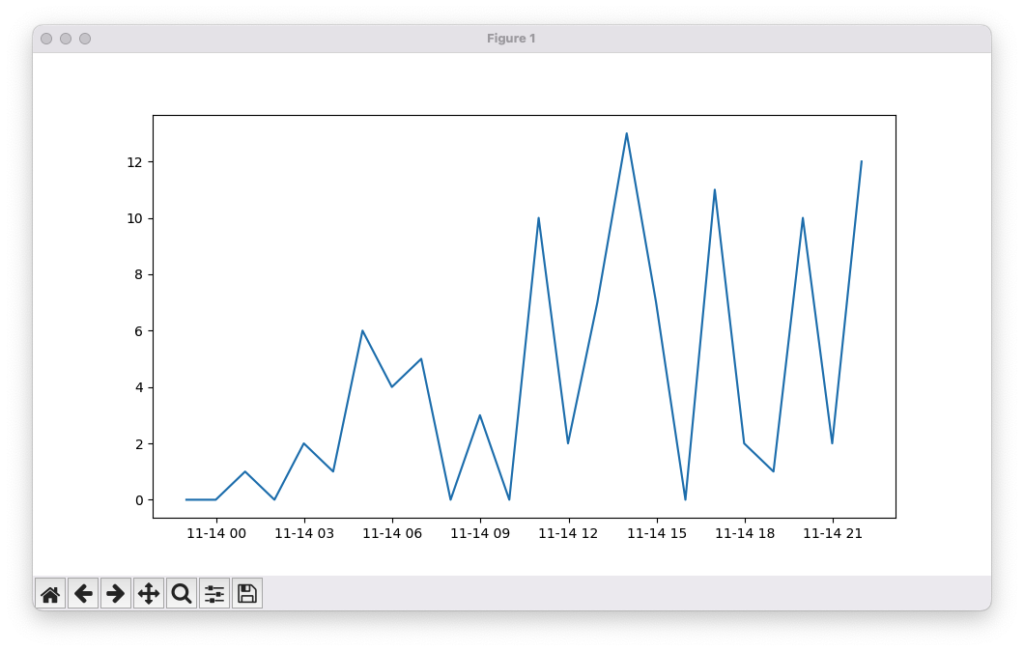
    Line Chart

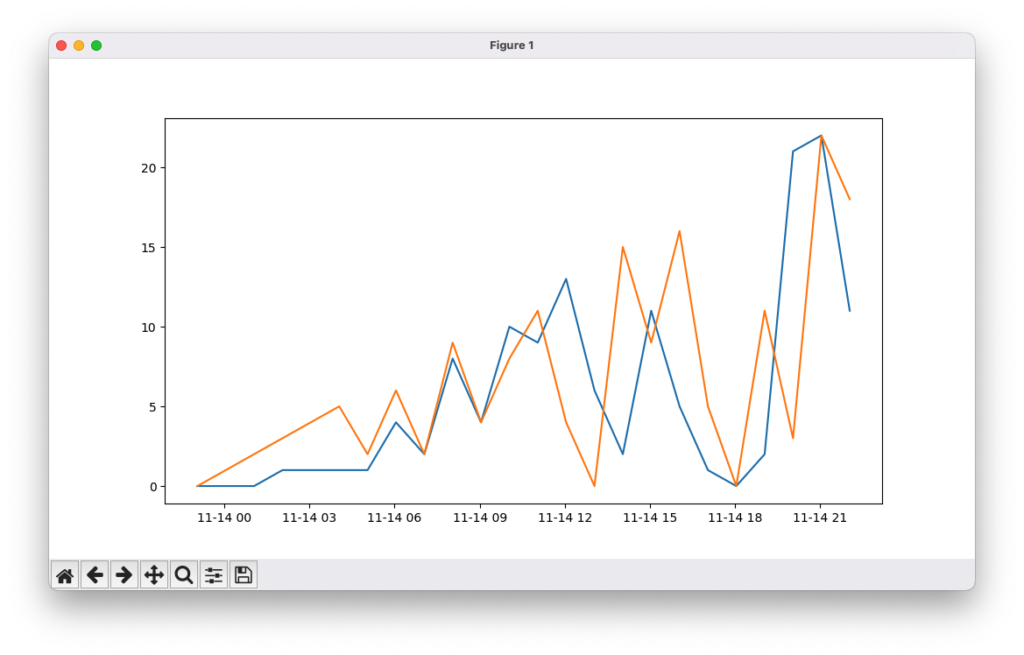
    A line chart is a graphical representation used to track changes in data over time. It displays data points connected by straight lines, making it easy to visualize trends, patterns, and fluctuations. Line charts are commonly used for time-series data, such as stock prices, temperature changes, website traffic, or sales performance

    Example

    from datetime import datetime, timedelta # Import tools to work with dates and time differences
    from random import randint # Import function to generate random numbers
    import matplotlib.pyplot as plt # Import Matplotlib for plotting graphs
    x = [datetime.now() + timedelta(hours=i) for i in range(24)] # Create 24 timestamps (one per hour starting now)
    y = [randint(0, i) for i, _ in enumerate(x)] # Generate random values based on index position
    plt.plot(x, y) # Plot the x (time) and y (random values) data
    plt.show() # Display the graph

    from datetime import datetime, timedelta
    from random import randint
    import matplotlib.pyplot as plt
    x = [datetime.now() + timedelta(hours=i) for i in range(24)]
    y = [randint(0,i) for i,_ in enumerate(x)]
    plt.plot(x,y)
    plt.show()

    Output

    You can also plot multiple lines like this


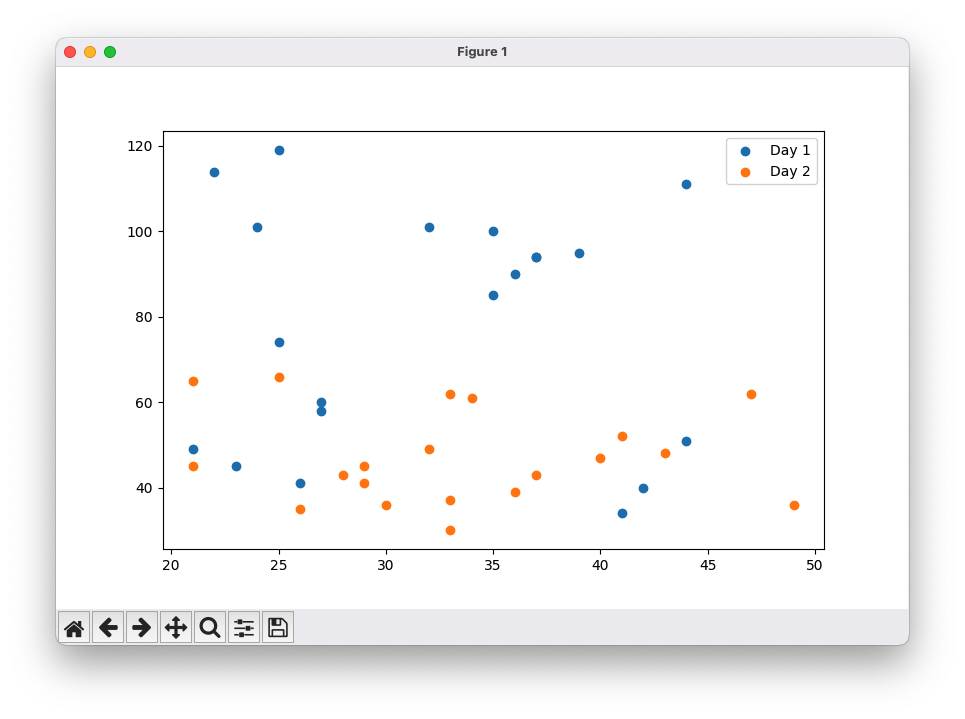
    Scatter Chart

    A scatter plot is a graphical representation in which each value in a dataset is plotted as a dot. It is used to visualize the relationship or correlation between two variables. The position of each dot along the x-axis and y-axis corresponds to the values of the two variables. Scatter plots are useful for identifying patterns, trends, clusters, and outliers in data

    Example

    from datetime import datetime, timedelta # Import date/time tools (not used in this example)
    import numpy as np # Import NumPy for generating random data
    import matplotlib.pyplot as plt # Import Matplotlib for plotting
    x_1 = np.random.randint(low=20, high=50, size=20) # Generate 20 random x-values for Day 1
    y_1 = np.random.randint(low=25, high=120, size=20) # Generate 20 random y-values for Day 1
    x_2 = np.random.randint(low=20, high=50, size=20) # Generate 20 random x-values for Day 2
    y_2 = np.random.randint(low=25, high=70, size=20) # Generate 20 random y-values for Day 2
    plt.scatter(x_1, y_1) # Create scatter plot for Day 1 data
    plt.scatter(x_2, y_2) # Create scatter plot for Day 2 data
    plt.legend(labels=[‘Day 1’, ‘Day 2′], loc=’upper right’) # Add legend to distinguish datasets
    plt.show() # Display the scatter plot

    from datetime import datetime, timedelta
    import numpy as np
    import matplotlib.pyplot as plt
    x_1 = np.random.randint(low=20,high=50, size=20)
    y_1 = np.random.randint(low=25,high=120, size=20)
    x_2 = np.random.randint(low=20,high=50, size=20)
    y_2 = np.random.randint(low=25,high=70, size=20)
    plt.scatter(x_1,y_1)
    plt.scatter(x_2,y_2)
    plt.legend(labels=['Day 1', 'Day 2'], loc='upper right')
    plt.show()

    Output


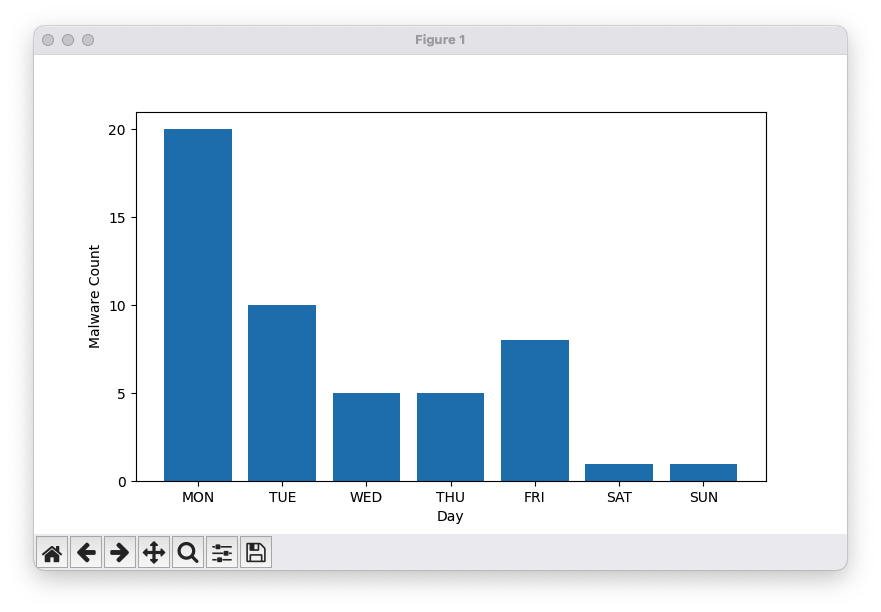
    Bar Chart

    A bar chart is a graphical representation in which values are depicted as vertical or horizontal bars. The length of each bar corresponds to the magnitude of the value it represents, making it easy to compare different categories or groups. Bar charts are commonly used to display discrete data, such as sales by product, population by region, or survey results

    Example

    from datetime import datetime, timedelta # Import date/time tools (not used in this example)
    import matplotlib.ticker as mticker # Import ticker module to control axis ticks
    import numpy as np # Import NumPy for handling arrays
    import matplotlib.pyplot as plt # Import Matplotlib for plotting
    x = np.array([“MON”, “TUE”, “WED”, “THU”, “FRI”, “SAT”, “SUN”]) # Days of the week
    y = np.array([20, 10, 5, 5, 8, 1, 1]) # Malware counts per day
    plt.bar(x, y) # Create a bar chart
    plt.gca().yaxis.set_major_locator(mticker.MultipleLocator(5)) # Set y-axis ticks at intervals of 5
    plt.xlabel(‘Day’) # Label x-axis
    plt.ylabel(‘Malware Count’) # Label y-axis
    plt.show() # Display the bar chart

    from datetime import datetime, timedelta
    import matplotlib.ticker as mticker
    import numpy as np
    import matplotlib.pyplot as plt
    x = np.array(["MON", "TUE", "WED", "THU", "FRI", "SAT", "SUN"])
    y = np.array([20,10, 5, 5, 8, 1, 1])
    plt.bar(x,y)
    plt.gca().yaxis.set_major_locator(mticker.MultipleLocator(5))
    plt.xlabel('Day')
    plt.ylabel('Malware Count')
    plt.show()

    Output


    Maps

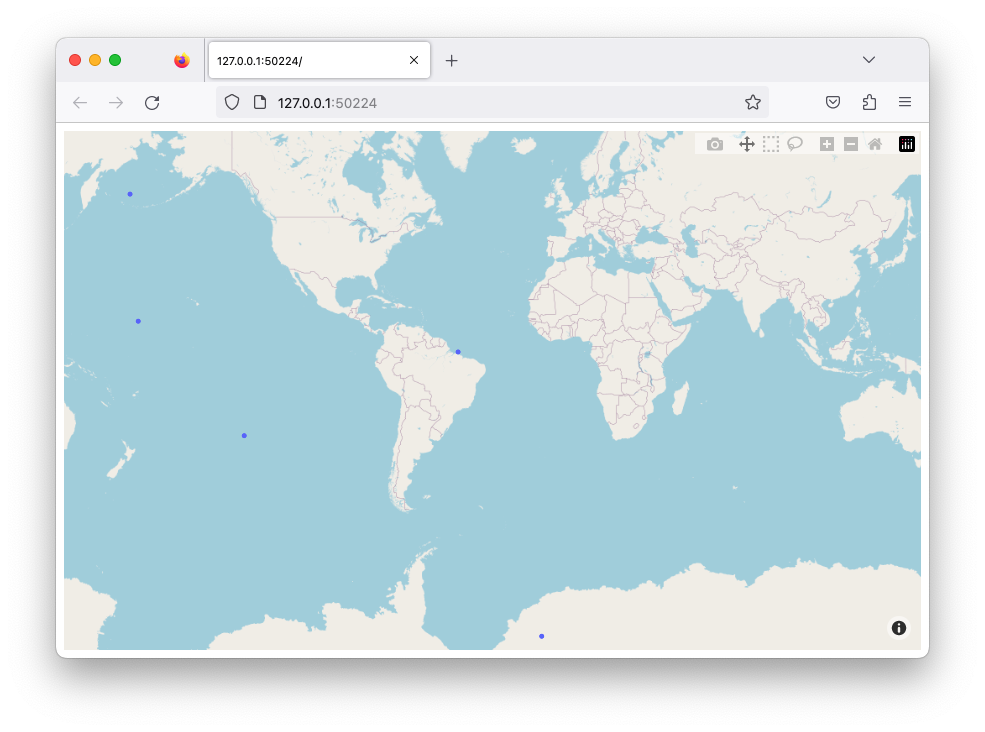
    Maps are a type of data visualization used to display geographic data. You can plot points, lines, or areas on a map to show locations, routes, or spatial patterns. Tools like Plotly provide built-in integration with OpenStreetMap, allowing you to create interactive maps without needing an access token. Maps are useful for visualizing data such as population distribution, weather patterns, travel routes, or incidents across different locations

    Example

    import plotly.express as px # Import Plotly Express for interactive plotting
    from random import uniform # Import uniform to generate random floating-point numbers
    temp_list = [] # Initialize empty list to store random coordinates
    for i in range(5): # Loop 5 times
        temp_list.append({‘lat’: round(uniform(-90, 90), 5), ‘lon’: round(uniform(-180, 180), 5)}) # Append a dictionary with random latitude (-90 to 90) and longitude (-180 to 180)
    fig = px.scatter_mapbox(temp_list, lat=”lat”, lon=”lon”, zoom=3) # Create an interactive scatter map using the generated coordinates
    fig.update_layout(mapbox_style=”open-street-map”, margin={“r”:0,”t”:0,”l”:0,”b”:0}) # Set the map style and remove extra margins
    fig.show()  # Display the interactive map

    import plotly.express as px
    from random import uniform

    temp_list = []

    for i in range(5):
        temp_list.append({'lat':round(uniform( -90,  90), 5),'lon':round(uniform(-180, 180), 5)})

    fig = px.scatter_mapbox(temp_list, lat="lat", lon="lon", zoom=3)
    fig.update_layout(mapbox_style="open-street-map", margin={"r":0,"t":0,"l":0,"b":0})
    fig.show()

    Output

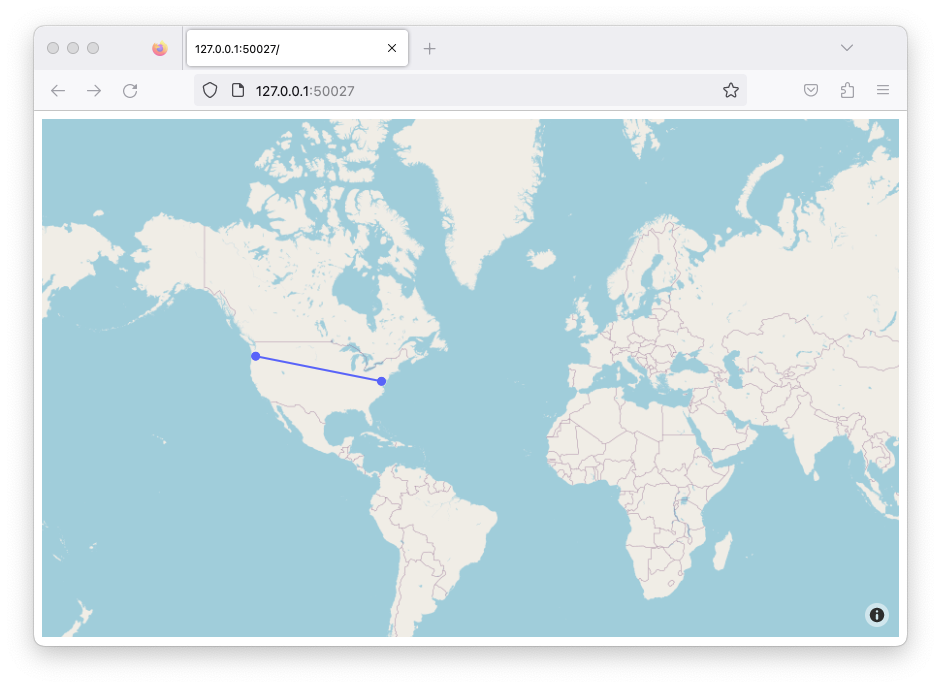
    You can also add lines between dots

    Example

    import plotly.graph_objects as go # Import Plotly Graph Objects for more customizable plots
    fig = go.Figure(go.Scattermapbox( # Create a scatter map with markers connected by lines
        mode=”markers+lines”, # Show both points (markers) and connecting lines
        lat=[45.6280, 38.9072], # Latitude coordinates of the points
        lon=[-122.6615, -77.0369], # Longitude coordinates of the points
        marker={‘size’: 10} # Set the size of the markers
    ))
    fig.update_layout(mapbox_style=”open-street-map”, margin={“r”:0, “t”:0, “l”:0, “b”:0}) # Set map style and remove extra margins
    fig.show() # Display the interactive map

    import plotly.graph_objects as go

    fig = go.Figure(go.Scattermapbox(
        mode = "markers+lines",
        lat = [45.6280, 38.9072],
        lon = [-122.6615, -77.0369 ],
        marker = {'size': 10}))

    fig.update_layout(mapbox_style="open-street-map",margin={"r":0,"t":0,"l":0,"b":0})
    fig.show()

    Output