Microcomputer (SBC)
Also known as a system-on-a-chip (SoC) or single-board computer (SBC), this type of device is a compact, integrated unit that combines most of the essential components of a traditional computer onto a single circuit board or chip. It typically includes a central processing unit (CPU), memory, input/output interfaces, and, sometimes, specialized components such as graphics processors or networking modules. These computers can perform various tasks and run full operating systems, making them suitable for a wide range of applications. While they are used in general computing, they are often optimized for efficient data processing, supporting embedded systems, mobile devices, Internet of Things (IoT) applications, and other environments where resource efficiency is crucial.
Example
- Raspberry Pi 4: A single-board computer
- VisionFive 2: A high-performance quad-core RISC-V single board computer
Uses
- Desktop: A desktop computer is designed for use at a fixed location, usually on a desk or workstation. It offers high processing power, storage, and connectivity, making it suitable for tasks such as office work, programming, gaming, media editing, and general-purpose computing. Desktops are not portable and typically rely on external monitors, keyboards, and mice.
- Web Server: A web server is a system specifically configured to host, manage, and deliver web content over the Internet or intranet. It processes HTTP requests, serves webpages, files, and applications, and may include features like security, load balancing, and database integration. Web servers are essential for websites, web applications, and online services.
- Raspberry Pi Oscilloscope: A Raspberry Pi oscilloscope is a system built using a Raspberry Pi and additional electronics to display and analyze the waveform of electrical signals. It allows users to measure voltage over time, detect signal patterns, and troubleshoot circuits. This setup is widely used in electronics labs, DIY projects, and hobbyist experimentation.
- Home Automation System: A home automation system controls electronic devices and appliances within a home, such as lighting, heating, security cameras, smart locks, and entertainment systems. These systems enhance convenience, energy efficiency, and security, often managed via mobile apps, voice assistants, or automated schedules.
- Media Server: A media server stores, manages, and delivers media content (such as videos, music, and images) to other devices over a network. It can stream content to smart TVs, computers, or mobile devices and may include features like transcoding, library management, and remote access.
- Raspberry Pi Retro Gaming Machine: A Raspberry Pi-based system that emulates and runs classic video games from vintage consoles and computers. These systems are popular for nostalgic gaming, hobbyist projects, and educational purposes, enabling play without the original hardware.
- Wi-Fi Repeater: A Wi-Fi repeater extends the coverage area of an existing Wi-Fi network by receiving, amplifying, and retransmitting the signal. It helps eliminate dead zones, improve connectivity, and increase network reach in homes, offices, and public spaces.
- VPN Server: A VPN server hosts and delivers Virtual Private Network (VPN) services, enabling users to securely connect to a network over the internet. VPN servers encrypt traffic.
Raspberry Pi 4 Model B 8G
A single-board computer (SBC) that was officially introduced by the Raspberry Pi Foundation in 2012. The concept for this device dates back to 2006, when the foundation began prototyping to create a low-cost, accessible tool to help students and beginners learn about computing and programming. The primary goal was educational—to provide schools, hobbyists, and learners with an affordable way to explore coding, computer science, and electronics without the expense of traditional desktop computers.
Over time, the Raspberry Pi has grown far beyond its original purpose. Today, it is widely used not only in classrooms but also by hobbyists, researchers, and professionals worldwide. Its compact size, affordability, and versatility make it a popular choice for developing and testing software, building prototypes, automating tasks, and even deploying small-scale servers or Internet of Things (IoT) projects.
Despite its popularity and community-driven ecosystem, the Raspberry Pi is not open-source hardware. The design diagrams are copyrighted, and the hardware is developed and maintained under the foundation’s control.
The Raspberry Pi’s evolution demonstrates how a tool originally designed for education has become a powerful platform for innovation, experimentation, and real-world applications, all while maintaining its accessibility and low cost.
Raspberry Pi 4 Model B 8G Specifications
- Release: 24 June 2019
- CPU Speed: 4× Cortex-A72 1.5 GHz or 1.8 GHz
- RAM: 8 GB
- USB 2: 2
- USB 3: 2
- USB OTG: 1 (Power USB-C)
- HDMI: 2× HDMI (rev 2.0) via Micro-HDMI
- Ethernet: 10/100/1000 Mbit/s
- Wifi: b/g/n/ac dual band 2.4/5 GHz
- Bluetooth: 5.0
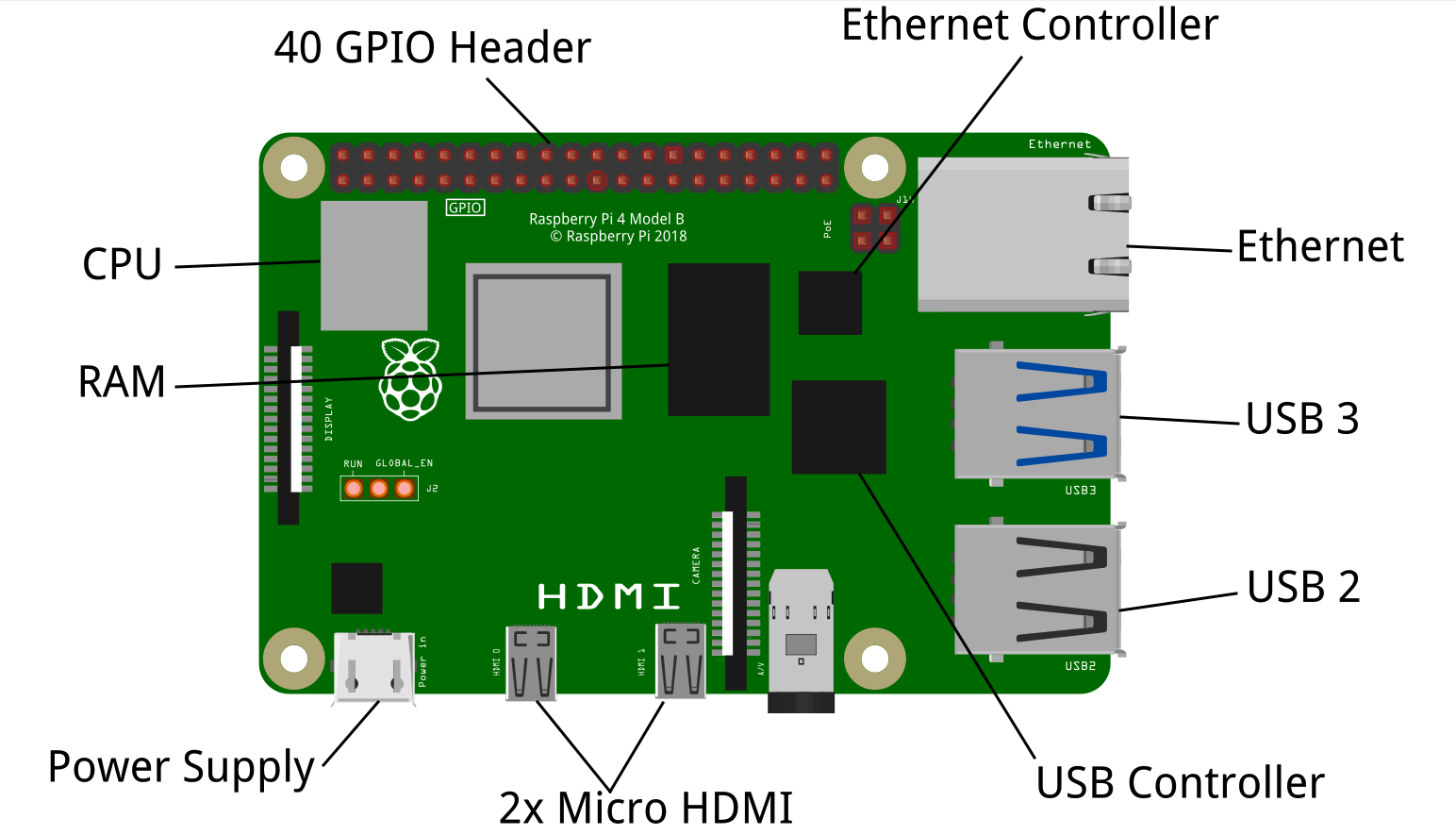
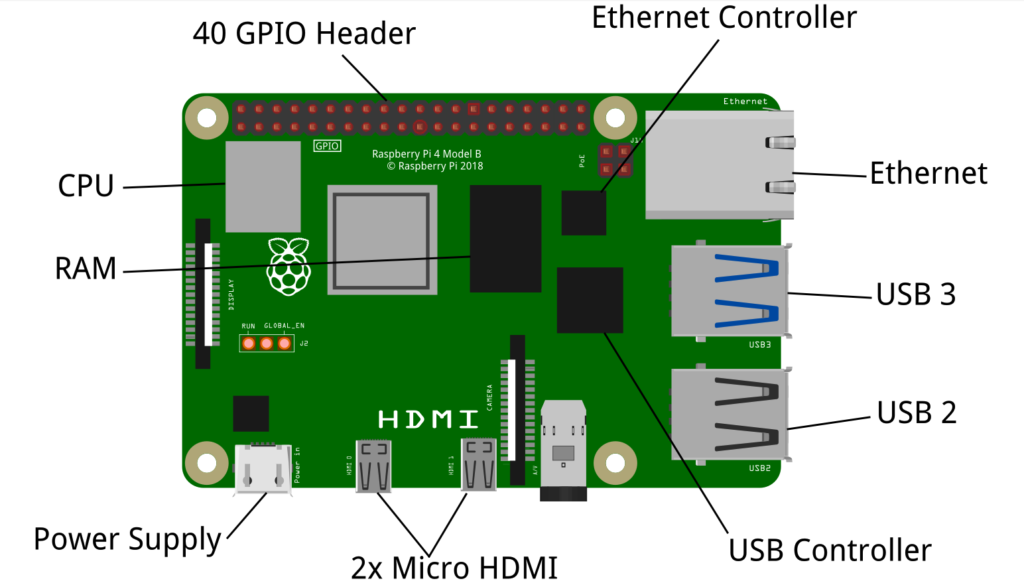
Raspberry Pi 4 Model B 8G – Front-Side
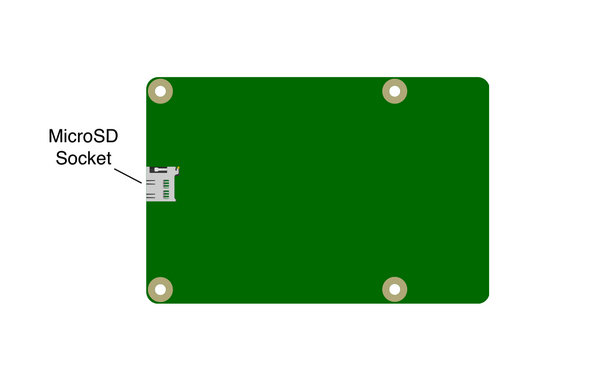
Raspberry Pi 4 Model B 8G – Back-Side
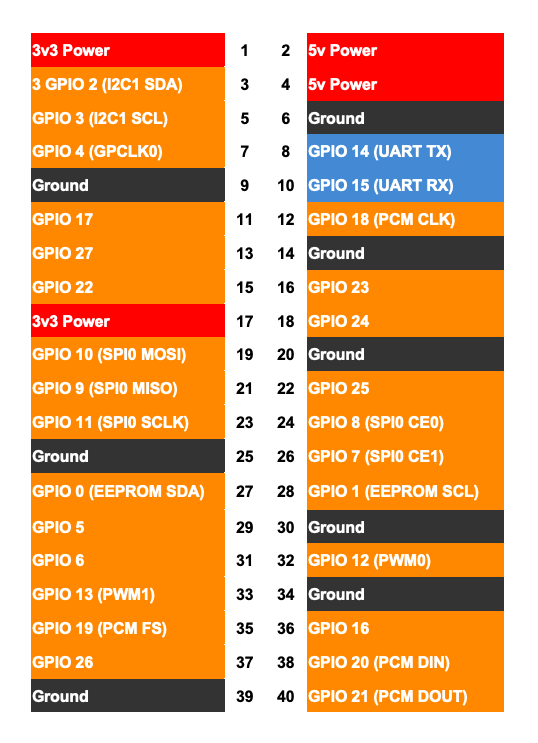
General Purpose Input/Output Pins
GPIO (General Purpose Input/Output) pins are versatile connectors found on microcontrollers, single-board computers such as the Raspberry Pi and Arduino, and other electronic devices. These pins enable the device to interact with the external environment by sending or receiving electrical signals. GPIO pins can be programmed to operate as inputs (to read signals) or outputs (to drive signals), making them highly adaptable for a wide range of applications.
Digital pins
Digital pins are input/output (I/O) interfaces on microcontrollers and single-board computers that can be used to read or set specific voltage levels. They operate using binary states, meaning they can recognize or output only two distinct conditions: LOW or HIGH.
For example, when controlling an LED, setting a digital pin to LOW turns the LED off, while setting it to HIGH turns the LED on. These states correspond to specific voltage levels. Typically, any voltage level above approximately 2.5V is interpreted as HIGH, while anything below this threshold is considered LOW. The exact threshold values may vary depending on the specific microcontroller or board being used.
In practice, digital pins are not limited to controlling LEDs; they are widely used for tasks such as reading the state of a button (pressed or not), controlling relays, sending signals to sensors, or driving other electronic components. Since digital pins can only represent two states, they are best suited for on/off or true/false conditions, unlike analog pins, which can represent a continuous range of values.
Analog pins
Analog pins are input/output (I/O) interfaces on microcontrollers and single-board computers that can read a continuous range of voltage levels, rather than just two discrete states like digital pins. Typically, they can measure voltages between 0V and 5V, though the range may vary depending on the board. This makes analog pins especially useful for applications that require precise or variable input values.
By connecting a potentiometer (a variable resistor) to an analog pin, the microcontroller can measure different voltage levels based on the knob’s position. Turning the knob changes the resistance, which in turn alters the voltage being read, producing a value that can range from 0 to 5V. This allows the program to interpret a wide spectrum of inputs rather than just “on” or “off.”
Internally, analog pins use an Analog-to-Digital Converter (ADC) to translate the continuous voltage into a digital value that the processor can understand. For instance, with a 10-bit ADC, the input voltage range (0–5V) is divided into 1024 discrete steps, producing values from 0 to 1023. This enables fine-grained measurement of signals that vary over time, such as light intensity (from a photoresistor), temperature (from a sensor), or sound levels (from a microphone).
Some analog pins can also be configured for output, but this functionality is limited. Instead of producing a true continuous voltage, they typically use Pulse Width Modulation (PWM) to simulate analog signals. PWM rapidly switches a digital pin between HIGH and LOW states at different duty cycles, creating a variable-voltage effect. This allows controlling devices such as motors, LEDs (for brightness control), or audio output.
Analog pins are essential whenever your project requires working with gradual changes or input value ranges, offering flexibility that digital pins alone cannot provide. They are ideal for tasks involving sensors and actuators that require precise control and measurement.